
As a bit of a tech guru, it saddens me to see parents trapped in the psyche that they need to not only “Keep up with the Joneses”, but need to provide their child with a $300+ device to use at school. Let alone stationery, let alone uniforms.
The reality is that schools should be providing the devices for the students, but this runs into many issues. One is the ongoing costs to the school which many simply don’t want to budget for or have other priorities and are not funded adequately enough to provide for one-to-one devices in their school. Then there’s the requirement to maintain these devices and issues surrounding damages and repairs and whose responsibility that is, along with many others. So instead of dealing with this, schools have been farming this cost off onto their community and expectations land on the parents to provide these.
Here’s the other reality though. If you can’t provide one, because of whatever reason (including any moralistic ones), then you do not have to. Schools cannot enforce it, and it says so in the following article. It’s against the law. Schools can’t even demand a particular kind of device – they can’t demand any device. These are only recommendations so that they have devices that are all similar and therefore easier to manage within the classroom so that unskilled teachers don’t have to learn how to use a range of device types in order to assist and help with any technological problems.
But, as we’ve come to know, most devices are usable by the general population and are rarely so dissimilar that they become problematic. Add to this the fact most schools are running Google Apps, which operate on the big cloud in the sky and runs off the internet – therefore look, run, and work all the same regardless of the device being used (allowing for differences between tablet apps and browser based versions).
Simply put, any device will do. Shop around, and select one that matches your budget, and then your needs, not the other way around.
Parents who aren’t in the position to splash out for a device that will likely only last 3 years and then you’re up for another one, should swallow their pride and go and talk to the school. If the school is worth their weight, they’ll explain, discuss, and come to some arrangement for you. It is more than likely some compensation can be made, and in most cases, schools will have a (albeit limited) supply of devices available for student use.
If not, then it’s more a reflection on the school than you as a parent.
Don’t just accept it and remortgage your house or go without food for a week to pay for it. It sickens me that this happens because parents don’t want to go to the school.
Go and talk to the school. Yes they are closed at the moment, but they’ll be open soon enough. Go and have a chat and explain your position. Yes, there may be shame, but it’s not worth just going along with the list of demands, complaining about it later, and missing out on other more important things. Like school lunches.
I’ve always said schools need to sort out BYOL before they sort out BYOD. If every student is a “Bring Your Own Lunch” student, THEN, and only then, should you start thinking about becoming a “Bring Your Own Device” school.

Original Article: https://www.stuff.co.nz/business/money/88562690/schools-byod-or-bring-your-own-device-demands-are-a-rising-cost-to-parents?rm=m
For many parents, preparing their children for the school year means finding ways to cope with the costs of BYOD.
BYOD stands for “bring your own device”, and refers to pupils owning devices like laptops, iPads and Chromebooks for use in the classroom, and for homework.
Prices quoted by electronics retailer PB Tech, which has built a “shop by school” search tool, show the costs of devices expected at schools vary from Chromebooks starting at just over $300 up laptops costing $2000 or more.
In both cases there can be extra costs for shock-proof, waterproof cases, and accidental damage insurance.
Schools have worked hard to negotiate deals, and affordable payment plans for families, knowing the extra pressure BYOD policies can put on hard-pressed families.
But parents without ready cash can find themselves being steered by schools towards finance companies, or even Work and Income.
It’s not clear exactly how many people do get government help to cope with BYOD costs, but the first three months of last year, covering the back-to-school period, saw 24,278 instances of “hardship assistance” made by Work and Income, adding up to just under $5.3 million in payments.
DEBATE OVER
The debate over whether devices have a place is the classroom is largely settled at intermediate and high school level.
But some primary schools have introduced BYOD for their older pupils, and retailers like PB Tech sometimes pictures of primary-age children on their website.
The Ministry of Education says ultrafast broadband is transforming education, and has invested heavily in helping schools and teachers to “equip students with the necessary digital skills to take part, create and thrive in a fast-evolving world”.
Schools cannot legally force families to buy their children devices, but it’s now common practice for them to use words like “require” and “expect” in their BYOD policies and menus of devices.
Intermediate and high school parents may feel they have no choice but to fund BYOD, and there’s even signs of pressure on some parents of primary school children.
Primary schools often own a number of devices, but as Buckland Beach Primary School tells parents: “Parents are now offered the chance to improve the access their child has to ipads. This is offered through BYOD where students bring an ipad from home.”
Other Articles: https://www.stuff.co.nz/business/money/88562690/schools-byod-or-bring-your-own-device-demands-are-a-rising-cost-to-parents?rm=m

 In 2014 Google released it’s LMS to the world. Aptly called “Google Classroom”, it was little more than a Google Plus type newsfeed for classes. Teachers could sign up student accounts, and set assignments and post announcements.
 First, go to
  For my class, each student has a school Google Account. I then put up the unique class code on the whiteboard and ask each student next time they log onto the Chromebooks to join the class.
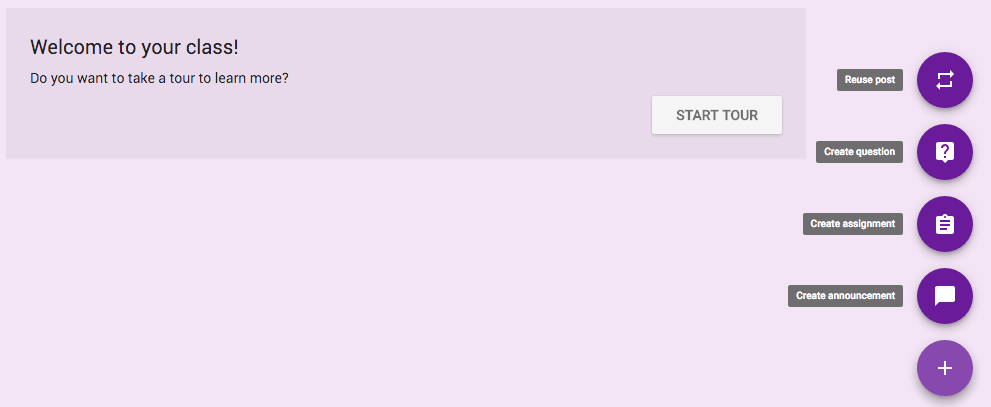 For instance, if there is a particular video that I want the students to watch for a lesson, I can create a new post, and share the link. Students will then look at the Google Classroom and see the video link, and in time, watch it. Much like a newsfeed, they can comment and share their thoughts (though mostly comments turn to “wassup au” and the like) as they find themselves in a new social environment and explore communicating with each other in different ways!