Tag: teaching portfolio

  • Teaching Porfolios: Date Based Portfolio

    One way in which you can build your teaching portfolio is to use each of the years for your registration as a structure for folders and dividers for your portfolio. This can be done easily in both hard copy portfolios as well as online or computer based portfolios.

    Whichever way you decide to go in setting up your portfolio, you should consider each of the steps in this guide.

    Hard Copy Portfolio

    Essentially you just need a divider, or section, or entire folder for each year. You could choose to group your years together for the three years of your registration, though this is not necessary.

    Then its just a matter of putting each piece of evidence into the relevant year as you teach. I would keep each one dated and keep them in the order they happened in. Then at the end of the year, close it off, and open up the next section ready for the new year.

    Computer Portfolio

    In Google Drive / Drop Box / Windows Explorer / Finder create three folders inside your portfolio. Label these as the years of your registration. Obviously, you could just continue, or keep your registrations together in a folder themselves.
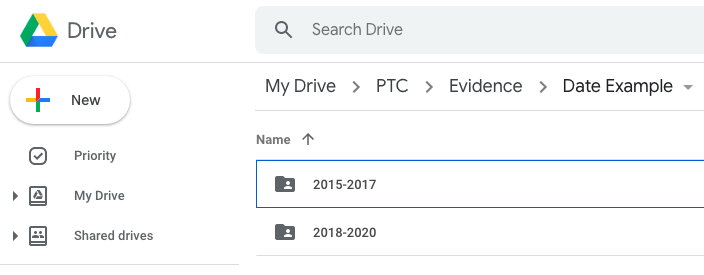
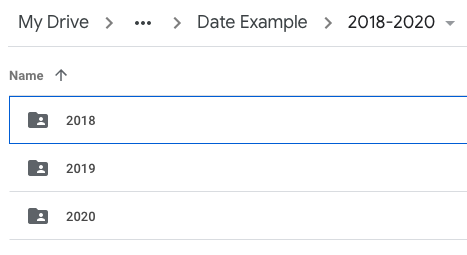
    One big melting pot

    Obviously if you just add each piece of evidence into a folder for each year it will begin to resemble a dumping ground of teaching stuff or one big melting pot of evidence rather than a well organised portfolio.

    One could merge the standards based approach outlined here into each of the year folders in order to add another layer of structure to your portfolio in an effort to keep it more organised. But this would require six folders, all named the same, created three times for each of the years. It would work, but it wouldn’t be very elegant. But, if this is how your brain works, then its a viable option. However, a better way would be by using tags.

    Tags for each teaching standard

    You can create a set of six tags, each one relating to a standard.

    Tags can be used throughout most file systems, but in particular if you use OneNote I would highly recommend this. If you set up a blog for your portfolio, categories or tags can be used for this purpose. I believe both Windows and MacOS have the ability to tag files. I’m not sure this is possible in Google Drive or Drop Box, but I could be wrong.

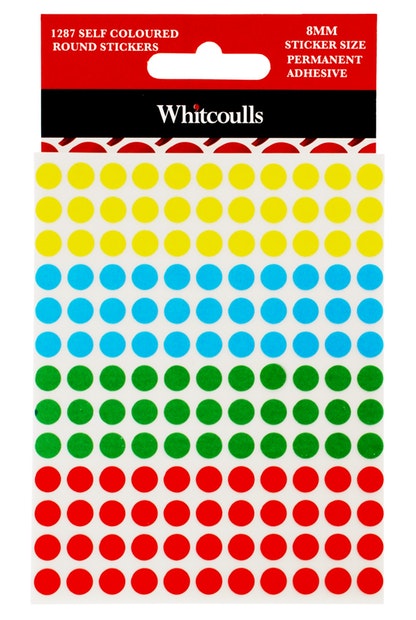
    If you’re building a hard copy portfolio, then stickers are your friends! Choose six coloured stickers to use, make a key of which standard each colour relates to, and then in the corner of the piece of evidence, place a sticker for the standard or standards that it relates to.
    Multiple Standards

    The biggest benefit to using tags is that it becomes very easy to attribute multiple standards to one piece of evidence. This is something that happens more often than not. Using tags saves on the doubling up of evidence as you copy a piece into multiple standards folders of other systems. Instead, you merely add as many tags as is suitable for the evidence, and it is “added” to those standards straight away.

    OneNote is free to use. Whilst the online and app version is very good, I find the OneNote 2016 software to be the best.

    For syncing, you will need an Office365 account, which costs. However, it is free for all schools thanks to the Government schools agreement with Microsoft.

    The Best Method

    The best software I’ve found for building a portfolio is Microsoft OneNote. In particular is the ability to use tags. These can then be searched for, and using different macros it can also build a contents / index page for each of these tags.

    I used to use a blog type approach, with each post being a different piece of evidence, but with some privacy issues being that it was online, as well as the fact I was having to create posts as a piece of evidence, rather than just using the file, it became cumbersome and extra work with the doubling up. I did however appreciate the use of tags and categories to be able to organise the evidence while still maintaining a date based approach.

    I will write an in-depth article about setting up your teacher portfolio in OneNote soon.

  • Teaching Portfolios: Making them Work

    Even though they are not required by the Teaching Council, many schools use Teaching portfolios to show evidence that a teacher is meeting the criteria and standards for registration, and therefore can be signed off when their registration comes up for renewal.

    The format of appraisal and the keeping of portfolios has been a bug-bear of teachers for a while now, with the increase of workload in collecting evidence and putting it in a portfolio for something that is not actually required.

    However, I argue that portfolios are a good way of keeping records of your teaching career and can help make you a more reflective teacher in the process. I think that they would be worth maintaining even if they are not required.  While I acknowledge there is a bit of work required to keep it, there are several ways in which you can streamline the process so that keeping a portfolio is no longer a burden or a time-sapping exercise.

    The following are several keys to success that I’ve found along the way so that keeping and maintaining your teacher portfolio.

    Rule 1: Make it work for you; instead of you working for it…

    The number one thing you need to do when making your portfolio is to make it work for you.

    What does this mean?

    Put simply, choose a system, a method of keeping evidence, resources, materials, artefacts that is natural to you. If you’re a hands on person who prefers hard copies of things, then use a clearfile or lever-arch folder, or even a cascading folder.
    If you keep a lot of your teaching work in Google Docs, or use Google Drive a lot, then create a folder for evidence and put all the files in there.
    If you put a lot of your teaching work online, then you could set up a blog or website.

    Choose a system that works for you

    • Clearfile
    • Lever-arch File
    • Cascading Folder
    • Cardboard Box
    • Google Drive Folder
    • One Note Notebook
    • Google Site
    • Website
    • Blog

    You can find out more about each of the main ways to organise your portfolio at the following articles:

    Date Based Portfolio

    Standard Based Portfolio

    Organise it how your brain works

    Following on from the previous point on making it work for you: Setting up your portfolio in the way that your brain operates means that organising and maintaining your portfolio will be second nature to you rather than battling with yourself internally each time you come to update it.

    There are two main ways in which you can organise your teaching standards portfolio:

    • Date Based
      This consists of folders or sections labeled by date (ie. 2018, 2019, 2020). In each folder you put evidence of your teaching practise as it happens.
    • By Standard
      This consists of creating a set of six folders or sections, one for each of the six teaching standards. As you create each piece of evidence, simply put it in the folder that it best suits.

    Obviously there are other ways as well. I’ve found the best to be a combination of these two ways. It doesn’t matter really how you choose to organise it, as long as whichever way you choose is how your brain best processes a portfolio of this kind.

    Robust yet Flexible

    It wouldn’t be a blog about teaching without a bit of an oxymoron in it. When you set up your portfolio, make sure whatever system you choose to organise it in is robust. Stick to it, and keep it consistent. At the same time however, be flexible enough to adapt it to fit your needs as you go. Don’t be afraid to try new things, reorganise it or adjust it as you need to. Remember, the first rule is key: this HAS to work for you. As soon as it doesn’t, you’re working for it and it become cumbersome.

    Tags Are Your Friend

    One thing I have found the more and more portfolios I have made over my years as a teacher is that you need a way to tag or categorise each piece of evidence. Regardless of whether you go with a date based or standards based approach, having a system of tags will save you a lot of time. Using tags avoids the problem mentioned next.

    Avoid doubling up

    There is nothing more demoralising to a teacher (or anyone for that fact) than having to do something twice.

    Therefore, ensure that you only have to enter evidence into your portfolio once. The use of computer based portfolios certainly helps with this, especially with evidence that fits under multiple standards.

    Avoid doubling up

    There is nothing more demoralising to a teacher (or anyone for that fact) than having to do something twice.

    A very good portfolio will find a way in which you can keep your work organised when you create it AND enter it into your portfolio at the same time. This is somewhat of a pipedream, though definitely possible. Essentially this is where flexibility of your system is key, as this wouldn’t be possible for every piece of evidence, but definitely a possibility for some.

    Keep an eye out for more…

    We will be adding more Teacher Portfolio ideas, tips, tricks, and how-to guides in the near future. Check back here for more!