
Category: Archived

All the old posts from years gone by.

  • Growth Mindset: What’s it all about

    A lot has been made of this ‘new’ buzzword that is hitting our education shores. Any word with ‘Mind’ in it seems to be linked to being better as an individual. Growth mindset has been around for a while though. But what is it?

    What is Growth Mindset?

    Growth Mindset is the internal thoughts that you can always get better. Whether it is something you are good at, or something that you struggle with, through practise, hard work, training, or just sheer determination, we can all make improvements and progress towards whatever we set our minds to.

    The alternative is a ‘fixed mindset’. This thought pattern suggests to yourself that you are good at some things and excel at them, but are not good in other things. A common area that fixed mindset is applied to is creativity. “I don’t have a single creative bone in my body” is exclaimed by those who are ‘less practised’ in this area. They’ve used this as an excuse not to get better, or not to work hard and try to improve on their lack of natural ability.

    In terms of education, having a growth mindset is incredibly important. It provides students with the challenge to always do their best, and if at first they don’t succeed, then try, and try again.

    Our brains are always making connections, especially growing up; making the growth mindset at school even more important. Having the mindset that these connections can not only be made in varying ways with varying skills and abilities, but that they can be strengthened and developed, enables students to grow as individuals and as learners, and give things a go.

    I found this video incredibly helpful when looking into Growth Mindset.


    In Practise

    One way in which I use this mindset in my class every day is through the use of Daily 5. I regularly encourage students by using the key principle of ‘The only way to get better at reading is to practise reading’. The old adage of ‘practise makes perfect’ rings out loud and proud, and provides the students with motivation to strive for excellence. Whilst I haven’t expressly ‘taught’ the growth mindset, it is definitely an ingrained philosophy in my classroom; in the way that learning is encouraged, they way I teach, and the learning activities we do.

    17855652233_69f0cb6dc3_b_q9c4as


  • No to League Tables

    “Have we introduced league tables? No.” Hekia Parata said this in a meeting at a school as she rattled off a number of things ‘scaremongers’ had said would happen in regards to GERM. This included things like Performance Pay. This statement on league tables is also in addition to this article from 2012.

    League tables: Hekia won’t take on teachers

    Obviously however, John Key wants them; and so he gets the media to do the dirty work, even encouraging them to do so in the aforementioned article.

    And respond they did. Whilst Fairfax’s “School Report” has been out for a while now, it is now being advertised, with words like ‘rate’, and ‘compare’ being bandied about like red paint on a fire engine.

    Why are teachers and schools so against league tables?

    David Shearer (Labour Leader at the time) touched on a few of the concerns in the earlier article. It goes further than just what he addressed though.

    Take a small school. Decile 1 or 2. Even 3. Lots of poverty in its community. Health issues due to poor living conditions, damp houses and cold, harsh nights in the middle of winter. Families split, both parents working full time to break even. The kids love the school.

    The teachers work hard. They’re trained. They undertake PLD. They genuinely care and want the best for the kids; not just the ones in their class, but all tamariki that come through their gates. There are major success stories, but are generally few and far between.

    The teachers are good teachers. Children who have started life on the back foot and who are facing continual struggle in life are making amazing progress each year, but are still “below” the untrialled and untested National Standards that this government hangs its hat on. The children wouldn’t make the same progress if the teachers weren’t any good.

    But along comes Fairfax media and their “School Report”. It shows that this school is ‘failing’ compared with School B down the road (who may or may not be inflating their National Standards results). Their teachers may be good, but also might have a community where students aren’t walking down struggle street, and achieving at school is the number one priority. The amount of progress that they have to make is minimal in comparison, and their teaching staff may be able to relax and not work as hard in order to maintain certain results.

    Parents of the first school compare and begin to buy into the league table problem. They leave school A with its hard working teachers, whose progress and dedication to their students is unrivalled, yet don’t show up in the broad umbrella of “below”, and go to greener pastures.

    School A loses students. The roll decreases. They lose a classroom and a teaching position. Eventually another leaves, and another. The school gets smaller, and the results don’t change, to the point where it is forced to merge or become one of the government’s heralded Charter Schools.

    This is why league tables are dangerous. They compare apples with shackles, oranges with hairties. They force assumption that schools with poor results have bad teachers, when quite often the opposite is true. A lot of teachers would simple cave under pressure, give up, or be eaten alive in School A with the requirements of it’s akonga. They would equally struggle to not only raise the achievement level, but just maintain it.

    So when I see an advertisement to compare schools while I’m reading the latest news, I get annoyed. Frustrated. Because I am a good teacher. I work hard for my students and my students work hard for me. They are a challenge, but the hard work brings reward. They make phenomenal progress each year while they are in the shadows of elephants in the room that no one wants to acknowledge; but these improvements, no matter how amazing, fail to show up in a simple pie graph showing banded results. Some of these students will go from a reading age of 5 and a half, to a reading age of 7; yet because they are 8, are still below.

    The public compares schools. School A must be rubbish, with dead-beat teachers. I don’t want my child going there.

    Thanks Fairfax. I’m sure John Key appreciates the dirty work you’ve gone and done for him.


  • Ministry website ‘gold-plated’?

    The Ministry of Education has spent a whopping $1.2million on a new website.

    Source: Ministry website ‘gold-plated’?

    I am dumbfounded. Absolutely speechless.

    For once, two of my main passions collide for the first time since designing and building our school website. I worked on this in the school holidays, in my own time, and built it with content from the school’s previous website’s content.

    $1.2 million. It’s $1,200,000. That is a lot of dollars being spent for a website, which in technology terms will be requiring a re-design in 4 years time, is a ridiculous amount.

    That’s $300,000 for each year of it’s life.

    Being a web developer of a variety of small websites, I know the approximate costs of doing this. To get some idea around website costings for large websites, I went and looked up approximate costs for large website designs, for which Education.govt.nz would fit into.

    Executionists suggests that large websites with all the costs can range in the area of $14,700 – $29,900. Being from a US based website, we can assume that this translates to $23,000 – $46,000 per year.

    While this is based on approximate costs, it certainly isn’t anywhere in the region of $1.2 million, or even $300,000.

    Silverstripe is the CMS (Content Management System) that is being used as the backend of the website. This is a Wellington based company, who I have had some minor dealings with (friends of friends helped develop it). Its incredibly flexible, but a lot of the management is done for the user. Silverstripe do partner with developers to help build web solutions. However, it is also Open Source, meaning the Government doesn’t NEED to pay a cent for it.  In 2013, the Government teamed up with Silverstripe as a ‘common web platform’, because it would save money by encouraging the use of Silverstripe for all Government websites, which suggested that 10-15 government  websites were built or redesigned each year.

    The Government has even set up a demo of Silverstripe so that Government agencies can have a play around. Actually, anyone can have a play around. I quite easily signed in and could begin building a demo site. It was easy to see how the Ministry of Education website was developed on from here.

    So, if this is the case, if the back end is already sorted out into default templates; then how did this website end up costing $1.2million?

    Refresh

    There is no doubt the old Ministry of Education website was due for a rebuild. The old site was developed in 2008, and I’m surprised it has taken this long for it to be re-built. Though, if it has a $1.2 million price tag, maybe it is understandable.

    It frustrates me that all that is said in defense of this spending is that the previous website was old and tired and required a rebuild, with new functionality and innovations that is required for our learners, whanau, and teachers in today’s online environment.

    But, at the end of the day, the money spent is exorbitant amount in any terms. It makes me wonder if the Government even “shopped” around for its development. Surely there are a variety of design companies out there that would do as good a job, including all the “functionality”, for a much more reasonable price tag. No one is saying it didn’t require a rebuild. What is being said is that it doesn’t need a whopping $1.2 million spent on a rebuild.

    Historic Trend

    Wait a minute. Haven’t we already seen this? Extreme expenditure on seemingly mundane things?

    Of course we have. This Government has built a reputation for burning holes in it’s pockets.
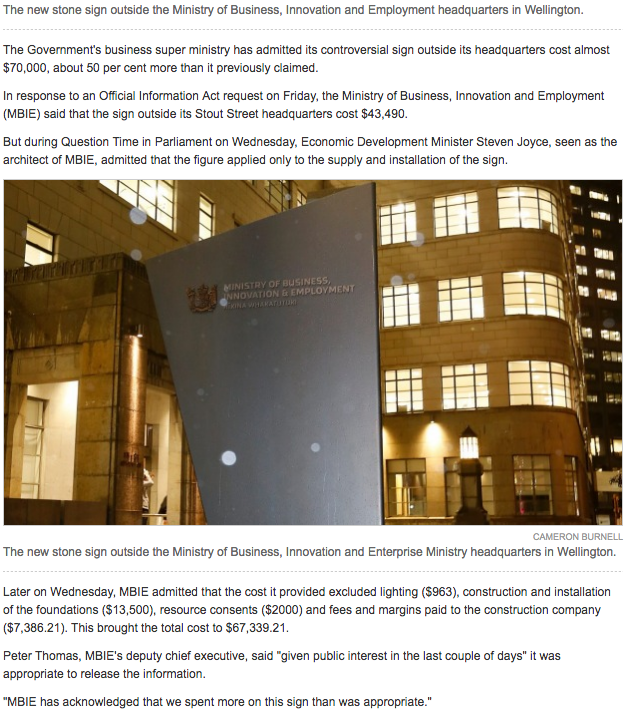
    Take the case of the Ministry of Business, Innovation, and Employment. In June, it emerged that $70,000 (not previously stated $24,000) was spent on a stone sign out the front of the building. In either case, $24,000 is a ridiculous amount.

    Fast forward to June 17, and it emerges that MBIE spends a whopping $140,000 on a curvy screen that is now in their reception area in the head office in Wellington. This is to go along with a $75,000 reception desk.

    It doesn’t just stop there though. Let’s take a look at the $26,000,000 spent on the new flag that ‘no one’ wants. I say no-one, but I may be exaggerating – much like the expenditure of this Government.

    Meanwhile, children starve, nurses go without a pay-rise, and miners face an improper burial. No amount of money should hold these things back from happening, yet picking and choosing seems to be all that happens.

    As Chris Hipkins and others have put it; this money could be better spent on other things. That’s not to say that the website shouldn’t have been rebuilt; but that this could have been carried out without spending such an unreasonable amount of money.


  • Whoopshhhhh!

    In relation to:

    • Hon. Hekia Parata – Minister of Education: Pictured Article.
  • Moving Google Sites to a different Google Account

    ePortfolio on Google Site

    When I first thought of a way to gather all my evidence as online documents, rather than print outs and photocopies that gradually fill up a clearfile every year, I knew that Google Sites was going to be the way. It’s seemless link into Google Drive allows for me to create an “Evidence” folder, and then link to any document inside those folders. Using the Practising Teacher Criteria as a guide and a structure, I created folders inside the ‘Evidence’ folder, and began collating and sorting the evidence appropriately.

    However, at a NZEI cluster meeting where I shared this with other teachers in the area, many were concerned that hosting this on the school’s accounts would be problematic should one leave that school and move onto another. They mentioned that being able to somehow host this themselves on a personal site would be better.

    Luckily, this isn’t too hard to do, even if you’ve already set up your site on your school account like I had!

    Gmail or Google Account

    If you have your own personal Gmail account, you essentially already have Google Sites. Next to your account name, there is the Google Apps ‘9-square’ button. Clicking on this will open up the available apps, including Google Sites (hopefully!) If you haven’t already created your site, you can create a new one by clicking on the red ‘Create’ button.

    However, if you need to move your existing Google Site to your own domain, or your personal account, then you’ll need to complete the following steps. These can be found at E-Portfolio Apps. I have added to these to match the current Google Apps UI.


    Moving a Google Site out of an Educational Domain

    Steps to take place under the Educational Domain:
    1. To begin, open the site from within the educational domain.
    2. Go to More Actions () -> Manage Site.
    3. Select the “Sharing & Permissions” (or select this from the More Actions button in step 2).
    4. In the section titled “Invite people:” type in the email address of the personal account.
    5. Select “Is owner” from the drop down box. 
    6. Click Invite these people. This will send an email to the account listed above which will include a link to the sites current location under the ed domain.
    Steps to take place in the personal Google account:
    1. Open Google account and Gmail to view the link to the account we just shared.
    2. This will take you to the Ed Domain log in page. At the bottom of the sign in section there is an option to “Sign in with a different account”. Enter the personal account log in and password here.
      Note: To avoid all this, try opening the link in a different browser.
    3. Once you are logged in, open the site and click the More Actions –> Manage Site options.
    4. Select the General option.
    5. In the middle of this page, there is an option to Copy this Site. Select this. 
    6. Type in the site name and take note of the new URL which should read:
      http://sites.google.com/site/(new site name here)

    7. Click the button to Copy Site.

    To remove the school account as an owner of the site:

    Go to More Actions –> Sharing & Permissions and remove the school account as an owner of the site.
    Note: I didn’t do this as I still wanted to have access to this from my school account at this stage.
    At any point the school site can now be deleted.

    Instructions written by Heather Stafford, Technical Communications Instructor at E-Portfolio Apps. These have been edited by Al Ingham to match the current Google Apps layout in August 2015.


    Conclusion

    And that’s all there is to it. Easy ay!

    I even went a step further, using my alingham.com domain to create a sub-domain for my eportfolio to sit in. Editing this is relatively straight forward by following this article.

    It is also important to remember that, unless you want to go through all your evidence and black out student names, you should keep your eportfolio as ‘private’, and never publish the site as ‘public’. This means that any sub-domain you’ve created will simply point to the sites.google.com url, but the information will remain private to you and anyone that the site has been shared with.