Category: Archived

All the old posts from years gone by.

  • Email from the Minister

    ———- Forwarded message ———-

    From: “The Right Honorable Minister” <HerMajestyParata@ministryofed.govt.nz>
    Date: 4/02/2016 7:26 PM
    Subject: Ongoing Expenditure and Orders
    To: “Accounts” <MrFudge@ministryofed.govt.nz>

    Good morning sir,

    However, it is a short lived good morning as this morning has not been good at all. In fact it has been dreadful.

    We are all out of manuka honey which I was feeding to the Ministry’s prized stallion, “Whinnie”. His coat was looking a little dreary and I heard somewhere that smearing honey on their coat helps bring out a certain lustre. Of course, Whinnie deserves only the best of honey, and so I have ordered a large batch of 750g jars of Northern Hawkes Bay manuka honey. Of course, I will have the local supplier thrashed if these do not arrive on time. Please just add this to our outgoing expenditure for the month.

    In addition to this, I would like to make note of the lightbulb that has blown in the caretakers cupboard at our Horowhenua office. This is of course a huge breach of occupational health and safety, and will require a further seminar for all cleaners and custodians to attend. The only provider I have been able to find at short notice is in Sydney, and so I have gone ahead and booked flights and hotels, as is company government policy. I have also been in touch with Big Mike for him to start getting plans in place to rebuild the entire reception area in the Ministry of Education building in the Capital, seeing as Horowhenua are required to report to us. Seeing as this is a huge imposition on our staff, it is only right that they benefit in the way of being able to enjoy a fresh look as they enter their work place. I am hoping this will raise moral a little.

    I have told Big Mike, however, to watch the bottom line. He mentioned to me that instead of putting in an additional elevator, that he had a contact who had managed to get a cheap golden staircase which he would be willing to sell to us at minimal cost. This should cut the upgrade by at least $2million dollars from the proposed $30million.

    I am aware of the significant costs already spent on the stationery upgrade last month. Our custom made gold coated biro pens had “Ministry of Enducation” printed instead of “Ministry of Education”. I have been in touch with the printer, who while they cannot refund us, they can make another run at only 80% of the cost, seeing as there is now one less letter they have to print. I have okayed this deal.

    Lastly, I have asked our hygiene stockists to supply instructions on the inside roll of the Ministry designed loo paper. This should assist members to replace the toilet paper themselves, instead of having to hire the wait staff to come and perform their wipe duties. This should save the ministry about $400 a year. I have already terminated the contracts for the hygiene team.

    Please advise as to the arrival of my personal hover desk. The legs on my desk are getting tired, and will need to have a rest soon. The hover desk, while still being developed, should alleviate the health checks and risks that the legged desks have. I have gone ahead and approved the purchase of more of these for every Ministry of Education office around New Zealand, even though it may not be fully finished yet.

    I’m sure you’ll let me know if there are any issues with this. As usual, I’ll no doubt ignore your advice and refer you to HR. We cannot afford another Novopay debacle; although this was not really issue as it meant we did not have to pay the teachers for a while. I’m pretty sure they didn’t care anyway.

    Right. Off to set up the new charter school. This one is teaching purely in Latin, and will feature upside down learning. Evidently it’s been scientifically proven that any new learning actually has weight, and for children to really learn something properly, they should be turned upside down so that the information seeps down into their heads. Sounds more than plausible.

    Sincerely

    Her Majesty
    Ministry of Education
    New Zealand Government

    ———————————–

    Note: Privileged/Confidential information may be contained in this message and may be subject to legal privilege. Access to this e-mail by anyone other than the intended is unauthorised. If you are not the intended recipient (or responsible for delivery of the message to such person), you may not use, copy, distribute or deliver to anyone this message (or any part of its contents ) or take any action in reliance on it. In such case, you should destroy this message, and notify us immediately. Aforementioned email addresses, names, and expenditures are indeed made up and are intended for political satire.If you have received this email in error, please notify us immediately by e-mail or telephone and delete the e-mail from any computer. If you or your employer does not consent to internet e-mail messages of this kind, please notify us immediately. All reasonable precautions have been taken to ensure no viruses are present in this e-mail. As our company cannot accept responsibility for any loss or damage arising from the use of this e-mail or attachments we recommend that you subject these to your virus checking procedures prior to use. The views, opinions, conclusions and other informations expressed in this electronic mail are not given or endorsed by the company unless otherwise indicated by an authorized representative independent of this message. Please disregard this message if it has caused undue harm or offense.
    This article has been a follow up to the posts here: http://unleash.alingham.com/2015/the-true-cost-of-charter-schools/ and here: http://www.stuff.co.nz/national/politics/76717264/ministry-of-education-spends-25m-on-stairway-to-heaven-in-office-revamp  with more to follow, no doubt. http://www.newshub.co.nz/tvshows/story/ministry-of-education-faces-backlash-for-20-million-fit-out-2016021019#axzz3zXcRH7g8

  • That strange quiet kid

    But they do their work. They get on well enough with others. They coast through the year, and by the end of the following year you’ve already forgotten them.

    This here is a story of what I would consider one of those kids. She even describes her highschool years as “very dedicated, very studious, very disciplined” but also “a bit insecure” as she told in an interview, “I used to get made fun of for being either too provocative or too eccentric, so I started to tone it down. I didn’t fit in, and I felt like a freak.”

    Fast forward to 2016, and this eccentric, provocative, insecure girl has just performed the most loud, proud, and magnificent performance on a world stage.

    As the 50th Super Bowl kicks off, the voice of Lady Gaga, accompanied beautifully by the soft chimes of a piano, rings out around Levi’s Stadium in Santa Clara as she sings the National Anthem of her country. There is no bravado. No arrogance. No ego. No overperforming. No bizarre meat dress. Nothing weird. Just a simple, humble voice piercing the aura of the occasion, and reaching in and touching hearts around the stadium and the world.

    [su_note note_color=”#f4f4f4″]Apologies, but the NFL has insisted that the content only be played on Youtube. Please click the video to watch it there.[/su_note]

    As tears roll down her cheeks, you can see that this isn’t just about singing the National Anthem. This isn’t just the sense of occasion on the world’s biggest stage. This isn’t a show, or even a performance. This is much more than that. This is that small, quiet, insecure, weird kid in the class making it.

    And making it big.

    Not a single note falls out of place. Not a note out of time, or a word unfinished. Not a miscued start, not a preempted moment. She conducts herself, and works seamlessly with her accompaniment throughout the stops, pauses, pianissimo, forte, and crescendos. She softens her tone and draws everyone in, then belts out the strongest line flawlessly. She connects with everyone in the stadium. The players forget about singing, and even the reason they are there. Their coach’s hearts melted, and tears appear in the eyes of the toughest of men on the field.

    As the middle of the anthem hits home, you get the feeling that the glamour and glitz of her career are now forgotten. The 28 million albums she has sold are incredibly insignificant, as are her 6 Grammy Awards.

    No. This is Lady Gaga making it on the world stage.

    So, I implore you, as a teacher; never ignore the weird kid. Never underestimate the quiet, insecure kid. Don’t quash the creative kid, just because they aren’t “academic”.

    Here is a determined, powerful woman showing the world how it’s done. She has embraced her individuality, enhanced her creativity, mastered her skills, and blown the world away with her passion, her drive, her voice, and her ability to make the most of the once in a lifetime opportunity.

    Hashtag: #Made_It.

  • The Gap is Closing

    In response to:

    Hekia Parata: Improved Maori education shows gap is closing

    Key Points

    • Data used by Hekia Parata is from 2008 to 2014. Why didn’t she use 2015 Data which would have been more current?
    • Up to 2014, before schools got found out, there were schools who were screening students and would only have those that would succeed be represented in their data; or even sit NCEA Level 2.
    • Hekia makes mention of the increased “…information about the performance of their children and their schools and they are using that information to engage in informed discussion with teachers and schools”, which is a clear promotion of the changes the Government made to reporting schedules with the introduction of National Standards. Students who passed through NCEA Level 2 in 2014 would have had very limited, if any, input from anything related to the National Standards, as they will have been Year 8 or Year 9 when the standards were introduced.
    • “However, while there has been dramatic progress in recent years we are not satisfied” – and never will be until 100% of students are passing every form of qualification. This will of course immediately count for nothing, as it essentially makes those qualifications worthless if everyone has them.
  • Microsoft OneNote – Teacher Planning – Part II

    Part 2 – How do I set OneNote up as my Planning Folder

    As mentioned in Part I of Microsoft OneNote – Teacher Planning, every teacher, every school, plans differently. The method that follows is just one way in which teachers could use Microsoft OneNote to plan. It is not necessarily my prefered method, but is one that I can see working well with how OneNote operates, and therefore is a good example of how OneNote can be used to enhance and organise teacher planning and paperwork.

    Below, I will outline how I have set up Microsoft OneNote as a planning folder for unit plans, lesson plans, and subject based information.

    Step 1: Create Notebook

    Folder structure for Planning Notebook

    However you like to, create a Notebook. Clicking on the existing Notebook reveals a drop down list in the Mac version, with a grey plus (“+”) button in the top. This will allow you to open or create a Notebook. I called mine “2016 Planning”.

    Step 2: Create Plan and subject folders

    Along the top I clicked the tab with the “+” sign to create a new tab and labeled each one accordingly. I had a generic “Plans” folder, along with a folder for Mathematics, Literacy, and Inquiry; which make up the three blocks in my day. I added P.E. and Health as there are additional plans that do not fit under inquiry that I will be using. In turn, there may also be additional plans in the other curriculum areas, such as The Arts, which don’t fit under any of the Inquiry units. I changed the colour of each to match the colours I associate each with thanks to previous curriculum documents. These also match the colours that I used in Google Sheets last year.

    Step 3: Plans folder

    In the plans folder I created a series of pages on the right hand side. These are as follows:

    • Page Structure for Planning FolderYearly Overview
    • Term 1 (menu holder)
      • Long Term Plan
      • Weekly Overview
        • Week 1

    *Note: The menu holder is a blank page that reads Term 1. This is merely to organise the sub pages into Terms, so within this folder, there will be Terms 1 through 4, and under each, a Long Term Plan, Weekly Overview, and the Weekly Plans. Two of these are school requirements that may or may not be necessary in your school. You’ll also see that Week 1 is a sub-page of “Weekly Overview”, though Weekly Overview is not a menu holder, in that a generic plan outline is included in this plan, with the sub pages sitting under it.

    Step 4: Including existing plans or planning templates

    There’s little point in throwing out the baby with the bathwater here.

    Instead of creating plans and units within Microsoft OneNote, you can insert or “attach” existing documents; much like you would be able to insert plans, notes, or newspaper cuttings into a clearfile folder.

    Importing local files into Microsoft OneNote

    For the long term plan, rather than attempt to create the complex table in OneNote, (especially seeing as I’ve developed this plan to automatically shade in particular subjects if they are not being covered) I have merely “attached” or inserted the excel spreadsheet into the OneNote page called “Long Term Plan”.

    Another option, and great feature, is Inserting a PDF printout. OneNote will go and open the selected file, print out a PDF copy of it as it is, and then insert that PDF as a page in your folder for display. A very useful feature that I am sure I will make the most of throughout the year.

    Step 5: Creating Unit Templates

    Initially, I thought about doing the same for Unit Plans, but quickly realised this would become tiresome as the year goes on. Essentially I would not be using OneNote at all, merely gathering files, which I may as well use Google Drive for.

    So to use OneNote a little more, I decided to copy the Unit template from Google Docs and paste it into OneNote.

    Seamless; aside from the superfluous Drawings/Shapes I had added as additional flare for the unit plans. These were quickly inserted by using screenshots and entering them into OneNote separately. I was amazed at how accurately it copied the table from Google Docs and added it into OneNote without any formatting issues.

    I then used Onetastic to create a number of custom headings and font formats, and went through and edited the template using these. This is not a necessary part of the process, but one I like to do as a designer.

    Creating Page templates is very easy in the Windows version of OneNote. I have yet to find if the OS-X version has this capability. Visit here to find out about creating page templates. Essentially, I created a blank Unit Template with the relevant headings and sample content. Saving these as templates then allows me to open them up as pages for following terms, and following years.

    Step 5: Weekly Plans

    Early in my teaching career I separated all my plans out, so I had a weekly overview, a mathematics weekly plan, a reading weekly plan, a writing plan, as well as an afternoon plan. I know many teachers who plan like this, and it hasn’t been difficult to go back to this after collating all those plans into one Google Sheet last year (Read here).

    Week 1 plan - Literacy

    By creating a folder for each subject, I have somewhat forced myself to return to this system. In each subject folder, I have created a “Term 1” menu holder, much like the page structure in Step 3. This is a blank page. I then made two sub-pages; “Unit Plan” where I inserted the Unit Template from Step 5, and a “Week 1” plan, which is displayed above.

    This is essentially a table copied from my Google Sheet from last year to show what happens in Literacy each day of the week, according to the Weekly Overview in the “Plans” folder (See Step 3).

    Step 6: Linking to OneNote Pages

    As I explored more and more of Microsoft OneNote, I needed to make sure I made use of its many facets. One of those is linking to the different pages from within OneNote, so that when I have my planning folder open, I can quickly click once on a particular part of the weekly plan and jump straight to the related week plan for that subject.

    Weekly Plan - Links to other PagesThe screenshot above is the “Week 1” page within the “Plans” folder (See Step 3). As you can see, I have made five “Week 1” links under Whole Class Maths for the week.

    These link to the Week 1 plan in the Mathematics Folder. This allows me to view the week overview, and directly click once on “Week 1” to automatically go to the Week 1 plan for Mathematics, rather than having to click on the Mathematics folder, and then find the corresponding week.

    Next week, in the Plans folder > Week 2 page, I will change these links to point to Mathematics folder > Week 2 page.

    In Conclusion

    And that’s about as far as I’ve got. I’m sure that there is much more to learn about Microsoft OneNote that I will no doubt come across throughout the course of the year.

    I am also very aware that there may be other ways of using OneNote for planning, and in teaching. If you do, please share these with us in the comments below. I would be more than interested in seeing how others use it and see whether such methods I could incorporate into my own planning.


  • Microsoft OneNote – Teacher Planning – Part I


    There are numerous ways in which Microsoft OneNote can be utilised in education. There are plenty of posts about the versatility of this software, and how it can be used.

    This is a little different.

    Obviously, one of those ways is for lesson planning and teacher organisation. Having a central place where lessons and units alike can be located and linked to within, with a seamless transition for the teacher to manage the learning and paperwork within their class.

    It is all well and good knowing that OneNote can be that one place where this can happen; but the resounding question I always had was “How?”. How do you make it so that OneNote takes care of all your planning and paper-work.

    Obviously the way teachers plan varies from teacher to teacher, and requirements for planning vary from school to school. There is no set requirements as such. Each teacher will have their way of creating their plans, and over the last few years I have explored many different options to find a method of planning that I can manage, that works for me, incompasses technology and, if possible, is void of paper.

    Google Docs

    Last year I utilised Google Sheets for my planning. Week plans, Overviews, etc all had their own sheet which was then duplicated as each week progressed. Each Term of the year had its own Google Sheet. Unit plans for the school had been converted into Google Docs for collaboration, but very few units required planning with other classes. It worked well, and is a system I am happy with and comfortable with.

    One Note

    Along came OneNote. I had heard a lot about it, but hadn’t looked much into it, as Microsoft had lost its way somewhat with its focus around Surface, Windows 8, after a somewhat rubbish MS Office 2008 and 2010. Luckily, 2013 has been much better, as has Windows 10, and the Surface Pro 4 and Surface Book look the money as well.

    So this year, I have been looking into how I can use Office 365 and of course OneNote as a way to organise the myriad of paperwork teachers encounter.

    The most obvious way to begin was to tackle planning. But like many, that question of “How” lingered as I began to get to grips with the OneNote interface.

    Then I saw this video. In it, the process for using OneNote for teaching and planning is outlined. Within 30 seconds, I had it full screen and was zooming in to see how her folders were arranged, and what pages she had added to each.

    Over the next few weeks I developed this video into my own working templates, copying some layout features from the Google Docs I had set up last year. It took a little longer than I had planned, but hopefully set it up in such a way, that it will be robust enough to survive the year ahead without too many adaptations needing to be made.

    To see how I did it, please continue to my next post – Microsoft OneNote – Teacher Planning – Part II

  • The Property Game – Wellington Schools

    It’s been a bit of a rough start to the year for education.

    If it’s not people complaining about the amount of holiday the teachers get, then it’s the cost of education and how supposedly it is meant to be free.

    Last week there was an article in the Dominion post, announcing the property funding of $6m building upgrade for Khandallah School.

    In it, it mentions six Wellington schools that have received close to $90m dollars in property upgrades.

    Now don’t get me wrong; some of these schools have said they have been asking for these upgrades for a good long time, and there should definitely be some relief that their requests have finally been listened to.

    However, it is incredibly interesting when you start to unpack the schools, especially being aware of the types of schools these are, and the communities they belong to.

    Khandallah School has a decile rating of 10, and it’s not surprising given it is one of the richest suburbs in the Capital. They get the princely sum of $6m to upgrade 9 classrooms from leaks.

    The other schools mentioned follow a similar pattern.

    Kelburn Normal School; decile 10, Ngaio School; decile 10, and Newtown School; decile 3 get to share $20m. It will be interesting to see how much of that $20m will be distributed to the lower decile school. But benefit of the doubt gives each school $6.6m.

    Wellington East Girls College; decile 8, and right in the heart of Wellington (Mt. Victoria), gets a massive $39m upgrade to replace a demolished main building due to ‘seismic concerns’.

    And the last of the big spenders, Aotea College; decile 5, got given a massive $24m upgrade approval at the end of 2015.

    Information on school deciles were mostly gathered from here.

    In stark contrast, my own school has also been asking for an upgrade to four of our classrooms. They are old, somewhat run down, and very much still the same as they were in 1960 when it was built, aside from the furniture and possibly the carpet. In 2012 we were all but confirmed for a remodel and were even given a time estimation of end of Term 3. But, as pencil pushers began to get involved, and earthquake testing and engineers reports got involved, suddenly our budget got revised and we were unable to do anything. For three more years we were unable to do anything with our 5YA, and when repairs to some prefab roofs and upgrade leaky walls and windows in those prefab had to be carried out, the upgrade to the sturdy brick 1960’s buildings became all but a dream. The four teachers and their 30 odd students would just have to make the most of the tatty walls and rotting wooden windows with mismatched glass and colour schemes, as well as the sun bleached PVC skylights that acted like timpani drums when it rained,not to mention all the patch up repairs, non-functioning pipes for the old boiler, and bending shelves and storage from the last 50 years.

    We are a decile 2 school, although for the majority of the aforementioned time, we’ve been listed as a decile 3.

    In 2015 we finally got approval for one part of the needed upgrade. The roof. And yet we are made to feel guilty when we feel hard done by here, for not feeling incredibly grateful for what we WERE given. There is a marked difference in teaching now in that when it rains, we no longer have to compete with the “ratter tatters” on the roof, and instead just look outside and try to make out the “pitter patter” of rain drop. But in comparison to what was all but confirmed, only ¼ of the necessary work has been carried out.

    But because most of the “upgrades” we’re asking for are merely cosmetic, and not driven by health needs or leaky buildings, (and possibly because our decile suggests we’re not important!) our priority on “the list” keeps dropping down the bottom. Don’t worry though, because we will keep teaching a 21st Century curriculum, with modern technology and contemporary teaching practises within 4 mid 20th century walls and classrooms.

    I’m not even going to go into any of the troubles Christchurch schools have been facing, because I’m not there and not up to play with where things are at; but I can only suspect that there will be some very frustrated principals, staff, BOT’s, and communities.

    It does seem intriguing that a massive amount of money is being poured into the high decile schools in Wellington; communities that are more than likely in high support of this Government, and who will continue to support them as long as their schools are made a priority.

    Oh but what about Newtown and Aotea, I hear you say. Well, as mentioned, there is no figure given for Newtown; just that they get a share of $20m with two decile 10 schools.

    Aotea College is a decile 5 school, based in Porirua; an area with a low socio-economic reputation. But whose constituency does Aotea College fall under? Kris Faafoi – Labour. Who is his National counterpart?

    One Ms. Hekia Parata.

    Read into this what you will. Some, even most, might say it has nothing to do with decile, and all to do with leaky buildings or seismic strengthening.

    But the numbers speak for themselves, and any school that fits into the leaky building syndrome, was built sometime within 1994 to 2004, so has already had significant funding. My example of a low decile school still waiting for a “confirmed” upgrade from 2012, hasn’t had any classroom upgrade since the 1960’s for four of its senior classes.

    Just saying.

    If you have any stories from other examples of this, or any comments, please leave a comment in the form below. It would be really interesting to hear your views.

  • Children gain book smarts by reading aloud to dogs | Stuff.co.nz


    Children are reading aloud to dogs to boost their book-smarts in an innovative project.

    Source: Children gain book smarts by reading aloud to dogs | Stuff.co.nz

    Is anyone else a little miffed by this article? I mean, good on them for thinking outside of the box and involving children in the process of animal rehabilitation and the inclusion of canine expertise in facilitating the practice of the juvenile reading process, but really?

    There is no doubt that reading aloud helps children improve their reading ability, their decoding skills, and their fluency. These are all things that are a feature of many primary school classrooms around the country. Daily 5, a literacy programme that I run in my class features this as a focus for students to do exactly that – practise reading out loud to someone. Students will read with emotion and try and read so that they make sense to their buddy. Their buddy can help with coaching and support.

    But at what stage did we replace reading to someone else with reading to dogs? At what point did reading to your Mum and Dad at night before bed become ancient history? Have we become so lazy or so busy and so self-indulged in our own life that we no longer put any time or effort into spending time nurturing, growing, and supporting our children? At what point did we relegate the task of reading out loud to dogs?

    And if the only “fun” in reading is in direct relation to hungry animals, then I suspect sales in “The Very Hungry Caterpillar” might spike during January.

    Next holidays however, there is going to be a relative shortage of dogs as they attend the National Writing Convention, and so I am going to be busy training houseplants how to listen to children read and offer support to them. I may even start by putting little bandanas around them so they know to calm down and stop running around like crazy trees.


  • The Cost of Free Education

    Families struggle to afford the rising cost of back-to-school requirements

    Free Education

    Firstly, I want to point out that this is purely my thoughts on this, and only using my view as a teacher and educator in my opinions of this. I believe education should always be free. I do not have children, and have come from a family fortunate enough to be able to afford education. I have never been in a position where I haven’t been able to make ends meet, and so this of course affects my views.

    I am, however, very aware and understand that the pressure and cost of school for some families is beyond their means at the present time, and I want to acknowledge that the beginning of the year can be an incredible hardship for them. I certainly do not intend to belittle that in any way.

    There are a number of issues that this article raises in its conscious or unconscious attack on schools. There are several inaccuracies from the outset, which are relatively clear from a schools point of view. Obviously, this article takes the side of the parents; as is much of the comments I’ve seen on social media about this. But hopefully your eyes might be opened to the reality of things for schools.

    The article begins by saying that the $35,000 spread out over each child’s years of schooling at a state school ($2.7K per year, $13.48 per school day) includes “…fees, extracurricular activities, other necessities, transport and computers, by the time they finish year 13.

    Fees

    State schools are not allowed to charge fees, yet many do. They are not compulsory to pay, and there have been several cases out there that have brought this to light. A certain school giving tags or badges out to show who has paid and who hasn’t comes to mind.

    A popular “fee” schools have introduced has been the ‘activity fee’. This often is to help cover or subsidise the cost of additional activities or programmes that the school is involved with during the year. This usually includes things like swimming, EOTC trips/activities, outside provider programmes, arts exhibitions or performances, etc. All of these activities are in aid of enriching the curriculum or learning experiences for the students. Schools cannot charge for accessing the curriculum, else it is not a free education. However, costs such as transport, instructors, tickets, or entry fees, are all too sizeable for schools to foot the bill themselves, even with an education rate or subsidy, and so schools often will ask families to help with this cost through an “activity fee”.

    Extracurricular Activities

    By its very definition, extracurricular activities are in addition to the curriculum. They are ‘above and beyond’ school time and school learning. Because of this they are, in their very nature, voluntary. Whilst I would strongly encourage such activities that are an addition to schooling; sports teams, musical instrument tuition, Kapahaka groups – they are in no way compulsory and should not be held ‘against’ a school by including them as a cost for free education.

    Other Necessities

    Other necessities is an incredibly vague term, but I assume that this relates to things like stationery and uniforms. These are not so much as part of the curriculum, but being part of a school. Unfortunately, there’s not much schools can do. Stationery is required to record, write, draw, detect, explore, share, and learn each and every school day. Unfortunately there’s no escaping this cost, and it seems unreasonable to hold this cost against a school from running a ‘free’ education. It’s almost like that free 14 day trial of the latest TV infomercial product, but you have to pay $9.95 in postage and packaging. The trial of the product itself is free, but there is still a cost to getting it to you for you to make the most of it.

    Transport

    Transport is a factor that has two sides to it. One, as mentioned, is getting students to and from activities, and buses are as cheap to charter as one would hope. The other aspect of ‘transport’ is getting to and from school. Sometimes this is by choice to send your child to another school further away than a local one, and sometimes the closest school is more than a walk away. Either way, this should not be considered a ‘cost’ on free education, in the same way that a plane ticket to a free concert in another city makes the concert any less ‘free’. You still have to get to it for it to be free!

    Computers

    Computers are an area that I am highly passionate about, especially in relation to education. Tech in classrooms has always been 10 years behind the times. And there is one reason for this.

    Cost.

    By the time a product or idea is ten years old, it’s become cheap enough for schools to get into the classrooms.

    Remember; for schools, yes there are some discounts, but in reality, the main factor is in the numbers. If each class at our school got an extra iPad for its use, the school doesn’t just have one iPad to purchase/lease. It has nine. And that’s just for one iPad between 28-30. For more usable numbers, you’d probably need at least 8 or 9 per class, making that upwards of 72 iPads. Not sure if you’ve purchased iPads before; but I can tell you that while education discounts help A LOT; 72 iPads is still a sizeable amount for a school to foot the bill for.

    Thus came the idea of schools introducing BYOD. Bring Your Own Distraction (device). By expecting each student to bring their own device, the school no longer has to pay massive amounts of money to have technology in the classroom that students can use for learning. However, this does come across as a ‘cost’ for education, but does come with the choice for students to bring any device; even ones they might already have, or that their family has.

    Once again however, schools can’t enforce this as compulsory. It is much the same as stationery in that it’s required, but comes at a cost for schools.

    Schools are pretty good at understanding situations, and will often have a selection of school devices available for students who don’t have devices to use throughout the day, should they be required for learning.

    I feel sorry for the mother who forked out for an iPad. The whole idea behind BYOD is that students should be able to bring their “own device”, regardless of brand. Enforcing that parents supply a particular brand, especially Apple products which are have a reputation of being among the most costly, is relatively insensitive of the school. It is also insensitive and bordering on illegal to put them on a stationery list as a requirement and not as an optional extra. I know some schools have put “computer usage subsidy” on stationery lists to help schools cover the cost of technology; but I’m told that this is also frowned upon by the powers that be.

    Getting Assistance

    Financial assistance is always an option in the many schools I have worked in. Schools are very aware of the cost they ask for, and are generally very understanding, especially with families with multiple children at the school, that it can be a struggle to make means meet. Many times, subsidies, reduced costs, sponsorships, scholarships, payment plans, and even waive the cost, are all possibilities that schools use to assist families. However; schools can only really help those families that they know of; and those that ask for help. Unfortunately here in lies the problem, in that there is certain social stigma, or whaka Ma around admitting to others that you dont have any money. But if schools don’t know, or aren’t told, there isn’t much they can do to help out.

    In addition to schools, there are also many other outside agencies and organisations that offer assistance, especially in the ‘back-to-school’ season. From stationery, to backpacks, to school shoes, there are a lot of options available; but once again, the stigma, shame, or pride get in the way. If they don’t know you’re struggling, then they can’t help out! I know the Social Workers in Schools has been able to assist in finding in and accessing these for people.

    Politics

    Weigh in the politicians. Chris Hipkins is right; there is an equity problem. There has become an expectation for schools to be at the forefront of technology like never before, and the idea of personal devices has increased the cost of getting technology into schools exponentially. Ms. Delahunty chimes in with overseas trips being offered as part of certain subjects, but again, these are always extra to the curriculum and while it’s “unfair” that not all families can afford to send their child on such trips, that is in-fact life. Some people are more privileged than others. Some are more blessed than others. That impedes not on the “free” education that state schools offer.

    In true Hekia form, she plays down everything and runs with a stock standard head in the sand response. She states that there is “no charge for education at state schools. “No child in New Zealand should miss out on an education because of cost.”.

    No child should. But some do. A lot do.

    She does make a factual statement I agree with in that most schools know the issues their community faces, and “…work hard to avoid imposing costs on them…”.

    “In addition, a range of support is available from the Ministry of Social Development for beneficiaries who are finding the start of the school year a particular challenge. My advice to any parent who is worried about the cost of uniforms, stationery or other school equipment such as electronic devices is to talk to their schools, who often have arrangements in place to assist families who are struggling financially.”

    I must say, this is the first and only time I have agreed with nigh on everything the Minister has to say. If cost is an issue – go and talk to the school. Meet with the teacher, principal, a board member, or even the office admin and ask. Don’t just blindly go and pay for the unaffordable if you are financially burdened, especially at this time of year.

    Every year an article like this comes out. The wonderful vibe schools get from its community heading into Christmas with the thanks and recognition of all that the teachers and staff have done throughout the year for their child is quickly forgotten and the media jumps on a bandwagon to hate on schools. For once the Minister is publicly defending schools in this case, which is a welcome change.

    The reality is this.

    Children cost money.

    An extra mouth to feed, an extra set of clothes, a extra health risk, an extra movie ticket, an extra holiday programme, and the list goes on.

    Yes, education and health care should be free. And yes, education, up until year 13 is free at all state schools.

    But yes, there are extra costs involved with schooling, like there are with having children in the first place. That’s life unfortunately; and it’s not school’s fault (not that it’s actually anyone’s fault – its just the way it is!)

    So let’s stop this back-to-school school bashing that goes on each year, and look for ways to help the situation for those who are struggling.

    To Help

    – Talk to your school. Be open and honest about your situation. Ignore the whaka ma because it is only in your head. Behind closed doors of the principals office, financial situations can be discussed and there is less judgement and more understanding than you’d expect. We always look for the worst in ourselves.
    – Education grants are often available for schools for certain projects. Some are easier to access than others; but the reality is, many schools and staff are busy and rarely have time (or energy) to go through lengthy grant application and approval processes. Maybe you could fill out the application for the grant on behalf of the school. Grants can go a long way into alleviating things like transport costs or increasing the budget for technology and devices within a school.

    – Offer to help with transport. I certainly wouldn’t recommend that every family do this to get out of paying for buses, but if you are out of pocket but have a car and license, I’m more than sure that arrangements could be made for you to transport your own child. In addition to this, it may be that the school may be able to reduce the cost of the trip if you come along with your child to supervise and support. Just an idea.

    – Education rates. Maybe you own a company, large or small. While the discounts offered to schools are sometimes sizeable and do go some way to alleviating the cost of things such as technology devices, if companies see the value in education rather than in money only, then put your money where your mouth is and offer them at import cost, so that your company isn’t taking profit from them, or even better, discount THAT rate aswell. I’m not saying make them free for schools (though I’m not going to stop you if that’s what you think you should do!), but discount them further than the 10 or 15% that schools usually get.

    – Make busses free for schools. This becomes a massive hurdle for schools to access other areas of education, such as swimming. With school pools being closed, and the local out door pool a) booked out during summer and b) closed during winter, we have about a 15-20km trip to the next closest pool. The biggest associated cost is not pool entry, nor is it the swimming instructors (both of which either the school pays for or we use grant monies for) but is the cost of the busses. Obviously bus companies have running costs to cover and driver salaries, but once again, there seems to be more than this put onto the cost for schools to offer the free education that our tamariki deserve.

    Free education is their right.

    Let us deliver on that for them.

  • Rangiora High principal ‘bullied’


    Rangiora High School’s principal alleges ”sustained bullying” by the school’s commissioner.

    Source: Rangiora High principal ‘bullied’

    This follows on from this ongoing saga for this school and this principal that has been happening since the start of last year.

    Finally someone in the media has hooked onto this. Quite ready for John Campbell to get back in the NZ Media spotlight! He would have been all over this!

    It seems like a very bad situation to be in, one that could only be seen in a movie.

    But it’s not. It’s real. And it is happening now.

    Kelvin Smythe has been a long time education reporter and writer, and has picked up on this issue since it happened.

    In cold blood: terror as an instrument of control in state education Part 1

    In cold blood: the Rangiora Horror Show Part 2

    Both of these articles are reasonably lengthy, but given the multitude of steps taken in this saga, it isn’t any wonder! I implore you to read them, and then form your opinion on whether you agree with what has happened. Obviously, Kelvin has his angle on any of these issues, but also gets his information from a variety of sources. However anti-government he appears to be, I do believe his intent is always to write the truth.

    And if this is anything to go by, its a terrifying series of events.

    It sucks to have to make my first posting of 2016 about something so horrific.

    Happy New Year everyone.


  • Tynker – Introducing programming to students

    Today I introduced the class to Tynker today, three days before the end of the year! Probably should have got them hooked on it well before now. But regardless, there’s not time like the present for trying things out and experimenting, so that you can implement something for next year’s class!

    What’s more, is with Tynker, it was relatively simple to get started.

    Getting Started

    1. Head to www.tynker.com
    2. Sign up for a teacher account. I used my school email address, but any is available. You can also sign up using Google or Facebook accounts.
    3. Once you’ve signed up, it will have created a default class. I created a new one, and got the class code.
    4. Get your students to go to tynker.com/schools and then they should click “Sign Up” for a student account. They can sign up using their Google account if you use Chromebooks at your school.
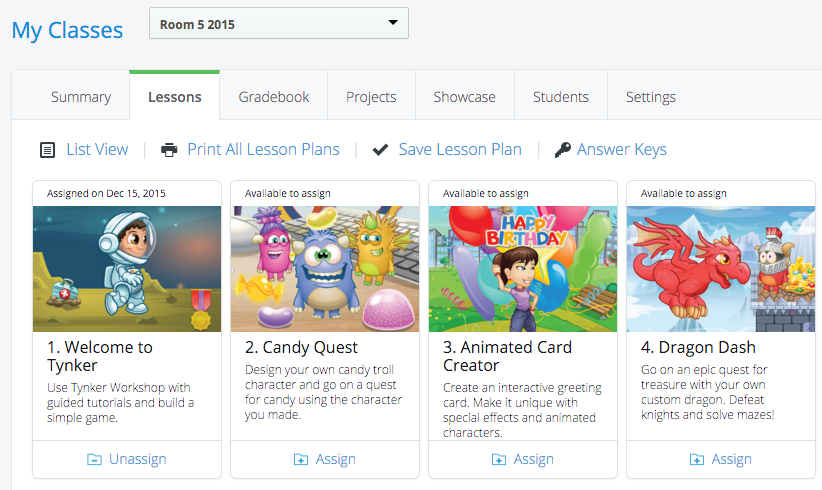
    5. Once in, the students can get involved. I clicked on the “Lessons” section of the dashboard.
    6. Click on “Assign” to give students access to getting started with Tynker. Make sure you remind students to read the instructions that are given. There are limited options, but then I do only have the free account version.

    And that’s about it. You’re in. You’ve got them started!

    How it works

    Once the students are signed in there are a couple of things they should do. Firstly, they should be reminded to read and follow the instructions. Many will be so keen and ‘gun-ho’ that they’ll skip past the tutorials to get to the ‘fun stuff’, and in the process, not know what to do.

    As the teacher, I recommend assigning the “Welcome to Tynker” workshop as per the instructions in step 6.

    tynker1_yyr9j3

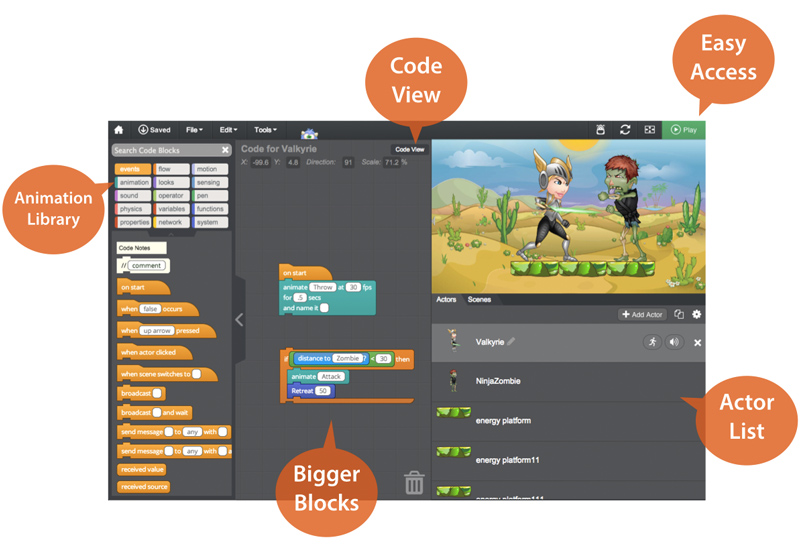
    Inside “Welcome to Tynker”, students will be taken through a series of tutorials that gets them working with characters, controlling them with their keyboards, and assigning sounds.

    It then works through adding “enemies”, and “rewards” to create the basis of a game.

    Students will be shown basic actions that they can drag over to the working area that then applies to the game or programme that they are making. These are completely customisable to allow for different characters to do different things. Animations, sounds, movement, key presses; all of them are able to be used to create a different part of the game. It even allows loops of actions to be repeated a number of times or loop when a particular event happens.

    And that’s about as far as we got! It definitely has a lot of options, and for motivated students, I could imagine that this would be very beneficial.

    As a coder myself, I can see how the blocks being placed together translates into sections of code that achieve different parts. The correlation between what the student creates in a series of instructions and what it makes the characters do is very clear, and very well understood.

    Hour of Code

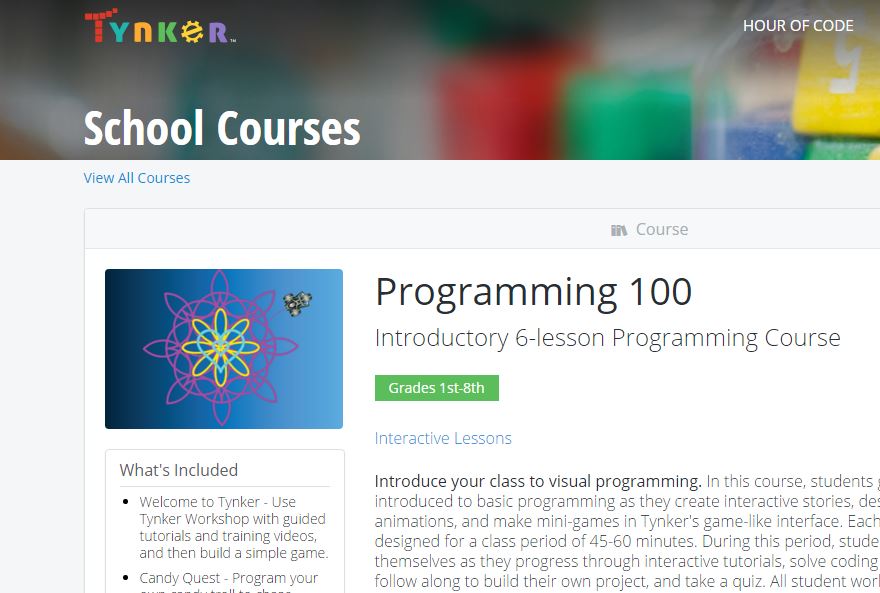
    As part of the Hour of Code initiative, Tynker has opened up a variety of activities that encourage the same kind of coding and programming skills. There are different levels, from beginner to intermediate, and a range of ‘worlds’, from Hot Wheels, to Candy Quest.

    If you know more about this, please leave a comment or two in the comments section below to add more information to this blog post!