Category: Archived

All the old posts from years gone by.

  • The White and Blue National Standard Box

    This week the internet world was bombarded with seemingly pointless debate around the colour of a dress. To me, it was quite clearly white and gold, and impossible for me to see how it could be any other way. While I could see how people saw the blue, the suggestion that the darker strips could be black was preposterous. But then when my wife commented on the black and blue dress, I was flummoxed. Seriously? I’ve stood by my artistic eye for my entire life; and now it starts to play tricks on me?

    dress-615x342

    For those wishing to find out about the dress and why it is blue and black, please read this article and this from the NYTimes.

    However, when I was thinking about this, it immediately made me think of each and every classroom around the country. We have many, many students who would answer “white and gold” to this question in a test, and many, many students who would answer “blue and black”. Some are restricted by the colours they see from the photo, and others are able to translate that and see the actual colour that the dress would be, based on the white balance of the background. And yet, because of this, many, many students would end up failing this test, through no fault of their own mind you.

    Many teachers all around the country would argue for and against the correct answer, and many, even when faced with evidence, would find it hard to fathom that they too, got it wrong.

    And yet we would continue to use a faulty system. A test that labels students as wrong, as failures, through no fault of their own, purely and simply because their brains aren’t wired that way. It puts everyone in the same box, and only those who are wired a particular way are filtered through to the top of success.

    The National Standards Box

    National Standards is the same. While we’ve come to accept them and we’ve had to work with them since 2010, it doesn’t make them any less flawed. Yes, we have come to manage them and get used to them, but deep down, I am still morally opposed to them. I’ve seen too many fantastic students with so much potential get labeled as “Well Below” or “Below” purely because their brains aren’t wired to think in terms of Reading, Writing, and Maths. They are considered unsuccessful, and targeted programmes are put in place to monitor and try and make these students fit into the box of the National Standards. We’re trying to make them see the dress as blue and black, when all they can see is white and gold. Even if we reason around it, and show them evidence, their eyes will still see white and gold, because thats how their brain is wired.

    Case in point is an ex-student of mine, who at age 9 was reading at an age of a 5 year old (that’s when you could get him to read), and writing not much better. Maths was passible, but only through drawing diagrams rather than numbers, of which many he wrote backwards. However, put a blank page on his desk and a pencil in his hand, and he would draw the most wonderful creations I’ve seen from a child. He had depth of tone, shading, details, feeling and mood, emotion and passion compressed into the graphite lines of his art. At times, he would draw beyond anything I’ve come to expect, even from myself. His talent was incredibly well developed, and I would have loved to continue to work with his drawing and develop it, honing his skills, and encouraging his internal well of creativity that was bubbling away inside. Instead, I spent 80% of the year fighting to get this child on task with his writing, force feeding him books with pictures which he just wanted to draw, and trying to get him to fit into the National Standard box. The other 20% was made up of 15% of me trying to think creatively about how to use art as a means of developing his reading and writing, and the remaining 5% giving up on anything structured and letting him do what he wanted – draw! It was a year filled with frustration, torment, arguments, negotiations, and ultimately, very little progress.

    We label them as they head into the prime of their learning and into the big wide world. They may be genius artists, or fantastic sportsmen, and will be incredibly successful in these fields once they leave high-school. But while they are in primary school, they have to fit into a different box and be measured. And they fall short. The message they get is negative. The internal self talk begins and the possibility of them reaching that potential lessens. Of course some will make it, but many will self combust and be filled with self doubt and lack of confidence in their ability, whether ‘academic’ or not. They call themselves dumb, and they know it. Because that’s all they’ve known since 2010.

    And teacher’s have their hands tied. On the one hand we have a beautiful and wonderfully wide curriculum full of opportunity and wonder, and in the other, the narrow field of vision as we peer into the National Standards box. “Integrate these through the other learning areas” they say, but the desired effect isn’t as easy to come across. As with last year, I never found a way to integrate reading through art, and I’m unsure whether I had, whether it would have made a difference in raising this child’s reading ability. Regardless of this, the dress was still white and gold for him, because that is how his brain is wired.

    As a teacher, what I want to teach is the ability for all students to see the dress as white and gold and blue and black, and accept the differences, while knowing deep inside that no matter what they actually see, that they are right in their own way, and that others are also right. I want them to be able to see them as successful, even if that’s just in one subject or curriculum area. Obviously they still need the basics, but labelling them a failure just because they don’t see blue and black isn’t the way forward to a successful future.


  • Student Success

    Can you read? Can you write? Can you count?

    If you say yes to these then you are a success. You have succeeded at school. You’ve made suitable progress through your years at school. Heck… You’re verging on being a genius. You’re probably headed to university, or some high end CEO job, and once you’ve done that, and are trying to work out what to do with your money after all the property you now own, you might just run for prime minister.

    If the importance that is placed on National Standards in this country is anything to go by, then this will be reality. Yet we keep on getting pressured into widening the curriculum day after day, by all the different curriculum areas; science, the arts, p.e. and health. Fitting all of this in within the school year is challenge enough, yet alone finding time in the school day. Many teachers have had to learn and adapt, and thus begin integrating reading, writing, and maths in amongst the other subjects.

    children-99507_640But isn’t success more than this?
    I’ve had a myriad of students through my classroom doors, some who are very successful academically. But I will always remember one student, Polly. Polly of course is a made up name designed to remind me who it is, but disguise her identity for privacy reasons. Polly was a neat student. She was on time most days, was well presented, had lunch, came from a home with supportive parents who turned up to school events when they could.  Polly had great friends, and was always very kind, considerate, and respectful towards others. She didn’t have a bad word to say about anyone. Polly got on and did her work. She was enthusiastic about school and about learning. She wasn’t the best at maths, reading, or writing, but always gave 100% effort and put her heart and soul into her work. But 2010 rolled around, and with it the implementations of National Standards, I found myself having to try and explain to Polly and her concerned parents why she was Well Below in all three areas. It simply wasn’t fair. Polly became a target student, and her progress was routinely monitored. By the time she left school, she was still Below the National Standards in all three subjects, but was a long way from being an ‘unsuccessful’ student. In fact, she was a very long way from being a ‘below’ student as well.
    You see, Polly had a lot going for her. She had perseverance. She had respect. She had kindness and reliability. Polly had great running ability, and determination, confidence, and commitment to boot. She had a dramatic flair, although only used this when she was required, on stage, in assemblies, and class plays. She got along with everyone, even those who crossed her. You see, when I said goodbye to Polly from my class, I knew it wouldn’t be the last I saw her. I knew that out in society, in the real world, whatever Polly chose to do with her life, she would be a success. She had the qualities that will make success inevitable. While she was not the brightest student academically, she will do well for herself regardless. Whether she becomes a stay at home mum, or a fast-food chef, air hostess, veterinary assistant, early childhood educator, bus driver, receptionist, or the second wealthiest CEO in the country, it won’t matter, because what ever she chooses, she will be successful at it – I am sure of it.

    grads

    In my experience, I’ve been through a few different ‘Graduate Profile’ activities, where we as teachers get around and discuss what skills and qualities we would like our students to leave our school with. Each and every time we end up with a list that includes many, if not all of the following skills and qualities:

    Creativity, Resilience,Able to work with a variety of different people, Motivated, Persistence, Expresses themselves, Curiosity, Humour, Endurance, Reliability, Empathy, Leadership, Compassion, Courage, Resourcefulness, Humility, Communication Skills, Thinks of others, Shows respect,  Shows not tells, Trusts others, Social skills,  Role model, Mentor, Volunteers, Gives to others, Active participator, Takes suitable risks, Uses initiative, Confident, Trustworthy, Problem Solver,Self Awareness, Self Discipline, Self Motivated, Ambitious, Flexible, Positive attitude.

    When you look through this comprehensive list, there is no question that they are suitable desires for schools to have for their students to have leave with, and more often than not, when teachers are asked to come up with such lists, no where is academic ability mentioned. No where on our Graduate Profile as a school does it say that a ‘model A’ student that leaves our school will be At or Above the National Standard.

    It’s definitely worth thinking about.

    What does success mean to you in regards to education and learning? Feel free to comment your ideas below.

  • Picture Books and Literacy Learning

    I was perplexed, astonished, gobsmacked, and bewildered when I read this article this morning.

    Picture books hurt reading, says linguist Pamela Protheroe

    Read Article – Stuff.co.nz

    There are very few words I can say right now about it.
    Luckily, most of us in Education circles have gotten used to ignoring such ‘research’ and will continue to listen to trained, practising teachers who know what works, rather than these so-called ‘researchers’ who blow in and blow out of a classroom to report their findings.

    But seriously. Let’s stop for just one moment. Someone has based their research thesis on this. Countless dollars on resources, time, and all sorts to carry out this research, and for the most part, it goes against every bit of logical instincts we have.

    My first reaction was – what are the implications for schools should this research be taken on board? Book rooms around the country turned upside down, with pictures being deleted from Ready to Read books, and replaced with text-only books. Picture books being thrown onto a fire in the school courtyard outside the school library. Its just not an image you even want to imagine books and schools becoming.

    Let’s face it. We’ve all been through school where picture books were more than a staple diet. They have helped us to make sense of the world, and have scaffolded our learning of English, which is confusing at the best of times! They have provided enjoyment and fun for reading. Even today, I prefer a good picture book, and the art covered pages that bring the story to life.

    And guess what. I’m not dyslexic. In fact, many of us aren’t. And even those that I know who are dyslexic, have not only learned to adapt with this world, but have done so from a very young age; suggesting that dyslexia isn’t really something that comes to haunt us in later life like baldness or arthritis might. I’m more than sure that if this research was the least bit true, that with the copious amounts of picture books that have been read over the years, we would have countless adults complaining of suddenly developing dyslexia and getting their words and letters muddled.

    Try, just for a minute, to picture it. Where the Wild Things Are, without the beautiful scratching and muted illustrations. The Very Hungry Caterpillar without the large stenciled fruit and holes in the pages. Green Eggs and Ham without the train going through the tunnel on tracks supported by the bamboo-like truffalo trees. There is no way that these stories, without their illustrations, would remain in our minds, but more importantly, remain in our hearts.

    9985972026_54e0b07122Imagination at heart

    As for ruining imagination; I somewhat agree. I believe the imagination of young people has been harmed by the overstimulation of digital media, film, and video games. But not by picture books. Not by still images. The stationary pictures that grace a page provide just a small portion of the imagination required to gather in the entire story. There are a lot more aspects to a story than even what the picture on a page can show us. Theres movement, there’s action, there’s descriptive settings, and facial expressions. There’s reactions and emotions, all of which change and adapt with the story, something that a still image in a picture book. They rather provide a starting point and a kick start for students imaginations to build on.

    Pictures, Pictures, Pictures

    My personal favourite is a book that has no words in it whatsoever. Most likely this is because of my prejudice towards art and drawings. It’s called ‘The Arrival‘ by Shaun Tan, and it is magical. In my teaching through Daily 5, a world wide literacy programme based on in class practice, developed by teachers for teachers, one of the things that is taught is ‘three ways to read a book’. One of those is to read by using the pictures. Even I ran into problems with this when teaching older children, who are now reading chapter books which contain very few pictures!

    In Conclusion

    I guess it is quite good that this researched doesn’t have a memorable name. I can’t even remember it from the title.

    There are a few things that we need to remember. They completely dispute her findings, and lay them to rest almost instantly. Firstly, like music, pictures are a universal language for all. They tell a story on their own. They are invaluable for communicating ideas for ELL students.

    And lastly, and most importantly, I leave you with one common phrase that is used all over the world, and speaks complete truth every time it is used. And I cannot think of a more suitable time to use it than this.

    “A picture is worth a thousand words.”

  • Are Modern Learning Environments a Fad?

    We’ve all heard it in news, and seen it in the high glossy magazines or furniture websites, claiming ergonomic desks provide a quieter classroom, or driving through the new housing development with a 21st Century school nearby while the state housing that serves the poorer side of society watches on from across the road. Some have even experienced it going to a conference or workshop which are always held in the latest completed building project, often surrounded by glass walls and neatly air-conditioned atmosphere with the fresh aroma of recently laid high tensile carpet.

    Thats right. Modern Learning Environments, or ‘MLE’ for those of us keeping a list of teacher jargon and acronyms.
    Back when my grandparents went to school, every classroom was the same. A blackboard with chalk-filled scratches and impurities, each wooden desk facing the front, lined up in an individual grid for maximum efficiency. The teacher provided information for the masses, delivering speeches from the front like a preacher at a pulpit, and it was your responsibility to remember and follow directions or you would miss out.

    As time went by, we began to question the effectiveness of this. Desks began to get grouped into small clusters, and the term ‘desk groups’ was formed. In junior classes especially, desks were done away with completely, with furniture makers beginning to focus on large tables for schools. A classroom computer (ex-office computer) sits in the corner and is the place for students to go during wet lunchtimes where the class Solitaire challenge begins. The blackboard is removed for the front of a fridge, and is so called as a ‘whiteboard’. The teacher sets group work and walks around the class to ensure students are on task and discussing ideas together.

    Eventually we reach the current predicament where schools feel like they have to provide a range of different ‘areas’ for students. There are small pods of desks which link together in different ways, ottomans which cluster into circles or snakes, carpet pads or cushions instead of chairs, bean-bags are brought out from the corners, barstools with benches instead of individual desks. There is no ‘front’ of the classroom, and the standard whiteboard is now an interactive projector with multi-touch capability. We’ve opened up the school network to enable students to bring their own device (‘BYOD’) to school on which they can complete their school work. The teacher is a facilitator of learning for every student, and provides a model for inquiry, where students learn on their own with support from others around them, finding out what they want to find out, how they want to find it out. The classroom accesses all corners of the internet, and learning outside the classroom happens each week where the class Skypes another class across the other side of the world. The students are connected through a learning management system (‘LMS’), and parents regularly check in with their child’s progress at school through the school Moodle.

    What actually is a Modern Learning Environment?

    The Ministry of Education defines a MLE as follows:

    “A learning environment may be understood to be the complete physical, social and pedagogical context in which learning is intended to occur. …a modern learning environment is one that is capable of evolving and adapting as educational practices evolve and change – thus remaining modern and future focused.”
    MLE.education.govt.nz

    In short, a MLE is a space that changes depending on the learning at the time, and is future focussed as education progresses. It provides students and teachers with a choice on how to use the space, depending on the learning activity at the time. Students may find it more comfortable to lie on the floor with a laptop, rather than sit upright at a desk with pencil and paper.

    The Ministry website continues to explain that there are eight parts to consider when discussing a Modern Learning Environment.

    1. Accessible
    2. Air Quality
    3. Heating
    4. Healthy and Safe
    5. Lighting
    6. Insulation
    7. Sustainable
    8. Acoustics.

    It is important to remember that this is purely the physical environment. It does not consider online communities, or digital environments within this; but does take into account the idea of ‘ICT everywhere’.

    Why the Craze?

    So why is everyone clambering to get up the property ladder and develop their school into a MLE? Is it the consumer culture we’ve become so entrenched in now filtering into our expectations for school buildings. Is it the same reason that we have to have the latest iPhone as we do have to have the latest classroom fad?

    Firstly, we are attracted to the new. Many classrooms look tired. Those schools that were built during the baby boom in the 1960’s, now have classrooms that are pushing 50 years old. Heck, I bet any of us would look tired if we’d had 1000’s of kids running around us over the course of 50 years! Schools have lots of other priorities as they come to grips with the technical age, and ‘modernising’ classrooms is well down the list of things-to-do.

    It thus becomes very attractive walking into a classroom with clean walls, sharp, clean lines, superb lighting quality, and durable, usable spaces. I’m not sure cleaners will agree that full length glass walls are a good idea, but there is a sense of flow having them, un-defining the boundaries of a space and creating an openness to the area. There is a natural desire for this new environment, given that the alternative is so… old.

    The Need for Guidelines

    In some ways, with everyone wanting the new buildings and new furniture, there has to be suitable reasons and guidelines behind having them installed, so that the government can quantify and add some structure to the wants and desiers of every teacher in the country. The eight parts of the MLE were developed to ensure that there are reasons behind the decisions that are made regarding school property. Even when upgrading old school buildings, the eight boxes can get ticked off as the issues within them are addressed, and though they might not have the latest and greatest technology, or motion sensor lights, or wall to ceiling windows, or enough range in furniture to put a furniture sale to shame, they can still be considered as a MLE.

    So is it a Fad?

    Essentially, no. It’s not a fad. It’s not just the latest thing people are talking about. While environment is important, it is not the be all and end all of learning and education. Can it help? Yes. But a good teacher will teach well in any environment. A good student will learn well in any environment.

    But we are in the 21st Century. There are lots of amazing options out there to explore, especially in regards to our learning environments, and pursuing these is just another step in developing life long learners out of our classes.


  • Saving Recent Downloads to Google Drive

    So you’ve gotten used to saving attachments from your G-Mail straight to your Google Drive. It’s pretty handy isn’t it!?

    But what about when you download that PDF resource? You can’t just select your Drive and it goes straight there (unless you have Google Drive for your PC).

    Not to worry. There is a very easy way to do this seamlessly using Google Chrome.

    Step 1

    First you will have to open up your drive in another tab. http://drive.google.com

    Step 2

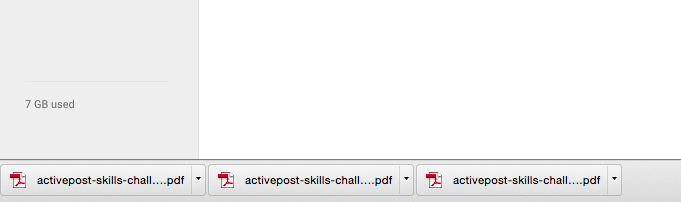
    Your downloaded files have finished (hopefully) and are now displayed down the bottom of your browser.

    All you have to do, is drag the file from the bottom of the browser into your drive window. They will then begin uploading straight away.

    Step 3

    And you’re done! You will see the little Uploads black box in the bottom right corner and be able to watch your files be uploaded into your drive.

    Screen Shot 2015-02-06 at 6.08.15 pm

    No more looking through your Downloads folder or trying to find where you downloaded them to before uploading them manually to your Google Drive. You can do it all from inside your browser window!


    I suspect that this trick will work in other browsers that list downloaded files, but have not tested it. Let me know if you’ve tried it and it works in Firefox or IE10!

  • Te Reo Māori for Teachers

    Over the years I have been wanting to learn Te Reo Māori. It is a beautiful sounding language and is an important asset to any New Zealander in understanding Māori culture. It is of particular importance to every New Zealand teacher, as their use and encouragement of Te Reo will help the language to grow and flourish, and show the next generation of New Zealanders its importance. By giving the language a place in the classroom, we in turn show that using the language, for our Māori students, is of great value.

    My problem is that I’m not the best when it comes to learning languages. I never have been. I suspect that to learn enough for me to fluently rattle of sentences will require both time and dedication, and then some more time. This, however, is very difficult to find in the teaching profession. There has been murmurings that Te Reo support for teachers should be a priority for the government if it is serious about upskilling educators to pass on the language to the next generation.

    However, I shall not give up, and I have begun to compile a selection of common phrases teachers often use in the classroom, in the hope that some of these will stick for me, and become a little more natural as I work towards learning Te Reo Māori.

    Directions and Instructions

    E tu Stand Up
    E noho Sit Down
    Haere mai Come here
    Haere atu Off you go
    Kia tere! Be quick / Quickly!
    Rārangi mai/atu Line up over here/there.
    Rārangi ki waho/roto Line up outside/inside
    Whakamaua/Tangohia tō potae Put on / Take off your hat
    Katia/Huakina te kūaha  Open / Shut the door
    Kuhu mai ki roto  Come inside
    Hoki atu ki tō tūru Go back to your seat

    Commands

    Titiro (mai) Look (this way)
    Huri mai Turn this way
    Huri atu Turn away
    Kia tau Settle down
    Taihoa Wait
     Kāti  That’s enough

    Praise and Encouragement

    Ka Pai  Very good
    Ka mau te wehi!  Awesome!
    Mīharo! Wonderful!
    Ka taea e koe! You can do it!

    Questions

    Kei hea tō pukapuka/pene rākau? Where is your book/pencil?
     Kei hea ia?  Where is he/she?
     Nā wai tēnei pukapuka?  Whose book is this?
     Kua reri?  Are you ready?

    Have you got any more phrases or vocabulary that you use in your classroom?
    Please comment your ideas below!


    Notes:
    Thanks to Tom Robinson for his guide to macron use in HTML.
    Another great idea is to learn a word a day. Here are 365 of them! NZ History
    This is another great resource I suggest getting your hands on! He Reo Ora

  • The Success (and failure) of Social Media in Education

    Let’s face it. With the advent of Facebook, the world got smaller. We made connections with anyone and everyone. This was then increased with Twitter, where 95% of the people I now follow I have never met in person. As humans, we crave interaction, but for many of us, prefer to do this in the comfort of our own homes.

    With the ‘Social Media’ organising and integrating itself with our social lives, it is no wonder that people have begun to form personal and professional relationships with others.

    Earlier this year I began to separate my personal and professional face online. There were a number of reasons for this, least of all in an attempt to not let my work and home life become too unbalanced. As teachers, we are well aware of the fact that it is almost impossible to ‘switch off’ thinking about our class, our students, or our profession, and anything to help me to do this is a good thing. Having the education world infiltrating my personal twitter account, or clogging up my Facebook feed was hindering such progress.

    In all of this, I am a firm believer in using the right tool for the job. Don’t get me wrong – I am also a New Zealander, and so built into my DNA is the innate desire to be creative with the use of certain tools and materials that lends more to a creative mindset. But at the end of the day, while you could play golf with a hammer (you should try it!), the hammer is still going to be best used to knock in nails.

    I was reminded of this when viewing a post asking what people thought of Pond, and why people flocked to a Facebook group to share resources and ideas, rather than use this new initiative by Network 4 Learning.

    The reasons were neither here nor there, with some being the annoyance of having to log in to yet another website (oh the hardship), but more concerningly, was the fact that they saw it as sterile and empty, with little interaction or use.

    Unfortunately, these people have missed the point of Pond. They’ve assumed that it is another social media, and thought ‘Why would I need another social media when Twitter and Facebook suit my needs?’. Well, put simply; Pond is not a social media. It is a database of resources in a central location. Think of it a bit like Pinterest.

    The social aspect of Pinterest is no way near as prevalent as Facebook or Twitter. But Pinterest definitely serves a purpose, and many, many teachers use it daily to gather ideas, inspiration, and resources.

    So why do I need Pond? Why not just use Pinterest? Well, it comes back to using a tool for its purpose. It also comes back to the sense of ‘New Zealandness’. Pond has been developed by New Zealanders. The resources are supplied by New Zealand teachers, for New Zealand teachers. While the log-in provided a turn off for some users, the reason behind using the Education Sector Login was so that this resource remains only for teachers (you have to admit, there is some comfort in knowing that). In addition, Pinterest includes EVERYTHING, and anything, whereas Pond will be providing teacher and education specific resources that have been tried and tested in the New Zealand classroom. Don’t get me wrong; Pinterest has its place. People can become creative and adapt and change it and use it for different aspects, build Boards for just Education or Teaching resources and more. But I believe that Pond has more to offer the New Zealand teacher in the long run, purely because that’s its core function and focus. That’s what it has been designed for.twitter-292994_1280
    I kind of think of it as shopping. At the Warehouse, they have a lot of stock, and a wide variety of every product you probably want. It certainly has its place and is a one stop shop for most people. But if we’re honest, we probably wouldn’t purchase a wedding ring from there. You’d go to a specialist jeweller. Likewise, while Pinterest has everything under the sun and works on the same principles, if its Teacher resources from New Zealand teachers, I believe you’ll get better results (even if you have to pay a bit more for it!)

    Making them Separate

    So, although the lines are constantly blurred between work and home, especially with teaching, there are a series of steps that you can follow to help keep aspects of it separate.

    • Create a different Twitter account for your work. This helps with a range of situations – including having parents or students following you. It limits your feed to other Teaching Professionals, and focuses your tweets on education related things. Managing multiple accounts is the hardest part of it, but with Hootsuite, and Tweetdeck, one can overcome this with relative ease.
      Mention your new account to your current education based followers, and then eventually get around to following them all back on your new account. Then gradually remove them so you can keep your personal and work related accounts separate.
    • Make a separate category or WordPress Multisite for your teaching posts. I used to include all my posts and thoughts and ideas in my own personal website. But my profession is somewhat unrelated to who I am as a person, and it begins to separate them out. As with twitter, it also helps focus the energy of my posts to a specific topic.
    • Facebook has always been for people I actually know, or have met. The only teachers I have on there are those I work with each day, those I trained with, or those that are friends who also happen to be teachers. One way I could see that you could keep things slightly separate would be to either create a separate account, or create a Page for yourself as a Teacher.

    Whilst it can seem like a bit of a mission to separate them out, especially if you’ve already started building your online following base, I have found it really refreshing to begin to build a void between these accounts in attempt to leave work and work before I come home. Likewise I don’t have Education and Teaching infiltrating my personal feeds when I’m browsing in my down time.


    Twitter vs Facebook

    social-iconsI for one am not going to get involved in a Twitter vs Facebook vs Pinterest vs Instagram vs anything. All have their value, and you can decide for yourself which you like and which you don’t. But for mine, I have a number of reasons I prefer to use (and refer to) Twitter for teaching and education.

    Firstly, Facebook was designed to connect people with people. Comments, posts, replies, and likes, all come from people, and go to people. While ideas and resources can get published here, and you can get inspiration from them, it seems to me to be a bit forced. Especially annoying are the notifications which constantly come up from groups that you belong to.Like using a hammer to chisel a notch out of a piece of wood. You can do it, but it’s easier to get a chisel.
    Twitter however shares the net with people. You can easily enter links straight away and put it out to EVERYONE, not just your friends or people who are part of a group. Those that wish to follow you (for the most part) can. And you can follow them back. This allows you to connect with people with a common interest. You can seamlessly pass on content, and by mentioning their handle, quickly reply or message them in an open conversation. Its a lot less formal and a lot more open and free to use it for all your purposes.

    Following a #hashtag also helps, and there are several “chats” that happen weekly which are open to everyone. All you have to do is search for the hash, and join in!

    So that’s my guide to Social Media and Teaching. No doubt, others will have their views, and will use what you use. This is merely my own observations as to what works for me.


  • Using Google Drive instead of My Documents

    Sometimes old habits die hard. Sometimes default settings also can be a bit of a pain. Sometimes you can set up all the synchronisation you want, but files will still get lost somewhere in the blue void.

    That’s my experience with Windows in schools. Microsoft does a very good job for the most part, but it has always been a bit of a sticking point when a teacher arrives at work on Monday and suddenly their work from the weekend goes missing. Or they’ve logged in on another computer and suddenly don’t have all the files they thought they did.

    Firstly, before we even look into using Google Drive, I want to say one thing. Back up your files.

    Then back them up again. Put them on a USB or portable storage. Take them home. Back them up again. Just in case.

    I make a habit of doing it every year at the end of the year. Some would even suggest doing it more regularly. Every term, or every month. However, now that I’m using Google Drive to store my files, I’m finding that the need to back up is much, much less than if I were purely relying on Windows and My Documents synchronisation.

    Google Drive

    Okay. So what is this amazing thing called Google Drive?

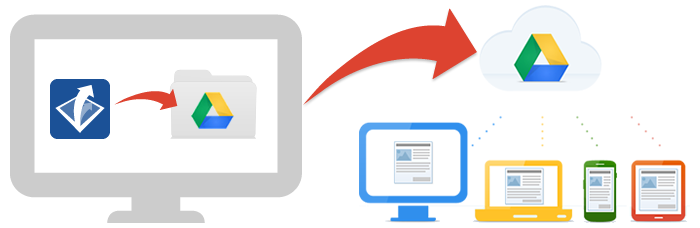
    Basically it is a server of all your files on the interweb. In a cloud some people say. It’s a USB stick, except instead of plugging it in, you simply log in online. This image below gives you an idea of how it works.

    All your files, uploaded to Drive, available on all your devices. Essentially we are setting up one big backup each time we make or create or edit or move any document in ‘My Documents’. And what’s more, space has just become unlimited with Google Apps for Education (#GAFE)

    Find out more about using Google Drive here: www.google.co.nz/drive

    From here you can click on  and create a new Google Doc, Google Sheet, Google Slide, or Create Folders to store your documents in, just as you would in My Documents.
    The Incoming tab will display all your shared files, along with any files that have been shared with you.

    The Recent tab displays the most recent files you have created or opened and worked on.

    In the Starred tab, you can see any files that you have starred (just like emails that you ‘star’ in Gmail)

    Bin is where all your deleted files are kept just in case.

    Searching and Finding

    Remember; Google is a search engine first and foremost. This means they can apply the same search functions to your documents as they can to the entire world wide web.

    At the top of the Drive home page (drive.google.com), or the Docs home page (docs.google.com), is a search box. This can search through any document you have opened or put into your drive.

    Do not forget you can use the Incoming and Recent tabs to help with finding documents.

    Integrating Google Drive with Windows

    There is a great program for Google Drive which creates a folder on your computer for your Google Drive documents. This then syncs up with your Google Drive on the internet.

    ANY file can be put onto Google Drive. It’s not just limited to Google Docs. This includes old planning files, PDF’s, images and photos of your class, worksheets, and other resources.

    1. Go to http://www.google.co.nz/drive/download/ and click on Download → Mac and PC.
    2. Once it’s downloaded open it and install with the preset default options.
    3. It will require you to sign in at some point.
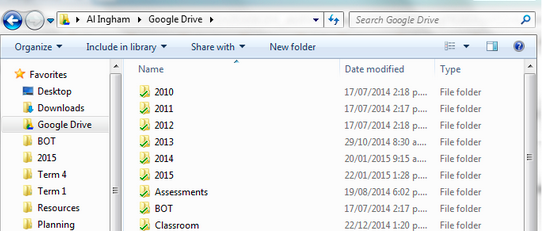
    4. You will now see a Google Drive option in your “Favourites” bar when you go to Windows Explorer (Windows+E).
      Here you can see I have copied all my teaching files over from My Documents to Google Drive.
      When I save a file, instead of saving it in My Documents, I save it to the Google Drive folder.
    5. In Libraries (down bottom left of the picture above), click on Documents


    6. You will see a bar at the top of the window. Click on Includes: 2 locations
      (Note: Mine says 3, yours may have a different number)
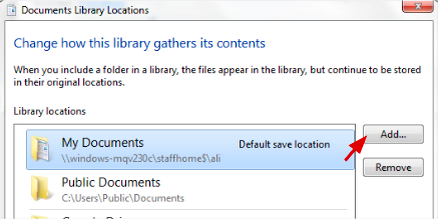
    7. On the right of the pop up box, click on Add.
    8. Find your Google Drive folder (should still be on the right in your favourites) and click on Include folder.
    9. You should now have your Google Drive folder showing up as a location.
    10. Right click on Google Drive and select “Set as default save location
      I then right click on it and select “Move Up” until it is at the top. This means when you click on “Documents”, your Google Drive location will show up at the top.
    11. Click on OK. And now you are all set up and ready to go!

    Tips and Tricks

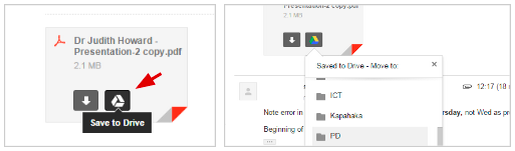
    1. You can save attachments straight from emails to your drive. Just click on the Drive icon that shows over the attachment in Gmail. Then you can choose which folder to put it in afterwards, and open it in your Google Drive.
    2. Use the little arrow at the end of the Google Search bar to filter your search results before you search. Maybe you can’t remember the title of the document, but you can remember that it was shared by a particular person or was a PDF. You can select these first. This arrow also works in Docs, Gmail, and all the other Google Apps.
  • Creating Unit Templates in Google Docs


    One of the big shifts forward in our school this year has been the introduction of Google Docs, Google Drive, and collaborating. This also coincides with a drive and a passion to integrate our unit plans and follow the “Less is More” policy (especially in regards to paper usage!). With a Term 4 being a huge success, we are stepping out into 2015 with our best foot forward.

    Part of my role as the “IT Guru” (Computer Wiz, TechGeek, whatever-you-want-to-call-me) is to make sure that

    1. The introduction of new technology happens seamlessly. This means having things up and running in the background before unleashing it to the general populous.
    2. That teachers are introduced to the new technology in a friendly and non-threatening way so as to learn, engage, and use it effectively to enhance their practise.

    Before running my tutorial on using Google Docs and Google Drive, I had to make sure things were set up and ready to be used in the easiest way possible. Ease of use for the end user is high on my list for anything I’ve ever done in regards to IT and teachers. If it is made easy for them, then they’re more likely to want to use it.

    One of the keys to this, was first making a template for the collaborative and integrated unit plan. This would enable other teachers to make a unit plan using a default (and schoolwide) template.

    1. Create a document in Google Docs by clicking on the blue plus (+) sign.
    2. Rename your new file by clicking on the title. Call it “Unit Plan Template” or something similar.
    3. Make your template for the minimal outline of the template. Add in the text, colours, stylings to build up the template with the default text and features. These should be things that are common across ALL unit plans; not just yours. For instance: instead of having “Term 1, 2015”, have “Term X, 20XX” so that others that use the template won’t forget to change the date.
    4. The next part is a little confusing. I suspect possibly because either Google has moved away from using templates, or they’re re-developing how it is to be integrated. Anyhow, this is how you make your template available to others in your organisation.
      You will need to go to “File > New > From template…“. This should load up the template gallery in a new tab.
    5. On the far right you will see the text “Submit a template“.
    6. This will bring up a standard form for you to submit your own.
    7. Click on “Choose from your Google Docs” and find your document “Unit Plan Template”. You can search for it in the search box at the top, or scroll through your recent documents.
    8. You can choose whether to enter a description. This could be quite useful if you’re planning on making a lot of different templates.
    9. You can decide on your own category. I put mine under “Planners”.
    10. The rest I left as is, but obviously you can set a second category if it applies, and change the language should you need to.
    11. Click on “Submit template“.
    12. It may take a while to appear in your list, as it has to be checked that it will work. I’ve never had any issues with this process. Usually within 5 minutes it will be made available to use.
    13. It should appear under your organisations tab for templates. It will also be available under “My Templates“.
    14. It will appear in this place for all the teachers in your organisation, and so they will be able to follow the process of clicking “File > New> From template…” and then clicking on the “Use this template” button.
    15. Once I’ve done that, you’ll see that the document is still in your Google Docs and Google Drive. I like to create a folder called “Templates” in Google Drive and drag the file into it. That way it doesn’t get in the way and is nice and organised. It also means all my templates will be in one spot on my Google Drive. The other benefit of having the file still, is that when you edit the template file “Unit Plan Template“, the change will automatically update for the Template Gallery. Useful!
    16. And you’re done!