Tag: teaching

  • NZCER – National Standards in their seventh year

    National Standards in their seventh year – NZCER

    At the mid point of 2016, we were presented with a survey which was sent off to NZCER for the current views of teaching proffesionals views on National Standards. 6 months later, and NZCER have done the collation and inquiry around the survey results, and have presented the following report.

    National Standards in their seventh year (PDF 2.9Mb)

    As one of these teaching professionals who completed the survey (selected at random by the school principal) I was quite interested in the results and findings. Below are some of the key quotes from the report, and hopefully it provides a good summary and synopsis of the entire article for you.

    Key Quotes

    • While (the National Standards) are part and parcel of teaching and school decision making, questions continue around their impact for students, differences in their interpretation and their impact on the rest of the curriculum.
    • Over half of teachers and principals still feel they have not had the support they need to work with National Standards.
    • Over two-thirds of teachers reported a narrowing of the curriculum they teach, associated with National Standards
    • Many teachers indicated that their school has a shared understanding of National Standards that means that overall teacher judgements (OTJs) at the school are consistent…
    • Only 41% of the principals and 49% of teachers thought they had had enough support and guidance to feel confident about their work with National Standards.
    • Only 16% of teachers agreed the impact of National Standards on students’ achievement overall has been positive.
    • Most parents and whānau reported receiving clear information in their child’s mid-year report about their achievement of National Standards… Fifty-one percent of parents thought National Standards provide a valuable record of their child’s learning.
    • Nine percent of the teachers who responded to the survey had used PaCT to support their OTJs in 2016. PaCT is a Ministry-funded online tool that was developed to support teachers to make consistent judgements of students’ performance in relation to the National Standards.
    • Teachers’ support for National Standards remained around the same as 2013, when it was 35%. The proportion who agreed National Standards provide a valuable record of student learning was stable at 23%

    Principal Comments

    • In the comments made by 43% of the principals about National Standards, the unreliable nature of National Standards data was the most frequently mentioned theme (18% of all principals).

      NS are a joke. Data coming to us from schools when students enrol here is highly unreliable. Our view is that without a National Test (WE DO NOT WANT NATIONAL HIGH STAKES TESTING!!!!) there is no accurate way of assessing whatever the data schools are submitting is truthful/correct. We are hard in our marking, we do not overstate student achievement, most probably we understate it. It is obvious that schools are not being truthful in their reporting of data because of the high levels of inaccuracy. OTJs cannot be accurately moderated within a school, let alone between local schools and definitely not between suburbs/cities etc. NS data being published by the MOE on Education Counts cannot be trusted.

    • Nine percent commented that the focus should be on students’ achievement, rather than their achievement of given standards.

      (National Standards) Do not acknowledge the progress of students who are not achieving at the Standard but are making progress, but it is not enough to move out of the ‘below’ categories.

    • Seven percent of principals voiced concern about the negative effects of National Standards on students and their learning.

      Good idea but each child will have different abilities. What about the child who is ‘below’ from 5 years–12 years old. How do they feel?

      It is soul destroying for students who are well below—we used to celebrate their small achievements—now they are just well below! 🙁 Overall, National Standards have led to a deterioration in the educational deal our children are receiving.

    Teacher Comments

    • Forty-four percent of teachers wrote comments about National Standards, and concern about negative effects on students and their learning was a main theme (13% of all teachers).

      Labels children from an early age. National Standards has helped label our Pasifika and Māori students as ‘below’ achievers, it doesn’t take into account the added value of the child’s own learning.

      I find the whole push for acceleration very dangerous as many children are getting insufficient consolidation and fall down later because they do not have a solid grounding.

    • The other most frequently mentioned theme in teachers’ comments was that the focus should be on identifying and reporting a student’s individual progress, rather than their achievement—or not—of a set standard (10% of teachers).

      National Standards do not accurately recognise the progress of some students, in particular ‘well below’ and ‘below’ students. A student can arrive at ‘below’, work as hard as they can all year and still be ‘below’. National Standards do not acknowledge or show this progress. This can be very demotivating for these students.

      National Standards are a terrible way to measure student achievement as it does not include specific progress within a level. Students may make huge individual progress within their own ability, however parents/caregivers are only concerned if their child is ‘AT’ National Standards.

    In Conclusion

    • Overall, the picture from the 2016 NZCER national survey responses indicates that, while the National Standards have been incorporated into teaching and learning and used by school leaders as indicators of student need, experiences of using them continue to raise questions about their role in student learning and performance, more than 6 years later. To make the National Standards more productive for teaching and learning, it would seem that the recommendations from NZCER’s 2013 analysis of its national survey data (summarised on p. 6 of this report) are still applicable.

    Your thoughts?

    What are your thoughts on National Standards and their role in today’s education? Are they relevant or are they a distraction from your teaching?

    What did you think of the report above? Anything stand out for you? Please Comment below.

  • Learning and Teaching and Learning

    This week, the Minister published a new announcement through the media. The headline: “Hekia Parata – Let’s make learning better.”

    For whatever reason, this completely grated with all sense and sensibility within me. Something just didn’t ring right grammatically.

    I’ve heard “Let’s make teaching better” before (all the time) as the powers that be whip and flog teachers who are already doing their darndest to keep a level head, and keep it above surface level (at least once in a while so they can take a breath).

    But I don’t think you can just switch the verb to learning and it make sense. Someone with

    The term switch

    Learning is defined by Merriam-Webster as “the activity or process of gaining knowledge or skill by studying, practicing, being taught, or experiencing something : the activity of someone who learns.

    Teaching is defined as “the job or profession of a teacher, and something that is taught : the ideas and beliefs that are taught by a person…”

    Learning is therefore the acquisition of knowledge, while Teaching is the imparting of knowledge. The two are direct opposites and so when used in a sentence such as “Let’s make learning better”, we start to question what is actually meant by that.

    How on earth?

    How do we make the acquisition of knowledge better? Sure – imparting knowledge in different ways is possible, but to change how knowledge or experiences is acquired – is that even possible? Are we not, as humans, limited to how we can gain knowledge, through our 5 senses? Touch, Hear, Sight, Smell, Taste? Is this not the extent of how we can learn? And how does one make this better? Obviously, vision and hearing impaired students have glasses and hearing aids to assist with these learning facets we have.
    Is the Minister asking for schools to increase the rate of so-called evolution so that we can learn better?
    Or have we now resorted to student bashing instead of teacher bashing?
    Is the emphasis shift all part of making the student at the centre?

    Is ‘ako’ to blame for this?

    For decades now, the way to make what you have to say more authentic and culturally sensitive, it has become custom to translate certain words from English into Māori. Whilst that may be a very cynical view of things, and possibly the initial use of such terms was genuine, we have built a series of terms that we now use in common New Zealand speak. Terms such as whanau, mana, and in education, akonga and ako.

    Ako itself means “teaching and learning”, and educationalists around the country jumped on it and spread it amongst the myriads of documents. It was one of the first Māori terms introduced in our university papers when learning about teaching and education.

    Does this mean that teaching and learning are synonymous?

    Not at all. Whilst the Māori use the same term for both, the context in which they do is what provides the meaning (as it does for other terms as well – for example puku can mean secret or silent, as well as, fasting, to swell, or to intensify a quality such as pukuriri which means “furious” – riri means angry.) There are terms in English as well that we know to mean different things.

    No. Teaching and Learning are not interchangeable just to sound smart. They are opposites. Like inhaling and exhaling. Up and Down, Square and Circle.

    The minister and others should stop trying to sound smart and stop confusing the matter.

  • Coding in the Curriculum

    In 2018, the New Zealand Curriculum is destined to have a new addition to its subjects.

    From the age of five, children will now be taught about coding, logic, problem solving, if-else statements, app making, social media analytics, and probably hacking as well.

    But there is a lot, a LOT, of apprehension about this, even as a techie myself (for instance – I design websites, and have coded for much of my adult life). Put it this way; I’m not jumping up and down about this announcement.

    Who?

    I don’t know about you, but the first thing I asked was who is going to do this? I have met many a good soul who dedicate their lives to teaching students, but who’s computer literacy is extremely limited.

    And while the content knowledge required to for Level 1 of the curriculum will be very basic, it still requires a great deal more teaching knowledge to be able to teach it effectively. What are students getting stuck on? What are the next steps? How do I solve the next problem?

    Take for example Level 1 of the Reading curriculum. It’s fairly straight forward. Most, if not all (fairly presumptive, I know) adults could achieve this. Now think of the teaching knowledge you would need in order to teach it effectively. The sounds, the blends, the phonics, digraphs, vowel sounds and rules around their usage, the common pitfalls and sticking points as well as the various strategies required to assist and help students to progress to level two. And that’s just scraping the surface of teaching students to read.

    Imagine the level of teaching knowledge that is going to be required to effectively teach digital literacy.

    And now take that to level two, and level three of the curriculum.

    My current estimate, based on my current place of employment and the various other schools I have worked in, would be that about 10% of teachers would have the skill set required to teach digital literacy if it was introduced tomorrow. And that 10% is probably generous. Most of what makes a good programmer, coder, or even just a ‘tech guru’ is the ability to solve problems. When something goes wrong, you need to know what to do to fix it, systematically, step by step, eliminating variables as you go. From experience, many teachers struggle to problem solve why their projector isn’t connecting, or why the sound isn’t working on their laptop. How do we then get to a place where teachers are teaching students even more complex problem solving when you introduce if-else statements that don’t work!

    Many non-tech-savvy people turn to one demographic for help. Young people. Why? Because they’re already up with the play on technology. Their desire to explore, to learn, to develop skills with technology seems to happen automagically, and I can only see teachers and schools getting in the way of that. As well as this, I read an interesting post about ‘future-proof’ learning, predicting what the future holds for our students, and how we can’t and shouldn’t be including things in the curriculum that are a phase, or a fad.

    (Note: I realise that schooling exists past primary school; but we already have specialist subject teachers at Intermediate and High School level, and so schools would merely employ a specialist ‘digital literacy’ teacher.)

    How?

    Another aspect that may or may not have been considered is how schools are going to teach it. You know, the practical side of it. You see; I’ve only once had to write down a piece of code on paper (during a Comp101 exam I took in Uni). It was nigh on impossible not being able to check and edit the code to improve it or to see if it worked. A lot of coding is trial and error.

    Essentially, if digital literacy is to be taught, then students will need devices. Doing it with pencil and paper will only last so long.

    Now I’m not sure about your school; but our decile 2 school has only just got to the point of having 1 device between 2 in the senior school, and 1 to 4 in the junior school. Yes; we can combine sets of these devices to allow every student to have access to one, but my point is, there are lots of schools out there who wouldn’t have this level of technology in their school yet.

    With more devices comes more problems. More students who run into connection issues, which in turn requires the teacher to know how to solve that problem (many of which once again, don’t know how to go about doing this on their own laptops as it is).

    When?

    Ultimately though, when are teachers going to fit this in? Or is it going to be integrated throughout the day? I guess that comes down to the individual teacher. But I know for one, I would love to spend more time teaching students how to use the Chromebooks, how to code a website, and more; but the reality is that I have a hard enough job covering the rest of the curriculum sufficiently, as well as the ever increasing demand on Maths, Reading, and Writing, without adding more to that workload.

    Gripe

    Don’t get me wrong. I’m not having a go at my colleagues or other teachers. They all have strengths and are all marvellous teachers. I merely see a massive gap between adding a subject to the curriculum and the current knowledge of those that have to deliver content about that subject. Massive gap.

    I can see my job as a tech-savvy teacher becoming more than it already is, as I can see me having to assist with other classes tech problems more than I already do, provide support for when tech devices go wrong, and provide ongoing P.D. as teachers encounter problems or inspiration that they want to explore.

    Once again – not sure when I’m going to actually get to teach my own class.

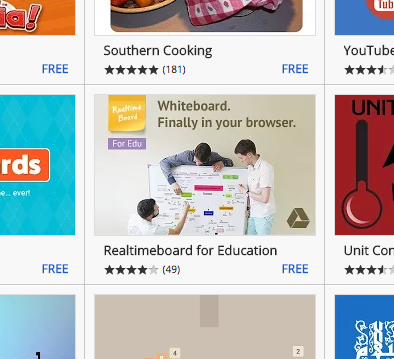
  • Realtimeboard: The Online Whiteboard for Teachers

    So you need some whiteboard software?

    Basically, there is software that is out there that mimics a whiteboard.

    Then there’s Realtimeboard.

    Online, creative, systematic, intuitive, custom, automatic, flexible. All the things you want in many software apps. But without adding so many options that it wipes out any function.

    I’ve been using Realtimeboard for a while now, but was always limited by their “3 board for free” policy, where free account users could only create three ‘boards’. Being that I would probably prefer to have one board for each subject, or one board for each topic, or even one board per lesson, the 3 board for free policy wasn’t really going to work.

    Recently, there has been a big push (even by Apple) for schools to ‘prove’ that they are a school, in order to offer educational packages to certified education institutions. Realtimeboard recently created a ‘education’ account that educators could sign up for. Their education package includes essentially their premium features, for the free package price. You can’t complain about that!

    Features

    Six-hats

    Below are some of the features that make Realtimeboard my new app of choice:

    Online

    If you want your app to be successful, it needs to be online. No question about it. People need to be able to access it on any computer, or even, any device; phones, tablets, netbook, notebook, laptop, or desktop computer.

    Realtimeboard is exactly that. It runs from the website, realtimeboard.com, much like Google Docs does, or WordPress. And like those, it has a dashboard that you’re taken to when you log in, with a grid or list view of your ‘boards’. As mentioned, the free account allows you to create only three boards, however, with the Education or Premium plan you can create as many as you like.

    Sharing

    To spread the use of your app, there is one thing above all else that will do that. The ability to share. Google does this seamlessly with their host of apps, all tying into Gmail and user contacts.

    Likewise, Realtimeboard allows you to send your board to any email address to share it. You can set the privacy to be view only or edit – though I suspect that such users may be required to sign up to the Realtimeboard service as well – which is how they spread their product.

    Sharing, in turn, also leads to collaboration, and is a key buzzword with anyone talking about technology and teaching together.

    Google Drive

    Integrating with a larger company’s product is a must. Realtimeboard not only allows you to sign up to its services using a Google Account, but then allows you to link with your Google Drive, and use your existing Google contacts list. This makes sharing boards a lot easier, especially with those on the same domain or those who also use Google Apps (which is most teachers these days). Add to that the fact that this will also work for students on Chromebooks, and it makes Realtimeboard an incredibly powerful tool.

    Web App on Chrome

    So more and more people are using Chrome, and people are discovering that they can add Web Apps to the home screen. Realtimeboard also does this, as well as having a Google Extension that users can add to quickly copy content from webpages into a board of their choice in Realtimeboard.

    The web app itself is little more than a link to Realtimeboard.com, but it sits nicely next to your Google Apps to remind you that it’s there, waiting to be of service!

    Templates

    With Realtimeboard, you can create a blank board, or use one of numerous templates which come pre-built with different layouts, different features, and different looks and feels. With that said, I mostly use a blank template to begin with, but in time, I can see the benefit of the templates if you have a specific learning module that requires one of the layouts seen in a template.

    Presentation

    Using the ‘Frames’ mode, users can use a frame to show a progression, turning Realtimeboard into a powerful presentation tool, much like Prezi or Impress.js. Each day in a series of lessons, or each lesson in a unit over the course of a term could be ‘framed’ up and put into a selective order. This makes it very flexible and usable for more than just keeping notes, or jotting down brainstorms.

    More

    As I say, I have only just started paddling in the pool of possibilities with this app. There is no doubt a range of uses and applications for it, both in the classroom as teachers, but also for students.

    So go ahead and get signed up. Get using it. Explore a new realm of possibilities in real time.


    Keep an eye out for an upcoming Check out my post on this site for how to use Realtimeboard, with real screenshots of the different tools and functions that the app offers.

  • Updating the Education Act 1989

    Earlier this month, the Minister released a public document surrounding the public having their say on the updates this government are wanting to make to the Education Act. In it, they outline what they need to do to change the landscape of the education sector in this country. It is worded in an incredibly positive way, and they have been more than inclusive by ensuring the use of the word “may” throughout the document (which is at least an improvement on how they made changes with National Standards, Class Sizes, Christchurch School Closures, and Novopay!) However, there are some issues within it. Quite concerning things, that if passed, will allow for a lot of changes that we may or may not be interested in, but our chance to have a say will have gone. I’ve gone through and highlighted some of these things to hopefully shed some light on what is really being said.

    Achievement and Accountability

    The Education Act changes all centre around supposed “child’s pathway” through school, and focuses on “raising their achievement”. While a growth mindset is healthy for every classroom, at some point, there is a ceiling on what can be achieved. By having a law written that says that raising achievement levels is paramount, it means that there could be issues if a child HAS achieved, or schools already raise the achievement levels beyond any reasonable expectation. As will be an issue that comes up all through this, there is the ongoing issue around how this is measured. No doubt the Government will rely on data gathered through National Standards reporting, yet we already know that this is clunky at the best of times. In the seventh paragraph, the changes suggest that it will outline in law ‘who is responsible for what’. This seeks to allow the government to lay blame on individuals should things not go to plan. This may be a board, a principal, or a teacher. Of course, they are also quite clear that any submissions that suggest changes that would increase government spending on education will not be considered. Quite clearly the government thinks that it is already doing enough in this regard.

    IMPROVING THE WAY BOARDS PLAN AND REPORT

    Improvements can be made to the way school and kura boards plan and report on how they make sure the right things are being taught, how they are informing parents, whānau and communities about what they are doing, and how well children and young people are achieving.

    Red tape around planning and reporting could be reduced so that boards are able to focus on what is important in promoting student achievement and wellbeing. There are some things that are a ‘must do’ for boards, such as developing a strategic plan, providing annual performance information, and meeting statutory reporting requirements. But there are other requirements that could be removed, and some complexity could be reduced. For example, high performing schools could move to a four-year planning cycle.

    It may also be useful to let groups of schools and kura work together when they are planning and reporting. This would help a community plan more cohesively, share expertise and reduce administration. It could particularly benefit Communities of Learning and small or isolated schools and kura.

    In Other Words…

    In this section, it mentions ‘red tape’ which is very vague in what it means. Essentially, I think, they want to get rid of some of the bureaucracy that gets in the way from making decision and making changes. But as always, they label this as a way for Boards to focus on other things, such as improving student achievement. In the example, they state that ‘high-performing schools could move to a four-year planning cycle’. By “high-performing”, we can assume that they mean “high-achieving”. In the following paragraph, it says that it ‘may also be useful to let groups of schools and kura work together…’ making reference to their Communities of Schools model. We can safely assume that the word ‘let’ could also be taken to mean “make”, especially when schools are ‘not achieving’.

    RESPONDING MORE EFFECTIVELY TO PERFORMANCE

    With better and more timely information, parents, whānau and communities can have an active role in helping to improve achievement for their children and young people. The Act could allow for a set of indicators to be established so schools and kura know what areas they need to report on.
    For example how well students are doing, and how the school or kura is managing its money.

    The Update could enable schools, kura and Communities of Learning that are doing well to get more freedom and extra decision-making rights. This would be balanced by monitoring schools, kura and Communities of Learning carefully and clearly saying what will happen if things go off track.

    Responding More Effectively to Performance

    Firstly, what does performance mean? No doubt, when the Ministry talks about performance, they mean achievement. Regardless of “better or more timely information”, parents, whanau, and the wider community can all have an active role in a child’s education. It does not have to be made into law through the Education act. It’s called parenting. It’s called raising children. It’s called childhood. A set of indicators that the change proposes are either National Standards, or a new set of KPI for schools. The suggested example of “how well students are doing” jumps up and screams “League Tables”, seeing as this is talking about reporting to parents and the community. This is public information that will be out there for everyone to see and compare, even though there is no doubt that these KPI will not show the value and worth of a school. This section goes on to include the Communities of Schools who do well will get more freedom – rewarding the “high achieving” schools once again, with more decision making rights. It then makes it clear that, in balance, poor performing schools would have such rights taken away and decisions would be made for you “if things go off track”. Which is exactly what we want as a school who’s students’ struggle, we definitely need an outsider coming in with a top down approach of “you will do better”; tongue firmly in cheek. Page 10
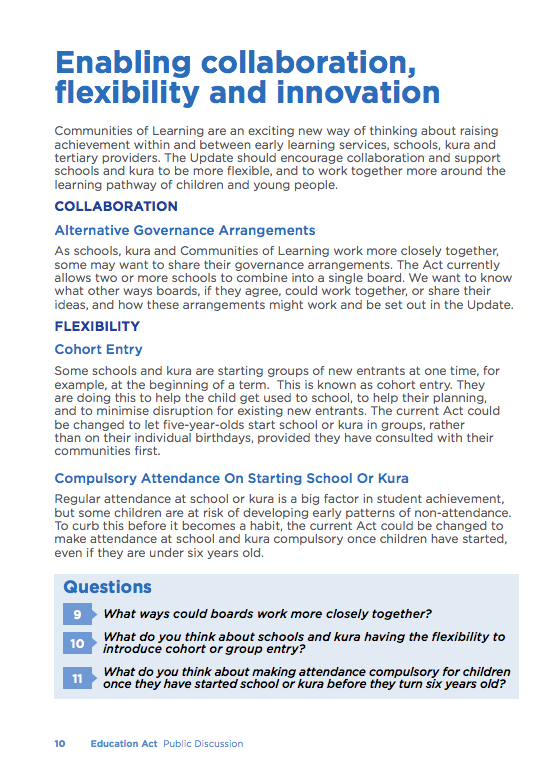
    Enabling Collaboration, Flexibility and Innovation

    This pare of the document just looks at the idea of Communities of Schools that the government has brought about through the IES. Under Alternative Governance Arrangements, they state that some schools who are working in a Community of Schools, “…may want to share their governance arrangements”. This is already happening with the property side of funding in some areas. Also, as is with earlier parts of this document, where it says “may want to”, it is also saying that some schools “may be forced to” share their governance. In terms of flexibility, it is interesting that the only reason why schools would be wanting to have different intakes at different parts of the year is largely to make National Standards reporting easier in Years 1 to 3. Their anniversary reports would all be at once, rather than spotted throughout the year, and it would tie in with the senior reports a lot more often. The question really is, is if your child misses out by a few weeks for the intake, they might essentially miss out on 3-6 months of schooling. What’s more, if a school down the road isn’t having intakes at set times, that family may decide to take their child elsewhere. Isn’t it already compulsory for children to attend school? What’s more, how is the Ministry going to enforce this, especially when funding for truancy officers has been cut, and the Government doesn’t want to spend any more on education? No doubt it will be one more thing that schools will have to chase up on in their own time.

    What is a “great” school?

    What makes a school great?
    How is this measured?
    There is no question, given the rest of this document, what the Minister sees as a “great school”. High achievement.

    But the word “Great” or “Greatness” surely encompasses so much more than this?
    Take for instance a local school in my area. A well recognised and renowned school, with parents and whanau driving from up to ten minutes away to send their child there. It is a decile 8 school and has about 330 students on its roll. 75% NZ/European and 17% Maori. Their ERO cycle is on a four to five year review. From the latest review it states that “Most students are achieving at or above the National Standards in reading, writing and mathematics.”
    One would say this is a great school.

    At the school I currently work at, the same can’t be said. We are about half the size, and fit in a decile 2 bracket. We have about 60% Maori students, 10% Pasifika and 20% NZ/European. We recently managed to scrape through and get a three year ERO review, which we celebrated like we just won the Rugby World Cup. Half of our students are below or well below the National Standard across all three areas.

    However, this year, both these two schools had their 50th Jubilee. Both of them started in 1965, the same time that Porirua officially became a city.
    At our school, we had close to 180 ex-students come and celebrate over the course of Labour Weekend, 2015. Old students came from all around the country, from Auckland to Timaru. We even had some fly in from overseas to come and visit their old primary school. We had a school gala which had cars parked along the street as far as the eye could see. The atmosphere was buzzing and our school was the centre of it all.

    In stark comparison, the other school had to cancel it’s celebrations due to lack of interest.

    I leave you with that question to ponder. Which is the greater school?

    Making every school and kura a great one

    Every school and every kura has to be a great one, and while most are doing well, a small number need more help to get there. Some more options could be put in the Act to help schools and kura get back on track. These could include an improvement notice, or an audit of one part of a school or kura. At the more serious end, a board could be asked to have different people on it.

    Naughty, Naughty!

    In this section, the Act turns its attention to the so-called ‘off track’ schools. The Ministry will help them get ‘back on track’, through the use of an “improvement notice” (similar to an infringement notice, I guess) or an audit (ERO visit). The serious end, the Ministry can remove a board if a school is REALLY ‘off track’, and no doubt choose (or appoint) the representatives on it.

    Creating a Set of Guiding Principles for Opening, Merging and Closing Schools.

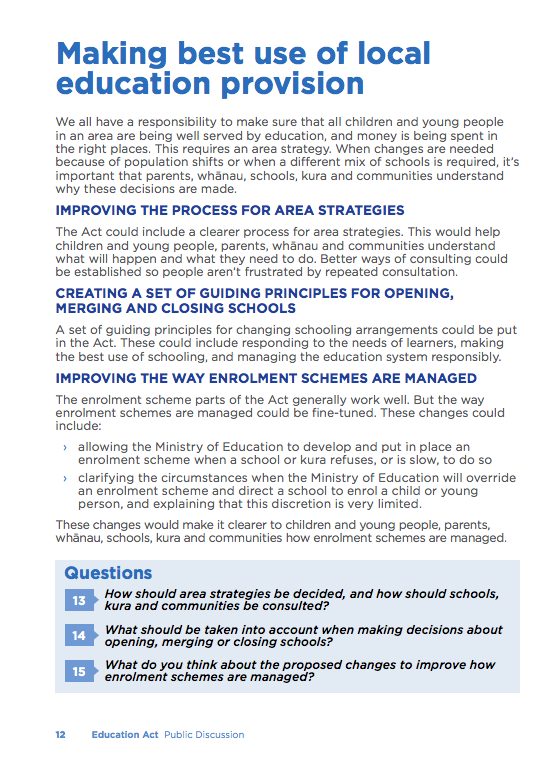
    What an interesting thing to amend within the Education Act. I wonder why this could have occurred? Maybe the Minister had too much trouble closing schools in Christchurch. Maybe she also had some difficulty merging some schools. And maybe they want to be able to open up new charter schools whenever they like. It has also made the provision for students to be forced to go to certain schools, and force certain schools to take certain students. Page 12
    In Conclusion…

    It is interesting the timing around this change. Reports are due, schools are winding down, half of the secondary schools are gone with exams, principals are drowned in end of year rollover for Novapay, and end of year activities. So it is unlikely that those who are working in the sector will have time or energy to fight the changes being proposed.

    No doubt we need to though, if we are unhappy with the proposed changes.

    Below are the details for how YOU can make a submission in answering the questions within the document.
    You need to do this. Answer, respond, challenge, debate. Talk over your ideas. The more responses they get, the more they might listen.

    Related Readings

    An easy way to make your submission is online at consultation.education.govt.nz. Here you will find an introductory video from Education Minister Hon Hekia Parata. There are questions to get you started, or you can upload a submission from your computer. You can also email your submission to education.update@education.govt.nz or write to: Education Act Update Ministry of Education PO Box 1666 Wellington 6140 New Zealand Submissions close on Monday 14 December 2015.

    PERSONAL INFORMATION AND CONFIDENTIALITY

    Submissions and documents associated with the consultation process meet the definition of official information and are therefore subject to the Official Information Act 1982. Please clearly indicate in your submission if you do not want your name to be included in any summary of submissions that we may publish.

    FURTHER INFORMATION

    If you have any questions about making a submission, or would like more information about the update of the Education Act 1989, please email education.update@education.govt.nz

  • The Collaborative Classroom

    The Collaborative Classroom

    Teaching environments and modern ways of reinventing knowledge.

    The silent classroom is a thing of the past. Long days at your desk, all facing north, with the teacher’s desk aligned in the opposite direction at the front have been relegated to the storage cupboard along with the typewriter and cassette tape.

    Instead, the class is a buzz. Students, while individual and unique, are working together to achieve a common goal. The key competencies of ‘Relating to Others’ and ‘Participating and Contributing’ both get ticks in their boxes. Motivated by their own choice, students are inquiring into the affects of bees or lack thereof on the environment.

    The Collaborative Classroom has come about to closely align with ‘Modern Learning Environments (MLE), and seeks to align the physical aspects of the classroom environment with the collaborative philosophy of today’s education standards. It is one thing to get students to work together, to have collaborative practises, to have a teamwork based curriculum, but if all the classroom isn’t set up for students to work together, then they won’t. Certain aspects of the ‘Collaborative Classroom’ leads students naturally to work together.

    But with the environment there needs to be shifts in the teaching that allows students to work together, to search, struggle, challenge, and extend each other, and hopefully, grow a deeper understanding in the topic, their peers, and themselves. In essence, the teaching environment leads to modern ways of reinventing the way we acquire knowledge.

    I do not think there are many modern day teachers who don’t incorporate some collaborative tasks into their daily programme. We are constantly reminded of the value of strategies like ‘Think, Pair, Share’ and ‘Reading Jigsaw’. Certainly, having recently gone through training college, the idea of ‘group work’ and collaboration are well ingrained in the pedagogy of how we were taught to teach.

    Now there is a move to ensure that such activity is not only expected, it flourishes and happens naturally purely because of the classroom layout. As this Government rolls out a selection of funds for schools to ‘modernise’ their learning environments, the collaborative classroom is immediately considered as the way forward. Larger open spaces which are customisable are favoured for this, as different tasks require different needs.

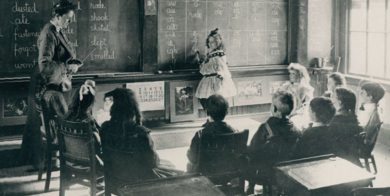
    1900


    Working in groups is not a new thing. As we can see in this old classroom photo, whilst individual desks are set apart, all facing the front, we can see the children of the class in a circle, participating in a lesson. Everyone doing the same thing so that they all left school fitting in a particular box was the aim.

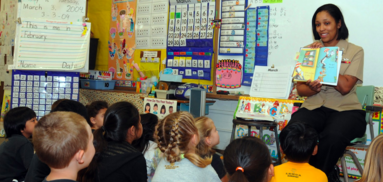
    1990

    In the 1990’s, desks were somewhat modernised, along with individual trays that have multiple uses. Large, often bulky ‘personal computers’ were all the range, and it wasn’t uncommon for each class to have at least one that sat in a corner, just waiting to be played with during a wet lunch time, or if you were lucky, publish a piece of writing.

    The introduction of a mat area also became popular, inviting students in closer to see details, but also participate in a lesson that was separate from the daily grind of staying in one place all the time. For the first time we see a dedicated wide open space in the classroom.

    2000

    Enter the year 2000, turn of the century, and educators are looking for ways to encourage student talk, real life learning, and discourse in the classroom. But without a budget, schools had to use what they had. Individual desks were kept, but placed into groups. Each child would still have their belongings, but they would also be part of a group to work with, discuss ideas, and work together as a team.

    It is around this time that the idea of a collaborative classroom came into play. Hubs of tables fill wide open space. The clutter is generally gone, but there is space for learning to happen. The walls are adorned with linked up screens that can be viewed from anywhere in the room.

    Roles and Relationships

    The role of both the student and the teacher has changed along with the physical space. In the 1900’s, the role of the teacher was that of a preacher. The fount of knowledge to fill the empty minds of the students. Repetition, repetition, and repetition was the key to learning, and if you didn’t get it first time, you’d keep doing it until you got it right.

    Take this through to today, we have a teacher who is a facilitator for learning. They pose questions that challenge and encourage wonderment. They inspire and engage. Students are the driving force for learning. They pick up an idea and take it further in the direction they want to take it. They work together to co-construct their success criteria, and figure out the how themselves. They rely not on the teacher for information, but on their own ability to go and find out. They are both collaborative, but independent, and the balance of these happens seamlessly. In an article written well before it’s time (1990), Tinzmann, MB et al. state that

    Effective communication and collaboration are essential to becoming a successful learner. It is primarily through dialogue and examining different perspectives that students become knowledgeable, strategic, self-determined, and empathetic. Moreover, involving students in real-world tasks and linking new information to prior knowledge requires effective communication and collaboration among teachers, students, and others.”

    The environment is only one part of the Collaborative Classroom. What is more important is the learning going on inside it. Rebecca Alber states:

    Learning, and higher-level learning such as synthesising information from several documents or analysing scientific data, can hit much deeper when done collaboratively. Let’s not forget Lev Vygotsky and his educational theory that proposes learning as a social process. And if he were alive today, he would most likely agree with the saying, Two minds are better than one. He might even add, “Better yet, how about three or four?”   

    It doesn’t matter if you are stuck in a 1960’s classroom with cupboards and storage, old flip-top lidded desks, and steel framed chairs; the way you go about teaching (or facilitating learning) is key.


    Is it any wonder then why the subtitle of this article spells out Teamwork with each first letter?

    Related Reading

    1. Tinzmann, MB et al. “What is the collaborative classroom.” Proceedings of NCREL (1990).
    2. “Deeper Learning: A Collaborative Classroom Is Key | Edutopia.” 2012. 29 Sep. 2015 http://www.edutopia.org/blog/deeper-learning-collaboration-key-rebecca-alber
  • Victory Over Death 2 – Colin McCahon

    Blogging Legend: Week 1

    3. Write a blog post about your favourite movie/song/piece of art including how it relates to your life as an educator.

    As an artist, musician, and movie lover, this challenge is a hard one. Having studied Art at tertiary level for three and a half years, and Art History for three, I owe it to myself to reflect on an artwork and explain how it relates to my life as an educator.

    The issue for me is finding my favourite. I have so many! Even choosing a favourite artist, I’m torn between McCahon and Hotere, J.M.W. Turner and Constable, not to mention Duchamp, Mondrian, and Pollock.

    So I’ve stayed close to home and gone with my first love; Colin McCahon. Now just to select one artwork from his ourve. Where do I even start!?

    Elias series? Otago Peninsula 1946? Urewera Mural?

    For me though, there is one expanse of a canvas that eclipses all of the rest.

    Victory Over Death 2 – 1970

    Victory Over Death 2 is a massive painting, over two metres in height, and five in length. White text scrawled across the blackened background. The words “I AM” dwarf anyone and everyone viewing the piece.

    Having stood in front of this monumental artwork myself, watching other paintings shrink into postage stamps, it leaves an impression on you; speaking a little deeper to some than others. The pixels on the screen in front of you now certainly don’t do it justice.

    Regardless, it links into how I view myself as a teacher. In particular, a male, primary school teacher.

    I can not escape the fact that in 2000 while on the lake shore of Lake Rotoiti, I heard my calling to be a primary school teacher, at a time when, as a sixth former, spending any longer in school than I had to was pure madness. Yet there it was – as clear as the shimmering lake was infront of me, the desire in my heart to become a teacher.

    You see, Victory Over Death 2 quotes a series of verses from various translations of Scripture. Regardless of my personal faith, they encapsulate my role in education at this time.

    The crowd standing by said it was thunder, while others said, ‘An angel has spoken to him.’ Jesus replied, ‘This voice spoke for your sake, not mine.’ – John 12:29, 30;

    Quite clearly, as I’ve said, this is almost the Lake Rotoiti experience in a nutshell, just a non-audible voice…if that makes sense?

    ‘Now my soul is in turmoil and what have I to say? Father, save me from this hour. No, it was for this that I came to this hour’ – John 12:27

    Since beginning my teaching career 6 years ago, many things have changed for me. Most of all, I’ve been fighting with depression since 2012. It takes a lot of energy to get to work each day, and while the kids drive me madder, somehow, they also keep me going.

    The light is among you still, but not for long. Go on your way while you have the light, so that darkness may not overtake you. He who journeys in the dark does not know where he is going. – John 12: 35

    It is a well known fact nowadays that there are fewer and fewer male role models out there for kids growing up. Divorce and separation statistics continue to grow, and whether it’s because they’re trying to hold down two jobs, or doing night shifts, or they’ve moved away or even been locked away, the male influence for kids is limited, and for some, non existent.

    For me, that keeps me going. I am that light in the darkness for these kids – especially the boys. Because besides me, they may have no other male role models in their life. This is summed up by the next verse on the artwork:

    While you have the light, trust to the light, that you may become men of light. – John 12: 36

    I am a teacher. I am a light. I am meant to be here. I am here for those kids. I AM.

    I AM

    Hopefully that sheds some light on why I became a teacher, why I still am a teacher, and why I try my best day in and day out for the kids. Its why I work in the school I’m in, despite numerous professionals encouraging me to get out and ‘spread my wings’.

    It’s partly for their education. It’s partly for the financial security (that doesn’t always come by being an artist!). But mostly it’s to make a difference. It’s mostly to be the light in the darkness and to show the kids that they write their own futures, and that they can make of it whatever they want if they apply themselves. It’s to bring them hope. Belief in themselves. A backbone and a spine. It’s to engage them. Inspire them. And then Unleash them. And thus, my teaching motto is born, and this blog and its articles are the extension of that into the online community.

    References:


  • Setting Up a Teaching Blog

    So you’ve thought about getting started with getting your teaching stuff out there in the wide wide world of the internet?

    Well done! You’ve taken the first step.

    It’s not easy. Keeping motivated, finding what to write about, finding time to write. These all get in the way and can stop you from blogging.

    But there are huge benefits. Sharing ideas. Working collaboratively. Commenting and discussing. Researching and proffesional development. All at the ends of your fingers.

    Which Platform?

    There are a bunch of suitable blogging platforms out there. WordPress, Blogger, Weebly, and Tumblr, just to name a few. Edublogs is also an option which is based on wordpress for teachers and schools. WordPress is fairly comprehensive. Blogger works well if you already have a Google account and want to keep all your things Google related (Google Docs, Sites, Drive etc). Weebly and Tumblr are great for linking in all sorts of media and different sources.

    I personally, highly recommend WordPress. I have used it extensively for many of my website designs since Version 2.1, which was released in 2007.

    Getting Started

    Step 1: Go to WordPress.com and ‘Create Website’. (You can go to WordPress.org if you already have your own server and know how to set it all up)

    Screen Shot 2015-09-28 at 8.54.26 PM

    Step 2: Choose your theme. There’s a HUGE range of these available, and even more if you have your own server set up. Even more if you’re prepared to pay for professional them.

    Screen Shot 2015-09-28 at 8.56.40 PM

    Step 3: Choose the name of your site, or at least the domain name you want to choose. Type in a keyword, or the name of your site in the first box, and WordPress.com will come up with a list of available addresses for your site. You may not get your first choice, given that wordpress.com has been around for quite a while now!

    Screen Shot 2015-09-28 at 9.03.55 PMStep 4: Unless you’re fairly sure you’re going to be making a thing of this, you’re probably going to want to go with the free option. This is fairly straightforward set up, and while it does have some limitations, these won’t (or shouldn’t) get in your way just yet.

    Step 5: So, that’s pretty much it. Now you just have to create an account. Use a personal email address (because you’ll want to keep the blog going should you move schools and change work email addresses), and select a username and password that you’ll remember.


    Make your First Post

    Screen Shot 2015-09-28 at 9.10.02 PMSo now it’s time to get writing. Say hello to the world!

    On the left hand side of the dashboard, you’ll see a menu. You can go to either the ‘WP Admin‘ which is where you can change some of your settings, as well as write posts. We will use this to start with, as it will be how you will make most of your posts.

    Further, down the list, under ‘Publish’, there is ‘Blog Posts‘ with an Add button next to it. Clicking on this will also create a new blog post, but we won’t use this way for now.

    So, go ahead, click on “WP Admin“.

    Alternatively, whatever web address you set up (for this case I’ll use “example”), you can go to “example.wordpress.com/wp-admin“.

    Once there, on the left there is your main menu where everything is.

    From here you can create pages, posts, upload media, create links, approve and moderate comments, change settings, and modify your appearance. Have a play around with any of this later. It’s pretty straightforward, and reasonably difficult to break – so go wild!

    Screen Shot 2015-09-28 at 9.15.05 PMFor now, go to “Posts -> Add New“.

    A brand new post will be created. Give it a title at the top, and then get writing! That’s pretty much all there is to it. The URL will be created automatically for you. You can give the post some tags, and a category, and on the right, there is the option to save it as a draft (useful if you’re working on a post over several days, or you start an idea and don’t quite finish it), or publish it to the wide world of the internet.

    There you have it. Your first blog post.

    Categories

    As a teacher, you may like to set up different categories for your posts. These can then be made into a menu under “Appearance -> Menus” and will just display the posts that you put into the particular category. Of course, posts can exist under more than one category as well. This post for example is in four categories; Digital Learning, Resources, Teaching, and CENZ.

    The categories I have on my site are:

    Whenever I have a new idea, I think about what category to put it into. I use each category differently.
    Education is for anything education related, but not classroom related. This often leads to media articles, National Standards, politics, NZEI stuff and all the things we deal with that is not to do with teaching.
    Teaching is everything related to the classroom and me as a classroom teacher. It includes ideas for the class, lessons, musings, learning, classroom management, and anything else.
    Satire is a series of drawings and cartoons, often political, that explore issues in the education system as a whole. They are often sparked by discussions in the staffroom, or cynical musings of my experiences in my school. I have to come up with a better title for this category, but for now, Satire will do.
    Teacher Wellbeing is a category set up for the pop-up videos that were made in 2015 as a part of a social network initiative for teachers. I decided to collate all of these and write a short thought around each, based on the short video clip. By making each into a blog post, I essentially archive it on my site so that I (and others) can always find them and refer to them again and again.
    Resources is as it sounds; any teaching resources I find, or use, or make, that I think others will find useful.
    Google Apps is essentially for thoughts around Google Drive, Google Docs, and all of the other Google Apps. Essentially these are a list of tutorials, but also includes other documents or articles that I’ve written regarding the use of Google Apps in the classroom.
    Digital Learning is a category I use for anything ICT and Education related. This includes the use of iPad’s, Chromebooks, or other devices in the classroom, BYOD, twitter in the classroom, and other related ideas.
    Finally, CENZ is obviously for the Connected Educator posts that I make, such as this one. This category will keep them all in one place.

    Add a Category

    Obviously you can choose your own categories. You may have more, or you can have none. You may find that you start with a couple (as I did), and create more as you write more and more articles that don’t fit anywhere in the few categories you initially create. Themes might come along, such as my ‘Teacher Wellbeing‘ category, and may only include a few posts from a specific time, but are valuable regardless.

    To create a category, click on ‘Post -> Categories‘. Then it’s as easy as adding a new category. This will then appear in a list on the right of the post text box when you publish a post. Another way to do this is to do it from within the post, by clicking “Add New Category” in the Categories box on the right (above ‘Tags’). The only issue doing it this way is not being able to create the slug – but you can go back and edit this from the main menu as described above.

    Be aware however, that the slug (URL) you create needs to be unique. For example, if you have created a page with a particular name, such as “Teaching”, and you try and create a category called “Teaching”, with a slug “teaching”, WordPress will rename this slug to “example.wordpress.com/category/teaching2” which looks horrid. A way around this is to set your category slug to “teaching-articles“. This will then appear as “example.wordpress.com/category/teaching-articles“.

    Pages vs. Posts

    So there is sometimes some confusion about pages and posts, especially when you first start in WordPress. Here’s how I got my head around it.

    Posts are like posters that go up on the staff noticeboard. They go up, they get read. They are somewhat temporary and short-lived, and stay around until someone takes them down and files them. They may then get archived (even if it’s in the round filing cabinet in the corner!).

    Pages are like signs. They’re built, and set up reasonably permanently. They have important information that you want read by those that are new to the site, and while they need updating, this only happens once in awhile – if at all.

    In wordpress or blogging terms, Posts are your blog ‘articles’. Pages are your permanent pages of your site – such as ‘About’ or ‘Education History’.

    Other than that distinction, Posts and Pages are nearly identical in the way WordPress manages them. When you create a page, it’s done in the same way that you create a post. This is probably why many get confused when starting out on wordpress. They will appear differently on your site though, with pages appearing at the root of your site (i.e. example.wordpress.com/page), where as your blog will appear within a category or date archive (i.e. example.wordpress.com/2015/09/post).

    That’s about it!

    There are many, many more bits and pieces to get set up over the next few weeks, and I’d recommend having a look through the tutorials over at wordpress.com.

    Codex.Wordpress.org also has a great knowledge base to hunt through for a more comprehensive run through. Be aware though, that many of the settings mentioned here may be restricted in your free account version at WordPress.com.

  • edblognz: Connected Educators #EdblogNZ challenge: Week 1

    Source: edblognz: Connected Educators #EdblogNZ challenge: Week 1

    This year I’ve decided to get my thoughts out there, and get out there more with commenting and collaborating. I’ve enrolled myself to take part in #CENZ15 and #EDBLOGNZ ‘s challenges.  Each week there will be a set of challenges for bloggers to engage, think, motivate, and discuss with others.

    From the site:

    “EdBlogNZ is issuing a challenge for New Zealand teachers to blog. Whether you’re a brand new blogger or have huge experience the challenge for you is to develop your blogging over the 3 weeks of Connected Educators New Zealand 2015.

    There are 3 levels of challenges:
    Absolute newbie – e.g. “I don’t even have a blog set up yet”

    Casual blogger – e.g. “I blog occasionally when I remember or feel I have something useful to say”
    Blogging legend – e.g. “I blog regularly (at least once a week) and have great interaction/contribution on my blog from commenters”.

    You can do the challenges from any or all of the levels if you wish. For example, if you’re new to blogging start at “Absolute newbie” but don’t feel like you have to stay there if you think you can work on the next level.
    There are 3 challenges per week, per level. In week 2, four challenges are listed—Challenge 3 is for those at Ulearn; Challenge 4 is for those who aren’t at Ulearn. Pick whichever is appropriate for you.
    The challenges for each week will be posted on the EdBlogNZ blog on the Monday of each week.
    Please register for this event by completing the form on this page: http://bit.ly/edblognz15
    I encourage you all to get involved (if you haven’t done so already!), even if you’re new to this whole ‘blogging’ thing.
  • Mini Lessons – Keep them Small

    There has been an increased awareness of the ‘Mini-Lesson’. We’re using them in Maths – otherwise known as ‘hotspots’; we’re using them in reading, and more commonly in writing. They are great ways of quickly conveying information, getting student buy in, addressing noticeable gaps in knowledge, and moving on.

    What Are Mini Lessons?

    A while back I noticed that students had an issue in writing where their sentences went on and on and on without a full stop or a comma and often including more than one idea and the never ending storytelling that never allowed me to breathe while reading it. Much like that.

    So I addressed it. We discussed sentences over the course of a week, spending 10 minutes at the start of the lesson each day discussing ideas, and including one idea at a time. Students helped me edit examples and decide where full stops should go. We even got into how to combine two ideas together. Student buy-in was high, and there was a noticeable improvement almost immediately.

    An example of what to cover in a mini-lesson
    An example of what to cover in a mini-lesson

    The problem

    The common issue with the Mini Lesson lies in the teacher. As a method, they are great, because student attention isn’t overworked, and they focus on one point.

    However, being the great orators many of us are, and our passion for the act of ‘teaching’, Teachers often make the mini lesson less mini, and more lecture. Student interest wains, and their attention wanders elsewhere. It can go from a snappy, quick, and invigorating lesson, to a morbid affair with boredom, purely because of the length of time focussed on one thing.

    The reality is, a good Mini lesson should have one key point that is the focus, and should be limited to 10 minutes. 15 at a push. But certainly no longer.

    The solution

    There are a number of things that you can do to avoid going overtime.

    1. Make sure you only have one focus for the lesson. Additional points, or sidetracks will only add to the length of time, and can potentially confuse the point of the Mini lesson for the students. If other issues come up that don’t fit into your key focus, but need to be a focus in the future, then put it in the plan for tomorrow. There is always another day.
    2. Set a timer. Let the student’s know what it’s for and they’ll keep you accountable to it. Believe me. As soon as the buzzer sounds, then that’s time up. Eventually however, this can become tedious, and may become a distraction for students. But it’s a viable solution if you’re learning how long you have in 10 minutes, and how much you can cover in the allotted time for the Mini lesson.
    3. Watch other teachers perform mini lessons can not only give you inspiration, but can also allow you to see for yourself how much they get through, and what time they allow for it. You can monitor the clock and see when ten minutes is up.