Tag: teaching

  • Setting Up a Teaching Blog

    So you’ve thought about getting started with getting your teaching stuff out there in the wide wide world of the internet?

    Well done! You’ve taken the first step.

    It’s not easy. Keeping motivated, finding what to write about, finding time to write. These all get in the way and can stop you from blogging.

    But there are huge benefits. Sharing ideas. Working collaboratively. Commenting and discussing. Researching and proffesional development. All at the ends of your fingers.

    Which Platform?

    There are a bunch of suitable blogging platforms out there. WordPress, Blogger, Weebly, and Tumblr, just to name a few. Edublogs is also an option which is based on wordpress for teachers and schools. WordPress is fairly comprehensive. Blogger works well if you already have a Google account and want to keep all your things Google related (Google Docs, Sites, Drive etc). Weebly and Tumblr are great for linking in all sorts of media and different sources.

    I personally, highly recommend WordPress. I have used it extensively for many of my website designs since Version 2.1, which was released in 2007.

    Getting Started

    Step 1: Go to WordPress.com and ‘Create Website’. (You can go to WordPress.org if you already have your own server and know how to set it all up)

    Screen Shot 2015-09-28 at 8.54.26 PM

    Step 2: Choose your theme. There’s a HUGE range of these available, and even more if you have your own server set up. Even more if you’re prepared to pay for professional them.
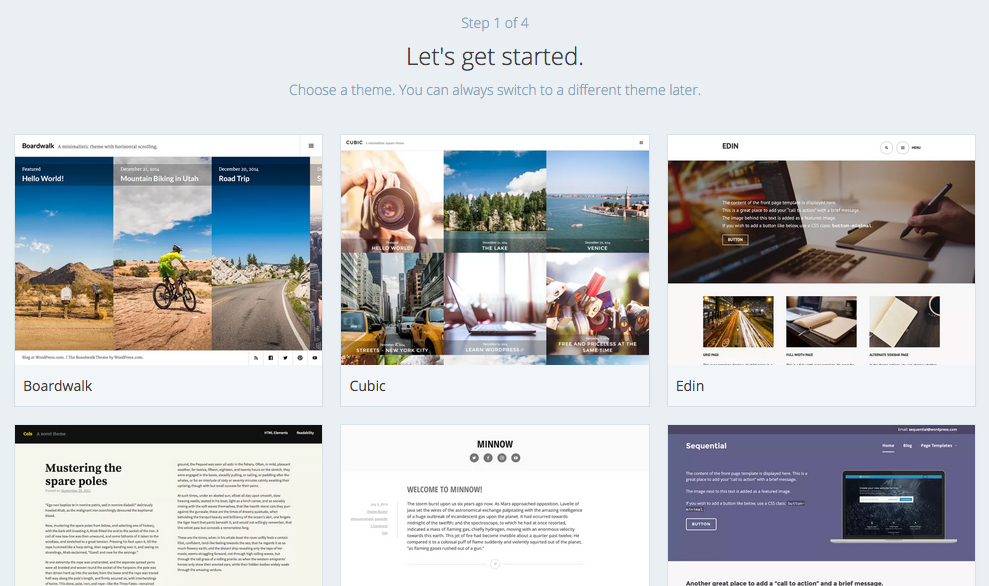
    Screen Shot 2015-09-28 at 8.56.40 PM

    Step 3: Choose the name of your site, or at least the domain name you want to choose. Type in a keyword, or the name of your site in the first box, and WordPress.com will come up with a list of available addresses for your site. You may not get your first choice, given that wordpress.com has been around for quite a while now!
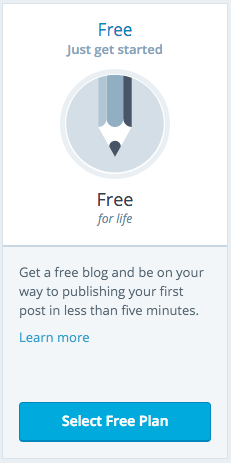
    Screen Shot 2015-09-28 at 9.03.55 PMStep 4: Unless you’re fairly sure you’re going to be making a thing of this, you’re probably going to want to go with the free option. This is fairly straightforward set up, and while it does have some limitations, these won’t (or shouldn’t) get in your way just yet.

    Step 5: So, that’s pretty much it. Now you just have to create an account. Use a personal email address (because you’ll want to keep the blog going should you move schools and change work email addresses), and select a username and password that you’ll remember.


    Make your First Post
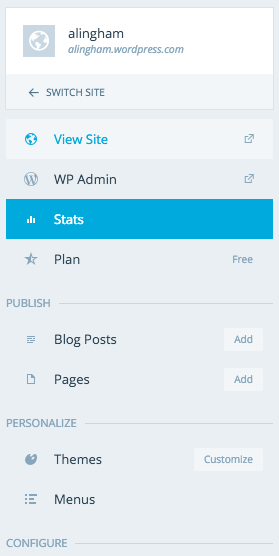
    Screen Shot 2015-09-28 at 9.10.02 PMSo now it’s time to get writing. Say hello to the world!

    On the left hand side of the dashboard, you’ll see a menu. You can go to either the ‘WP Admin‘ which is where you can change some of your settings, as well as write posts. We will use this to start with, as it will be how you will make most of your posts.

    Further, down the list, under ‘Publish’, there is ‘Blog Posts‘ with an Add button next to it. Clicking on this will also create a new blog post, but we won’t use this way for now.

    So, go ahead, click on “WP Admin“.

    Alternatively, whatever web address you set up (for this case I’ll use “example”), you can go to “example.wordpress.com/wp-admin“.

    Once there, on the left there is your main menu where everything is.

    From here you can create pages, posts, upload media, create links, approve and moderate comments, change settings, and modify your appearance. Have a play around with any of this later. It’s pretty straightforward, and reasonably difficult to break – so go wild!
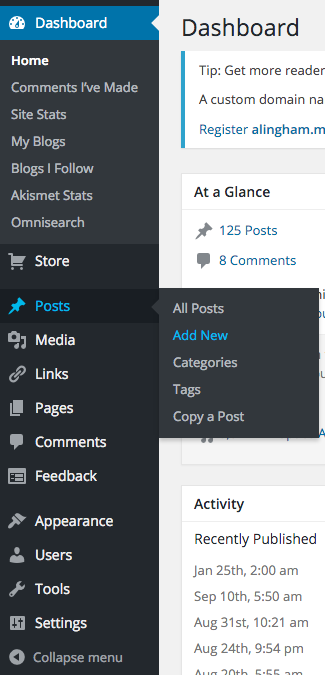
    Screen Shot 2015-09-28 at 9.15.05 PMFor now, go to “Posts -> Add New“.

    A brand new post will be created. Give it a title at the top, and then get writing! That’s pretty much all there is to it. The URL will be created automatically for you. You can give the post some tags, and a category, and on the right, there is the option to save it as a draft (useful if you’re working on a post over several days, or you start an idea and don’t quite finish it), or publish it to the wide world of the internet.

    There you have it. Your first blog post.

    Categories

    As a teacher, you may like to set up different categories for your posts. These can then be made into a menu under “Appearance -> Menus” and will just display the posts that you put into the particular category. Of course, posts can exist under more than one category as well. This post for example is in four categories; Digital Learning, Resources, Teaching, and CENZ.

    The categories I have on my site are:

    Whenever I have a new idea, I think about what category to put it into. I use each category differently.
    Education is for anything education related, but not classroom related. This often leads to media articles, National Standards, politics, NZEI stuff and all the things we deal with that is not to do with teaching.
    Teaching is everything related to the classroom and me as a classroom teacher. It includes ideas for the class, lessons, musings, learning, classroom management, and anything else.
    Satire is a series of drawings and cartoons, often political, that explore issues in the education system as a whole. They are often sparked by discussions in the staffroom, or cynical musings of my experiences in my school. I have to come up with a better title for this category, but for now, Satire will do.
    Teacher Wellbeing is a category set up for the pop-up videos that were made in 2015 as a part of a social network initiative for teachers. I decided to collate all of these and write a short thought around each, based on the short video clip. By making each into a blog post, I essentially archive it on my site so that I (and others) can always find them and refer to them again and again.
    Resources is as it sounds; any teaching resources I find, or use, or make, that I think others will find useful.
    Google Apps is essentially for thoughts around Google Drive, Google Docs, and all of the other Google Apps. Essentially these are a list of tutorials, but also includes other documents or articles that I’ve written regarding the use of Google Apps in the classroom.
    Digital Learning is a category I use for anything ICT and Education related. This includes the use of iPad’s, Chromebooks, or other devices in the classroom, BYOD, twitter in the classroom, and other related ideas.
    Finally, CENZ is obviously for the Connected Educator posts that I make, such as this one. This category will keep them all in one place.

    Add a Category

    Obviously you can choose your own categories. You may have more, or you can have none. You may find that you start with a couple (as I did), and create more as you write more and more articles that don’t fit anywhere in the few categories you initially create. Themes might come along, such as my ‘Teacher Wellbeing‘ category, and may only include a few posts from a specific time, but are valuable regardless.

    To create a category, click on ‘Post -> Categories‘. Then it’s as easy as adding a new category. This will then appear in a list on the right of the post text box when you publish a post. Another way to do this is to do it from within the post, by clicking “Add New Category” in the Categories box on the right (above ‘Tags’). The only issue doing it this way is not being able to create the slug – but you can go back and edit this from the main menu as described above.

    Be aware however, that the slug (URL) you create needs to be unique. For example, if you have created a page with a particular name, such as “Teaching”, and you try and create a category called “Teaching”, with a slug “teaching”, WordPress will rename this slug to “example.wordpress.com/category/teaching2” which looks horrid. A way around this is to set your category slug to “teaching-articles“. This will then appear as “example.wordpress.com/category/teaching-articles“.

    Pages vs. Posts

    So there is sometimes some confusion about pages and posts, especially when you first start in WordPress. Here’s how I got my head around it.

    Posts are like posters that go up on the staff noticeboard. They go up, they get read. They are somewhat temporary and short-lived, and stay around until someone takes them down and files them. They may then get archived (even if it’s in the round filing cabinet in the corner!).

    Pages are like signs. They’re built, and set up reasonably permanently. They have important information that you want read by those that are new to the site, and while they need updating, this only happens once in awhile – if at all.

    In wordpress or blogging terms, Posts are your blog ‘articles’. Pages are your permanent pages of your site – such as ‘About’ or ‘Education History’.

    Other than that distinction, Posts and Pages are nearly identical in the way WordPress manages them. When you create a page, it’s done in the same way that you create a post. This is probably why many get confused when starting out on wordpress. They will appear differently on your site though, with pages appearing at the root of your site (i.e. example.wordpress.com/page), where as your blog will appear within a category or date archive (i.e. example.wordpress.com/2015/09/post).

    That’s about it!

    There are many, many more bits and pieces to get set up over the next few weeks, and I’d recommend having a look through the tutorials over at wordpress.com.

    Codex.Wordpress.org also has a great knowledge base to hunt through for a more comprehensive run through. Be aware though, that many of the settings mentioned here may be restricted in your free account version at WordPress.com.

  • edblognz: Connected Educators #EdblogNZ challenge: Week 1

    Source: edblognz: Connected Educators #EdblogNZ challenge: Week 1

    This year I’ve decided to get my thoughts out there, and get out there more with commenting and collaborating. I’ve enrolled myself to take part in #CENZ15 and #EDBLOGNZ ‘s challenges.  Each week there will be a set of challenges for bloggers to engage, think, motivate, and discuss with others.

    From the site:

    “EdBlogNZ is issuing a challenge for New Zealand teachers to blog. Whether you’re a brand new blogger or have huge experience the challenge for you is to develop your blogging over the 3 weeks of Connected Educators New Zealand 2015.

    There are 3 levels of challenges:
    Absolute newbie – e.g. “I don’t even have a blog set up yet”

    Casual blogger – e.g. “I blog occasionally when I remember or feel I have something useful to say”
    Blogging legend – e.g. “I blog regularly (at least once a week) and have great interaction/contribution on my blog from commenters”.

    You can do the challenges from any or all of the levels if you wish. For example, if you’re new to blogging start at “Absolute newbie” but don’t feel like you have to stay there if you think you can work on the next level.
    There are 3 challenges per week, per level. In week 2, four challenges are listed—Challenge 3 is for those at Ulearn; Challenge 4 is for those who aren’t at Ulearn. Pick whichever is appropriate for you.
    The challenges for each week will be posted on the EdBlogNZ blog on the Monday of each week.
    Please register for this event by completing the form on this page: http://bit.ly/edblognz15
    I encourage you all to get involved (if you haven’t done so already!), even if you’re new to this whole ‘blogging’ thing.
  • Mini Lessons – Keep them Small

    There has been an increased awareness of the ‘Mini-Lesson’. We’re using them in Maths – otherwise known as ‘hotspots’; we’re using them in reading, and more commonly in writing. They are great ways of quickly conveying information, getting student buy in, addressing noticeable gaps in knowledge, and moving on.

    What Are Mini Lessons?

    A while back I noticed that students had an issue in writing where their sentences went on and on and on without a full stop or a comma and often including more than one idea and the never ending storytelling that never allowed me to breathe while reading it. Much like that.

    So I addressed it. We discussed sentences over the course of a week, spending 10 minutes at the start of the lesson each day discussing ideas, and including one idea at a time. Students helped me edit examples and decide where full stops should go. We even got into how to combine two ideas together. Student buy-in was high, and there was a noticeable improvement almost immediately.

    An example of what to cover in a mini-lesson
    An example of what to cover in a mini-lesson

    The problem

    The common issue with the Mini Lesson lies in the teacher. As a method, they are great, because student attention isn’t overworked, and they focus on one point.

    However, being the great orators many of us are, and our passion for the act of ‘teaching’, Teachers often make the mini lesson less mini, and more lecture. Student interest wains, and their attention wanders elsewhere. It can go from a snappy, quick, and invigorating lesson, to a morbid affair with boredom, purely because of the length of time focussed on one thing.

    The reality is, a good Mini lesson should have one key point that is the focus, and should be limited to 10 minutes. 15 at a push. But certainly no longer.

    The solution

    There are a number of things that you can do to avoid going overtime.

    1. Make sure you only have one focus for the lesson. Additional points, or sidetracks will only add to the length of time, and can potentially confuse the point of the Mini lesson for the students. If other issues come up that don’t fit into your key focus, but need to be a focus in the future, then put it in the plan for tomorrow. There is always another day.
    2. Set a timer. Let the student’s know what it’s for and they’ll keep you accountable to it. Believe me. As soon as the buzzer sounds, then that’s time up. Eventually however, this can become tedious, and may become a distraction for students. But it’s a viable solution if you’re learning how long you have in 10 minutes, and how much you can cover in the allotted time for the Mini lesson.
    3. Watch other teachers perform mini lessons can not only give you inspiration, but can also allow you to see for yourself how much they get through, and what time they allow for it. You can monitor the clock and see when ten minutes is up.


  • Growth Mindset: What’s it all about

    A lot has been made of this ‘new’ buzzword that is hitting our education shores. Any word with ‘Mind’ in it seems to be linked to being better as an individual. Growth mindset has been around for a while though. But what is it?

    What is Growth Mindset?

    Growth Mindset is the internal thoughts that you can always get better. Whether it is something you are good at, or something that you struggle with, through practise, hard work, training, or just sheer determination, we can all make improvements and progress towards whatever we set our minds to.

    The alternative is a ‘fixed mindset’. This thought pattern suggests to yourself that you are good at some things and excel at them, but are not good in other things. A common area that fixed mindset is applied to is creativity. “I don’t have a single creative bone in my body” is exclaimed by those who are ‘less practised’ in this area. They’ve used this as an excuse not to get better, or not to work hard and try to improve on their lack of natural ability.

    In terms of education, having a growth mindset is incredibly important. It provides students with the challenge to always do their best, and if at first they don’t succeed, then try, and try again.

    Our brains are always making connections, especially growing up; making the growth mindset at school even more important. Having the mindset that these connections can not only be made in varying ways with varying skills and abilities, but that they can be strengthened and developed, enables students to grow as individuals and as learners, and give things a go.

    I found this video incredibly helpful when looking into Growth Mindset.


    In Practise

    One way in which I use this mindset in my class every day is through the use of Daily 5. I regularly encourage students by using the key principle of ‘The only way to get better at reading is to practise reading’. The old adage of ‘practise makes perfect’ rings out loud and proud, and provides the students with motivation to strive for excellence. Whilst I haven’t expressly ‘taught’ the growth mindset, it is definitely an ingrained philosophy in my classroom; in the way that learning is encouraged, they way I teach, and the learning activities we do.

    17855652233_69f0cb6dc3_b_q9c4as


  • Education Changes – 2008-2015

    In the last five years there has been a dramatic shift in Education. Since this government (National) came into power in 2009, they have been non-stop in making wholesale changes across the sector.

    WELLINGTON, NEW ZEALAND - NOVEMBER 14: Education Minister Hekia Parata announces a Government partnership with New Zealand Rugby League at Westpac Stadium on November 14, 2014 in Wellington, New Zealand. The partnership has been set up to improve the education, health and wellbeing of thousands of young people and families associated with rugby league in New Zealand. (Photo by Hagen Hopkins/Getty Images)
    WELLINGTON, NEW ZEALAND – NOVEMBER 14: Education Minister Hekia Parata announces a Government partnership with New Zealand Rugby League at Westpac Stadium on November 14, 2014 in Wellington, New Zealand. The partnership has been set up to improve the education, health and wellbeing of thousands of young people and families associated with rugby league in New Zealand. (Photo by Hagen Hopkins/Getty Images)

    There is an old Māori whakataukī that says:
    Inā kei te mohio koe ko wai koe, I anga mai koe i hea, kei te mohio koe. Kei te anga atu ki hea.
    If you know who you are and where you are from, then you will know where you are going.

    What I want to do is take what changes have been made since the start of the National Government, and track these changes to their logical conclusion. By using what changes have been made, we can follow the progress of the GERM in our country.
    GERM is the Global Education Reform Movement.
    The Government is trying to create a crisis in education and impose a business model on our world class schools. This model, known as the GERM (Global Education Reform Movement) has infected other countries by introducing standardisation, competition and test-based accountability. – NZEI

    National’s Education Timeline

    2008

    • National releases their education policy.
    • National: Overhaul NCEA; introduce national literacy and numeracy standards; extend 20-hours early childhood education subsidy to playcentres and kohanga reos; teach more trades in schools and set up five “trade academies”; ensure all 16- and 17-year-olds are in school, work or approved training courses.
      ACT: Scrap Education Ministry and replace it with new Education Authority; allow state funding to public or private school of parents’ choice; deregulate schools but require them to be licensed by education authority; move curriculum “back to basics”.The key part of these policies is getting rid of the current education schemes, and replace them with more privatised versions of them. National Standards introduced to help regulate and narrow the curriculum, including going “back to basics” of reading, writing, and maths. Collect and monitor this data in primary school, and use NCEA “overhaul” to position schools against each other, including league tables. Deregulated schools, or Charter schools are to follow very soon after the election as part of ACT’s coalition.
    • National elected into government, using MMP to go into coalition with Māori Party and ACT.
    • Education (National Standards) Amendment Bill passed under urgency, allowing it to bypass the Education and Science Select Committee where the merits of National Standards could have been debated. Government sets precedence of limited to no consultation with parents or the sector.

    Visit NBR.co.nz for more information on government policies from 2008 election.

    2009

    • Anne Tolley becomes Minister of Education.
    • National makes large cuts to Teacher professional development services. This leads to a rise in private companies offering courses for teachers, and schools having to fund their own education development of its staff.
    • $35million additional funds budgeted over the next four years for independent (private) schools.
    • Education Amendment Bill 2009 introduces the idea of a ‘…body corporate or corporation sole may be appointed as a limited statutory manager or commissioner’
    • ‘Consultation’ with the public over National Standards. Data somewhat ignored (38% against, 14% for). Teachers vilified by the media for ‘not getting on board’ with the government policy.
    • Changes made to National Administration Guidelines to essentially make National Standards compulsory in all primary schools.
    • The Ministry begins promoting teaching and teacher supply initiatives and TeachNZ scholarships, informing overseas teachers of employment opportunities in key shortage areas in New Zealand, and awarding 1,023 scholarships to student teachers to study across the early childhood education, and schooling sectors.

    2010

    • Schools expected to begin using National Standards from the first day of school.
    • Schools that oppose National Standards forced to adopt them through threats of charter rejection, enforced ERO monitoring, or even closure.

    2011

    • Lesley Longstone appointed as Secretary of Education. Ms. Longstone had been a key figure in the introduction of charter schools in the UK.
    • National win general election by a landslide, and are re-elected into Government. Partnership with ACT and Māori Party continue.
    • Hekia Parata appointed as Minister of Education.


    2012

    • Minister of Education Hekia Parata announces policy to increase class sizes in order to be in-line with Treasury to save $43million each year. Continues with precedence of announcing policy with no consultation of the sector. Teachers appeal on force, and show multiple flaws in the numbers suggested by the Minister (such as making exceptions for technical teachers at intermediate schools).
    • Ms. Parata makes first mention of performance based pay for teachers as an option.
    • Minister of Education Hekia Parata backs down on class size policy, due to incorrect figures presented by Treasury, and from widespread disagreement from teachers, and more importantly, parents. “Ms Parata said the policy had caused “a disproportionate amount of anxiety” for parents and she was responding to that.”.
    • Novopay introduced for all teacher’s pay with limited to no trial or testing, despite advice given not to roll out the system which wasn’t ready. Not surprisingly, the system causes widespread issues, with some teachers not getting paid for months on end.
    • School Report launched by Fairfax Media to make National Standard data publically available. First comparisons between school’s data begins.
    • School closures and mergers in Christchurch announced following the 2010 and 2011 earthquakes. Limited to no consultation with those affected.
    • The Education Amendment Bill to allow charter schools introduced on October 15, 2012.
    • Lesley Longstone resigns after 13 months in the position, sighting a breakdown in relationship with Hekia Parata.

    2013

    2014

    • Government announces Investing in Education Success. $359million put into education through expert teachers and lead principals to oversee more than one school in an attempt to bring better practise across all schools. Initially accepted by secondary and principal unions. Primary school sector unhappy with the idea. Once again, limited to no consultation with the sector. NZEI negotiates changes with the Ministry.
    • First five charter schools open for the school year.
    • Government takes over ownership of Novopay. ‘All issues’ finally sorted out, two years after it’s release.

    2015

    • Removal of teacher elected Teacher’s Council. Rebranded as Education Council, with representatives selected by the Minister of Education.
    • Decile ratings changed for many areas around New Zealand.
    • Rules around teacher registration changed to align with the Vunerable Children Act 2014, introduced in light of child abuse and indecent assault of children, by teachers and those in authority. Examples: 1. 2. 3. 4.
    • PaCT tool being rolled out across the country for schools to ‘opt-in’ and use.
    • NZEI announces adjustments to IES proposal and seeks teacher vote.


    Where things are headed

    image-key-privatisationFirstly, your guess is as good as mine. All we can do is speculate and take what has happened and take it through to its logical conclusion. We can assume that this government what to turn schooling into a business, and privatise as many assets as it possibly can. The rich will get richer, and the poor even poorer. These are some of the natural conclusions of the moves that have been made in the reform of education in this country.

    • PaCT to become compulsory for schools to use to assess student achievement in Years 1-8, essentially becoming a Nationwide assessment.
    • PaCT data to be collected by the Ministry, and ‘failing’ students linked with their teacher so they can be monitored.
    • Teacher performance becomes linked to student achievement (or lack there of).
    • Performance pay introduced as a ‘reward’ for good teachers.
    • ‘Bad’ teachers ‘weaned’ out through lower performance pay, and increasingly difficult registration regulations and expectations. Some of these ‘bad’ teachers, however, will be ‘good’ teachers who have struggling students in their class and who aren’t getting ‘good’ results according to PaCT.
    • IES to make schools with ‘failing’ students adopt ‘successful’ school principal and lead teachers. Aligns with performance pay, and the removal of ‘bad’ teachers and principals from the school.
    • ‘Good’ principals to manage and run more than one school. Much like a CEO of a company.
    • School funding changes, along with IES, where groups of schools receive ‘bulk funding’ or ‘pooled resources time and money‘. (See 5.)
    • League tables introduced and made publically available through the media for parents to send their children to ‘successful’ schools, and avoid ‘failing’ schools; even though the quality of the teaching may be the same or even better. Schools funding also begins to be based on results of Fairfax Media’s “School Report“.
    • Failing schools to be merged into charter schools with private ‘managers’. More privatisation of the education sector.
    • Experienced teachers on highest pay packet to be replaced with young, inexperienced teachers on a lower salary, to save money in the budget.
    • Increase of class sizes to be rolled out.
    Notes

    In my opinion there are very few ‘bad’ teachers in education in New Zealand. When I make reference to ‘bad’ teachers in this post, I am making it from the perspective of the government, who would have us think that any teacher who has poor achievement results in relation to National Standards is a ‘bad’ teacher.
    In addition to this, I fail to see how teachers can be assessed in their ability to teach by the results of their students. I have had some students from struggling situations and home life who have made amazing progress in a year, but are still below where the Government reckon’s they should be according to the ‘aspirational’ National Standards. Furthermore, I have had some students who have made no progress, but I would challenge the best teacher in the country to do a better job and get that student to be At the National Standard, while still maintaining the teaching of the rest of the class as well. Therefore, this definition of ‘bad’ or ‘good’ teacher is completely flawed.

    Some may call this post ‘scare-mongering’; except it isn’t. The majority of it is laying out the facts, and then extrapolating them to their natural conclusion based on the precedence set by this government, and its desire to reform education in this country.

    Related Reading
  • Teacher Wellbeing – Tidy Up Your Workspace

    It feels good doing a good clear out; getting into all those shelves and cupboards and creating space. Have a chat to your principal, and see if they can help organise a team tidy up.

    We did this not so long ago. I’m not sure if it was ‘traded’ so much as suggested and we had a good clean out of the resource room at school. It also coincided with the fact we had a skip for part of a working bee the school had, and so making the most of this was also at hand.

    Even just spending an afternoon tidying up one part of your classroom can be one way to help break the cycle of the day.


  • Teacher Wellbeing – Mindful Walking

    This is a simple but powerful tool that helps draw your attention back to the present moment you’re experiencing right now.

    Cultivating contentment. A great combination of words. Very hard to do though. But being aware that there are things that are the way they are and are out of your control as a teacher, or as a human. Letting go of those alleviates stress, and allows for you to relax and enjoy who you are and what you do. Mindfulness is growing in popularity these days, especially as our lives become overrun with general busy-ness.

  • Teacher Wellbeing – The Importance of Sleep

    How much sleep do you get? Is it quality sleep? Sleep nourishes your body, and is pretty essential to integrate all the days’ stimuli. Here are a few tips that might help you get a restful night, full of some delicious quality sleep, tonight.

    This is something I don’t have a lot of problems with. If I’m honest, I think I am part log, because as soon as the light goes out, I tend to be asleep with in a matter of minutes, and rarely wake up until sunrise.

    I know that for a lot of teachers though, this is not the case. Thinking about class, assessments, issues, parents, deadlines; all gets in the way of allowing for sleep.

    I know one thing that some teachers to is to have a pad and paper next to their bed so that anything that bothers them in the night that they need to remember to do in the morning, they can quickly jot it down and forget about it.

    Maybe you have your own routine. Comment away!

  • Teacher Wellbeing  – Date Night!

    Date Night! It’s time to unwind with the significant people in your life. Do something fun, relax, park work at the door. Whatever you do – enjoy!

    They say that behind every great man is an even greater woman in support. It’s important to have a life outside of teaching. It’s important to make time for those who are outside of the profession, and make time for those who love and care about you.