Category: Archived

All the old posts from years gone by.

  • World Class – Bryan Bruce

    http://www.stuff.co.nz/entertainment/tv-radio/80115814/bryan-bruce-how-to-fix-our-school-system

    I can’t remember a time when a education documentary was this anticipated.

    I’m not sure what content it will hold, whether it will be one eyed and one sided, or whether it will hold anything worthwhile.

    I also don’t think that it will make much of a difference. Will the powers that be watch it? Will they listen? It will be interesting to see.

    “The young primary school teacher knew he had some explaining to do.

    After all, most of the children in his class weren’t in their seats – heck, half of the 10 and 11-year-olds weren’t even in the classroom – and the school inspector had walked in, taken one look and his jaw had just dropped.

    The teacher, though, had other ideas – after all this was 1976 and looking after a class of 34 pupils at Mount Pleasant School in Christchurch wasn’t just about lining desks up in rows, keeping the kids quiet, eyes front, and then not smiling till Easter for fear the youngsters found you too approachable and took advantage.”

    Tune in on TV3 at 7:30-8:30pm  or  TV3 +1  at 8:30-9:30.

    [su_video url=”http://res.cloudinary.com/alingham/video/upload/v1463995732/1463520189762-Docomaker.mp4″]

  • How should teachers be rewarded?

    Education reformers (or deformers) have begun using the idea of ‘rewarding’ good teachers to whittle out the ‘bad’ teachers by using student data, achievement rates, and other variables that are almost completely removed from the ability of a teacher to effectively teach. The notion of ‘reward’ is hard to argue against. Yes – good teachers should be recognised for their ability.

    But should they.

    I read a quote by Alfie Kohn. It reads like this:

    “So how should we reward teachers? We shouldn’t. They’re not pets. Rather, teachers should be paid well, freed from misguided mandate, treated with respect and provided with support they need to help their students to become increasingly proficient and enthusiastic learners.”

    The quote inspired me so much, that I turned it into an impact graphic. I added some of my own personal thoughts on the right hand side. Please feel free to download and distribute the graphic, tweet it, facebook it, share it on pinterest; whatever you need to do to spread the word.

  • Practising Teacher Criteria and Microsoft OneNote

    As we move further into tighter and tighter regulations around registering as a teacher, the need to keep track of and collate evidence of our ability as teachers to teach becomes more and more important. The Practising Teacher Criteria requires teacher to collect evidence and artefacts and keep track of these to show how we meet each of the 12 criteria.

    Over the last few years I have developed a couple of models with which to do this.
    One involves using Google Sites and Google Drive, which I prefer.

    The other involves Microsoft OneNote.

    If you already use OneNote, you may wish to keep your evidence and artefacts of your teaching to the 12 criteria in a Notebook within OneNote.

    PTC Template

    Thinking ahead, before I built my own notebook, I made a skeleton outline to save as a template.

    In the template, I have made 12 folders, each representing one of the criteria. I have also included an “Administration” folder for bits and bobs associated with the PTC, but not necessarily part of it. Each of the 12 folders have a “Welcome page” that outlines the criteria.

    Once created, you can go ahead and add pages, documents, items into each folder to build your collection of evidence for your PTC. It’s all fairly straight forward.

    Privacy & Security

    One common and important question about these methods is the privacy of students that are being used as examples of evidence etc.
    Both Google Sites and Google Drive have a full range of permissions, from full editing to view only, to completely private (Only Me) modes.
    Microsoft OneNote package operates more like a Word doc, where only those with access to the file will be able to see it. Naturally, you can share this over OneDrive, or by email, but ultimately, the privacy is in your control with who can view the files.

    Download

    So, as I am doing with a lot of my teaching things at the moment, I am making this template freely available for you to use for your own use. It is protected under creative commons, meaning you can’t go on to sell copies of this, but you can feel free to edit it, modify it for your own use, develop it further, and use it.

    [su_button url=”http://res.cloudinary.com/alingham/raw/upload/v1462773574/PTC-TEMPLATE.onepkg” target=”blank” style=”flat” background=”#39aa29″ center=”yes” icon=”icon: cloud-download”]Download .onepkg (30.9 KB)[/su_button]

  • Using Google Classroom

    In 2014 Google released it’s LMS to the world. Aptly called “Google Classroom”, it was little more than a Google Plus type newsfeed for classes. Teachers could sign up student accounts, and set assignments and post announcements.

    Read more: About Google Classroom

    Since it’s release, it continues to be developed. There are now polls, feedback, assignment documents. It even integrates with Google Calendar to keep students on top of the upcoming and due assignments that teachers set.

    Obviously, the target audience for Classroom is for use in High Schools. However, I have also used it rather successfully in upper primary school as well.

    Using Google Classroom in the Classroom

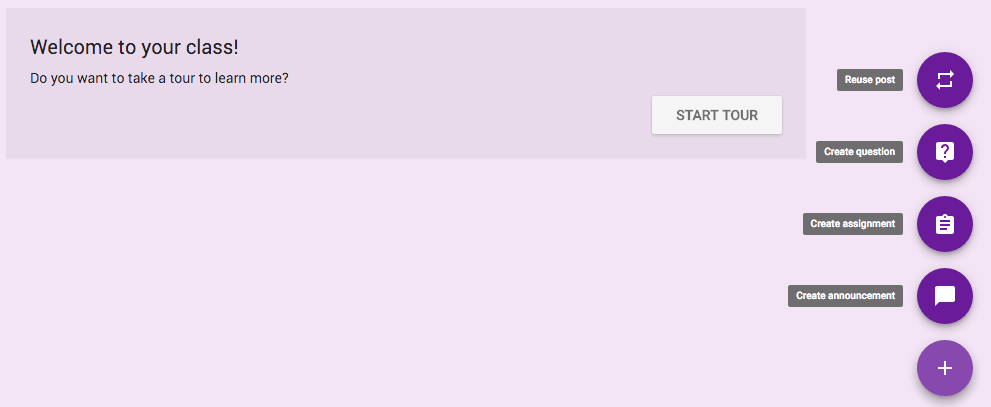
    First, go to http://classroom.google.com. It will then ask you to either sign in using your Google Account (Education), or if you’re already signed in, then you can Create or Join a class. You’ll want to Create one. Click on the plus, and click on Create.

    Of course, you can create as many classes as you need. One for each year level, subject or whatever. As a primary school teacher, I create one class for each year I teach.

    The great thing is, Google Classroom integrates straight with Google Drive, and creates a “class folder” for students work, posts, documents and everything else.

    For my class, each student has a school Google Account. I then put up the unique class code on the whiteboard and ask each student next time they log onto the Chromebooks to join the class.

    Once this is done, it is relatively simple to add assignments, projects, and ideas to the ‘news feed’ for the Classroom.
    For instance, if there is a particular video that I want the students to watch for a lesson, I can create a new post, and share the link. Students will then look at the Google Classroom and see the video link, and in time, watch it. Much like a newsfeed, they can comment and share their thoughts (though mostly comments turn to “wassup au” and the like) as they find themselves in a new social environment and explore communicating with each other in different ways!

    Once you have setup your class, it’s easy to manage assignments. Let’s say an afternoon’s work requires students to research and answer a few questions; you could set up a Google Document that has the questions on it. Each student gets a copy of this, and fills it in as they work through the afternoon, and at the end, they click on “Turn in”. This submits the work to the teacher, who can then provide feedback as necessary. The great thing about it is that it keeps students motivated; much more than just printing off a worksheet of questions and getting them to hand it in on your desk at the end of the day!

    There are a number of settings which are pretty straight forward which will help you set up your Google Classroom to your own preference. Things like whether students can comment or post, who can see what, and the look and feel of the site.

    There’s a heap more going on, and more is being developed each day, but as I always try and encourage – get in there and play around yourself. You learn more by doing anyway!

    Related Links

  • Open Source for Education

    I’ve been a long time advocate for open source software. It’s not just that it is freely available, but that it can be added to, modified, improved, or further developed and passed on for others that makes it appealing. In a sense, it is like education and knowledge; we pass it on to others, adding to it, developing it, and using it for our own uses, however and whenever we need to. In New Zealand, public education is free (though there is obviously a cost for this), and so following an open-source model for school technology is actually not too far removed from a possibility.


    Cost

    One factor that often holds schools back is the cost of technology. Usually this is related to devices and hardware, networks and infrastructure. Adding software to this cost is often unavoidable, but one way that schools can avoid paying more is by committing to using only open source software.

    Availability

    Much of today’s software is license based, and while there are various schemes to make things more affordable for schools and education institutes, paying for multiple licenses for different workstations and devices quickly adds up. Open-source software on the other hand is readily available, and is free to distribute throughout the school devices without the need for licenses or subscriptions.


    GNU.org even goes so far as to suggest that schools and education institutes have the moral obligation to exclusively use Open Source software. “The deepest reason for using free software in schools is for moral education. We expect schools to teach students basic facts and useful skills, but that is only part of their job. The most fundamental task of schools is to teach good citizenship, including the habit of helping others. In the area of computing, this means teaching people to share software. Schools, starting from nursery school, should tell their students, “If you bring software to school, you must share it with the other students. You must show the source code to the class, in case someone wants to learn. Therefore bringing nonfree software to class is not permitted, unless it is for reverse-engineering work.”

    You can read the entire article here: Why Schools Should Exclusively Use Free Software.


    Software

    There are a variety of lists out there of open source software suitable for teaching and learning. I’m not going to go into detail on all of them, but instead, begin to list some that you’re probably already using without knowing or realising it.

    Google Apps for Education

    Many of you will already be using Google Apps for Education. GMail, Google Docs, Google Drive, and Google Classroom are all becoming more and more popular and widespread throughout schools. Google have made this suite free for schools to use, with bumped up space and data for education purposes. Originally, all of these have been developed as open source software. The Google Apps API is still publically available for developers to utilise and build third-party apps on. Add to this the myriad of Apps available for free in the Google Webstore which can be added to user accounts for them to use online with Chromebooks or any Internet browser alike.

    WordPress

    WordPress is becoming more and more widespread as the CMS of choice for websites. Many schools use WordPress as the basis for their website, and with WordPress.com offering free accounts, classes and students are even developing their own blogs and sites as well. WordPress is, of course, open source, and is developed regularly, and added to through the use of plugins and other tools.

    Mozilla Firefox

    Shipped with all TELA laptops these days is the little browser known as Firefox. It’s a lightweight version of Mozilla browser, which is open-source, but Firefox seems to have taken off a lot more than its predecessor.

    Google Chrome Browser

    Much like Google Apps for Education, Chrome is Google as well as open source, and is fast becoming the most preferred browser for users around the world.

    Moodle

    Moodle is the industry standard in LMS (Learning Management System) for schools. It is proudly open-source, and provides users with all the flexibility that comes with that.

    VLC Media Player

    VLC is a well renowned media player, and is open source. The main reason I use VLC over anything else is because it’s just about guaranteed to be able to play every different kind of format there is. Videos with different codecs, DVD’s, audio; you name it, and VLC will play it. There’s nothing worse than opening up a video in front of the class and then it not work because a codec won’t load or the file won’t play. VLC seems to get around that.

    GIMP

    With it’s ridiculous prices, even the Education suite of Photoshop is out of reach for most schools. GIMP is THE open source version of Photoshop, and it does most, if not all, the major functions that you’ll need for editing images and photos in the classroom.

    There are numerous others out there. Wikipedia has an extensive list that you might want to check out. For now though, thats all from me!

    Related Links

  • School Journal Listening Post – GitHub

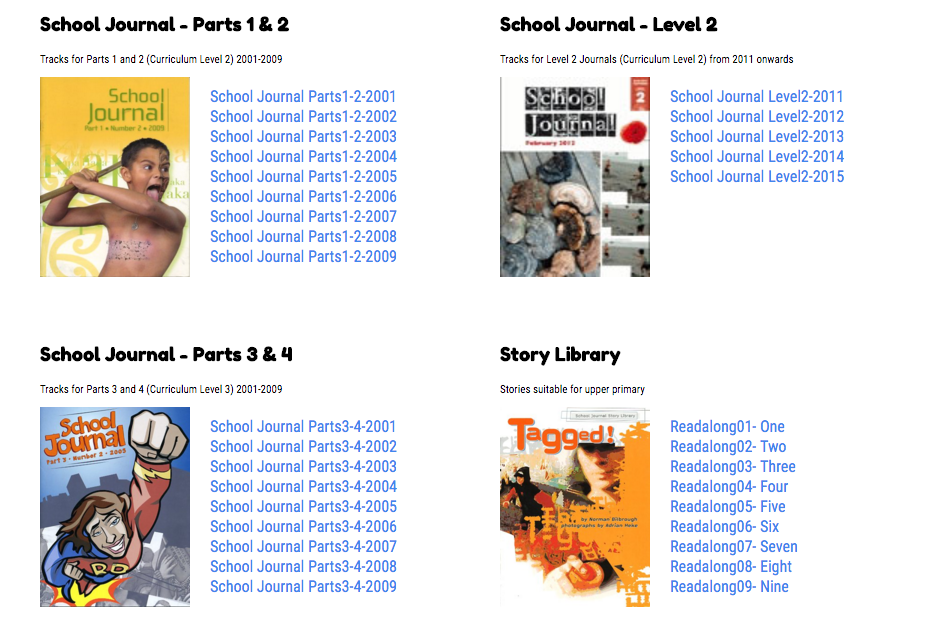
    School Journal Listening Post for New Zealand Schools

    Over the last couple of years, through teaching Daily 5, I’ve needed to develop a series of listening activities and read-a-loud books for the students to use. Using a copy of School Journal Listening Post was the sensible option, though because this is no longer available, I had to develop our own version for our school.

    Over the year however, I had many calls and requests for copies of this. Being an advocate for Open Source wherever possible, I decided to make this School Journal Listening Post free to download and develop yourself.

    You can visit the project on GitHub.

    [su_button url=”https://github.com/alingham/sjlp” target=”blank” style=”flat” background=”#20d717″ center=”yes” radius=”5″ icon=”icon: cloud-download” desc=”Free Download: 2.1Gb”]Download from GitHub[/su_button]

    Introduction

    This School Journal Listening Post is a PHP developed version which is designed to run a lot more dynamically than earlier versions found around the web. This particular version has been developed from a prior version using the audio files and journal covers assembled by Frank Lewthwaite and Plugged-In in 2009. These files are Copyright to the Crown, not to Plugged-In.co.nz. Plugged-In.co.nz has since been dis-established.

    NB: No copyright material has been taken from Plugged-In.co.nz in this project, though as a developer, I do want to make some recognition into Mr. Lewthwaite’s hard work and dedication to setting up his version for New Zealand Schools.

    The School I work for has a creative common’s policy on all work carried out by teachers it employs. This project was initially developed for use by the school only. However, due to increasing interest in the project, I have made this project open source on GitHub for you to use at your school.

    All Audio files and cover artworks are Copyright © Crown, under the Ministry of Education. More information can be found here: http://literacyonline.tki.org.nz/Literacy-Online/Teacher-needs/Instructional-Series/School-Journal/Audio-files

    PHP developed by Al Ingham. unleashed.alingham.com/

    How to Use

    You will need:

    • Web server – with at least 2.1Gb
    • PHP enabled
    • FTP client
    1. Download the repository to your desktop or desired location. This will be a large download (2.1Gb) given the number of audio files on hand.
    2. Open the .zip file and move contents to desired local location.
    3. Using your FTP client, upload the files from the local location to the desired server location.
    4. Visit your server location to check that it works!

    Please feel free to use this for your school, on your school website, for use by New Zealand School students. If there are any issues with your installation, please do not ask for support. I’m a full time primary school teacher and will not have time to offer the countless support requests that may turn up.

    I will endeavour to update the project as I find fixes to bugs, and as new recordings / journals come along.

    Please feel free to join this project if you would like to continue to develop it and add to it as time goes by.


  • Using Google Docs for Teacher Planning

    Earlier this year I wrote about the benefits of using Microsoft OneNote as a planning tool (Part 1, Part 2) for teachers to use with their class, week in and week out. I liked how the OneNote folder system could be flexible enough to include both Unit Plans and weekly plans in one place, and link between each of the subjects and daily plans. It is definitely a model that works really well.

    However, after using it for a term, I have decided to revert back to planning using Google Docs. There are a number of reasons for this, which I won’t go into great deal with, but which include:

    • Schoolwide use of Google Docs – with students using Chromebooks, and other teachers finally using Google Docs more widely, to suddenly swap to Microsoft is likely to confuse things.
    • Familiarity of Google Drive – All my other files and documents are in Google Drive, and I spent most of 2015 integrating all my resources, files, planning etc into Google Docs.
    • Access across devices – While OneNote is available for Mac, iPhone, and online, it’s certainly not as available as Google Docs, which just requires a browser. The Mac version for example looks much different, and even has some differences in opening different Notebooks.
    • Actual Files, not Notebooks – One problem with Microsoft is they’ve built the whole package. Unfortunately, I quite like making archives and organised folders of topics and date based backups of my teaching, allowing me to find Units or lessons by subject, but also in a date based format so that if you want to know what we did in Term 3 of 2011, I can show you. However, because OneNote creates its own files, which can only open in OneNote, organising them into folders is not very easy.

    Google Sheets

    The title of this post is slightly misleading in that I don’t really use Google Docs for week to week planning. Instead, I built a template using Google Sheets. But for search engine benefits, Google Docs is a lot more prominent for what people mean by the Google Apps suite.

    Firstly, I do use Google Docs to build my Unit plans. But for the weekly plan, the use of a grid is very much the basis for the plan, that using Google Sheets is a no brainer.

    In addition to this, much like Excel, Google Sheets has the ability to create different sheets. This allows the teacher to create different weeks plans and overviews throughout the term, and therefore only have one Google Sheet for the term, and include in it all the different weekly plans.

    Below I’ve attached a few examples of the way I’ve used Google Sheets for my planning. Hopefully this will give you a pretty good idea of how I use it.

    Each day has a column, and then a guide of times throughout the day run down the left.

    I’ve colour coded each subject, to make it more visual for my design aesthetic tendencies. Adding links into the plan is an awesome way of including resources, as Google Sheets is already in the browser, so having a link right there to the resource is a no brainer.

    Each subject gets added to and can take more than a page each depending on the activity. Group work and other plans are also added into the whole week plan, rather than having separate plans to jump between all the time.

    For another cool feature, for Maths groups I made a “Display” version which pulls the same data as my weekly plan, but puts it in a bigger font so I can display it on the screen and the students can refer to it so they know what work their group is doing each day.


  • I wish David would see more…

    Today Chris Hipkins’ bill was drawn out of a hat in parliament to undergo vigorous debate as to the abolishment of the charter school policy brought in by ACT, even though all historic evidence and international examples of this have all been failures.

    It’s interesting that at the same time the Labour bill to abolish charter schools comes out, that the education world in the UK prepares for EVERY public school to become a charter school (called ‘academies’ over there).

    So, this comes with welcome news. The abhorrent dealings of charter schools in this country have been well documented. It has been an utter disaster despite what the politicians who want it to succeed will say.

    Needless to say, I was pretty disgusted with this tweet from the ACT party.

    Needless to say, it received a pretty swift response:

    Well, that’s awesome. Nice one.

    What’s more, and as has been pointed out, Chris Hipkins also gained more support from his electorate than the entire ACT party did around the country. Chris Hipkins: 19,286. ACT Party: 16,689. Just saying!

    As I went deeper into the conversation I suddenly found one DBSeymour piping up into the conversation.

    If I was unimpressed before, my impressions are now severely lacking. The lack of actual intelligence begins to show that the puppet in front of us running the country as Undersecretary of Education is little more than a the blubbering buffoon that we all thought was an act. Turns out no; its actually true. We may have just found the long tail of underachievement in this country.

    The conversation that precedes this screenshot is all centred around the privatisation of education, the choice of integrated schools for those that want choice, and the question of why tax payers should be paying for charter schools where there is no accountability and that any land, property, resources, etc… are all kept by the company behind the particular charter school.

    However, despite this all being in clear view on Twitter, and being written in basic English, and as grammatically correct as one can be in 140 characters, DBSeymour seems to think that this particular question doesn’t make sense.

    Sorry David. The question makes perfect sense. The problem isn’t the question. It is you. Obviously it’s well above your level of understanding.

    Then to make things worse; the Member of Parliament; a person who should be holding the public with some kind of respect and regard because they are the ones who may vote for you, instead of continuing to attack the question, turns personal and now says that the person asking the question doesn’t make sense.

    And this is the person entrusted with implementing changes within our Education system.

    Maybe David actually needs to go back to school and learn how to comprehend basic sentences. I’m sure that this will no doubt hold him in good stead to begin entering into the public sector such as Twitter. Ah – I mean, parliament.


    There is a very small chance that DBSeymour actually only wanted to reply to @actparty with “You just don’t make any sense”. In which case; it’s about time someone brought that question up!


  • Problem Parenting

    Through the course of my career, I’ve come across them all. I’ve met the over-protective mother, the stern but busy father, the parents who we never see (for various reasons) and the parents who are as flaky as a puff pastry.

    At all times, I try and maintain a professional attitude when dealing with all parents, regardless of which category I might think they fit into, and I certainly endeavour to do the same here in this article. As always, confidentiality is paramount, and no examples in this are intended to identify any particular parent or family.

    Too Soft

    Over the course of the mid 2000’s, the culture of society changed, and the lawmakers began putting child rights to the top of all law making. Domestic violence cases where punishment and beatings to keep children ‘in-line’ were the target, but ultimately covered every kind of physical discipline for children within the home, and outlawed parents who were discouraging certain behaviours through use of smacking (most of whom will have only ever seen and used this form of discipline, as it was how they were disciplined as a child as well). I don’t advocate the use of physical discipline in any way, but when you remove the one strategy that parents use, you completely de-power them. Some parents stepped up their game and use other discipline methods. Many were left with nothing, so did nothing, in fear of being ‘caught’.

    The result of this has lead to two things. 1) Children are now well aware that parents can’t do ‘anything’ to them, and 2) Parents left without any discipline strategies to keep their children in line.

    Ultimately, these kids who rule the roost in every setting they are introduced to, beit school, home, shops, wherever – are immune to boundaries, purely because none have ever been put in place for them.

    However, as soon as they hit school and they are confronted with rules and boundaries, and a teacher who is going to enforce them, then the problems start arising. The child who is “untouchable” and has an ego to go with it constantly challenges the authority, often using “You’re not the boss of me” phrase which we can only come to expect.

    Unfortunately they have been taught, directly or indirectly, that no one is the boss of them. You can do what ever you want in life. Rules don’t matter. People can’t tell you what to do.

    So when someone does try to tell them what to do; like – do your handwriting, this becomes a challenge on their authority and troubles ensue.

    However; instead of the parents (often solo mum’s) coming up and laying down the law for the child and telling them in no uncertain terms that the rules at school are above everything else, that you do as you’re told, and that any consequence is followed through with, they often come in and say okay, okay, and take the child home. After a short talk, maybe a smack because they’re out of strategies, a sending to their room, the child is then back out and about, and rides their bike around the school grounds well into the late stages of daylight, in some sort of reclaiming of their territory. None of the consequence is remembered, acted upon, or even means anything to the child and so the process continues, albeit escalated. Eventually, the school has the “5 stand downs in a term” chat with the parent/s, and the decision is made to jump before they are pushed, and the child moves to a different school, rather than face up to the actual facts, the actual consequences of the behaviour and actually trying to change the child for the better. Restarting at another school (where the same process is likely to be repeated) is the easy way out; less confrontational, and less traumatic for the child. However, the child goes on to learn that they can do whatever they want, and that they can get away with anything because at the end of the day I’ll just change schools. The long term effects of this however, are staggering.

    Fighting every fight for them
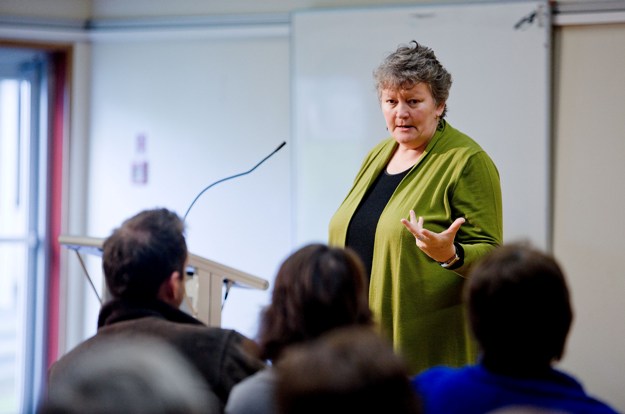
    The other worry is of course those parents who treat their darling like the fount of all things true, will go in to bat for their child, and will fight every fight. They enable them through allowing them to stay home rather than face the bully, call meetings with school leadership instead of with the teacher, see their child as blameless in every situation, regardless of the all-too-common phrase “Oh I know he/she’s no angel…”, and encourage the drama of otherwise very small and meaningless situations that other children deal with on their own in the course of a day. Anxiety levels are raised for all involved, until eventually, instead of fighting, they take flight – uprooting that child from one class and finding another school that will take them for a fresh start, where all to often the process is repeated because the child has not learned how to actually deal with the situation. The only thing the child learns from this is not resilience (the one thing that child needs more than anything else), but that it doesn’t matter what happens, I can go to Mummy and it will all be fixed.

    “Celia Lashlie has lashed out at mothers who mollycoddle their sons, saying many teenage boys are killed on the roads because their mums smother them and refuse to let them discover the consequences of their own actions.

    Speaking to a Traffic Institute conference in Hamilton yesterday, the former prison officer turned author admonished wealthy, so-called “helicopter mums”, who “hover” over their sons, refusing to accept they can be blamed for anything.”

    http://www.stuff.co.nz/life-style/5981627/Too-soft-mums-put-sons-at-risk

    I’m not suggesting here that these kinds of students are heading down this path. I’m a primary teacher, and driving is a way off for the majority of my students. But if the only way you are going to teach your son or daughter about resilience and perseverance, and standing up for yourself, is by running away from the trouble and going somewhere else; then that is what they will do for the rest of their lives. Come running to mummy.

    The Power of Mothers – Celia Lashlie


    The reality is that these parents have no strategies. No ideas about what to do. Many of them have given up because it’s all too hard, purely because they didn’t lay the groundwork back in infancy. When parents give up, the schools suffer. The 29 other students in the class suffer. The teachers suffer. But ultimately society suffers. These kids who don’t have ‘parents’ will become parents and will have no idea of how to be one, because they haven’t actually been parented themselves.


    Not all is lost.

    But you have to make an effort. It’s not going to be easy. But nowhere ever worth going is easy to get to. Here are a list of parenting supports in New Zealand that you should get in touch with.


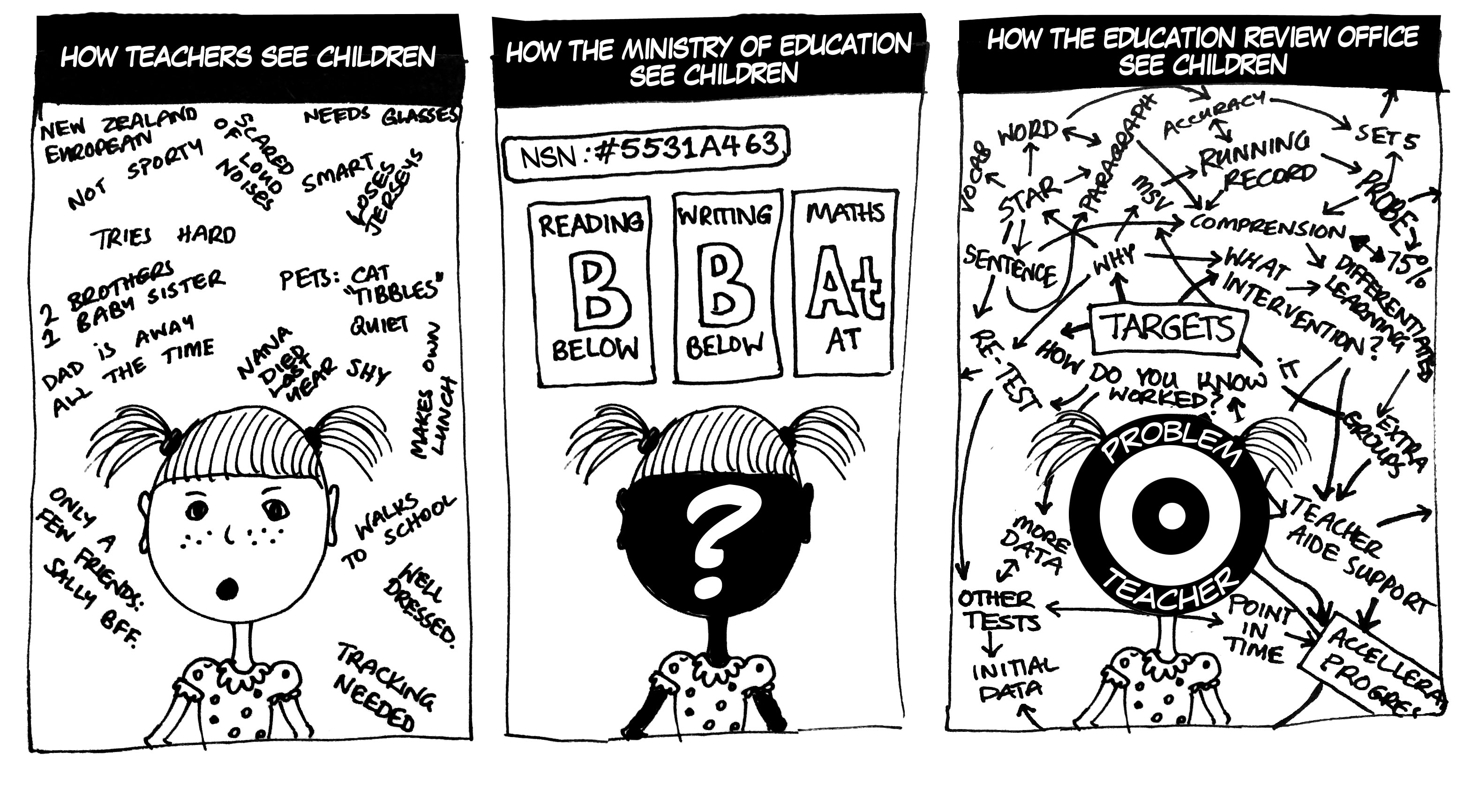
  • How Teachers See Children

    I was thinking today about the different professional views on how we should be seeing children, and how completely different that is from any kind of reality that actually faces us in the classroom.

    The only way to try and illustrate that, is in picture form.